Remember trackballs? Logitech does, and that means if you’ve missed this input device, you can bring it back to your creative projects and studios.
The appeal of the trackball is simple: take up less space, avoid all that business with surfaces and mouse mats and the like, keep your hand in a comfortable position, and get more precision when performing precise mousing.
Now, of course, some people just hate the feeling of the trackball, but the above reasons have made some people swear by them in studios, in particular. When you’ve got other gear, mixing desks and so on, trackballs are appealing for their fixed position. And that precision comes in handy when you’re using Adobe CS (visual folks) or making detailed edits on a timeline (sound, video).
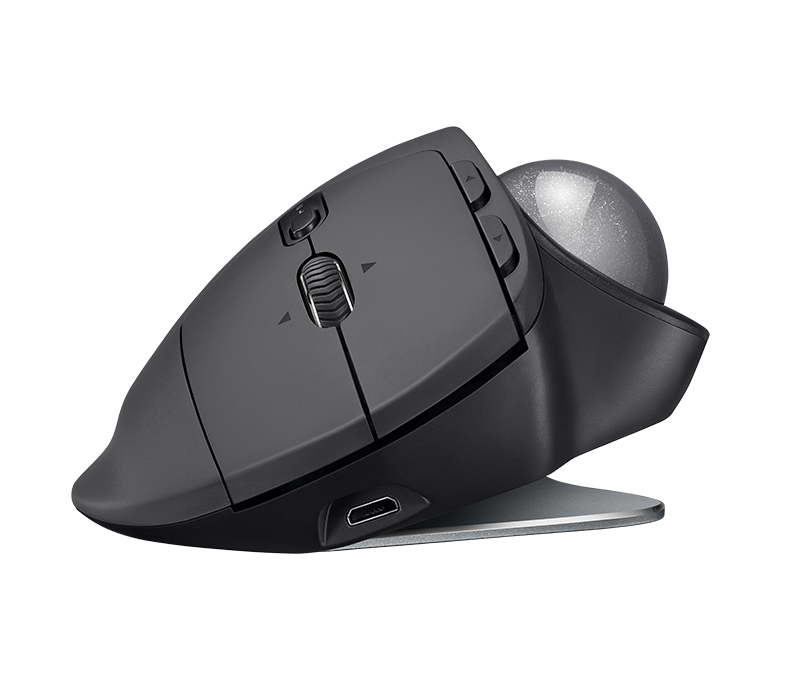
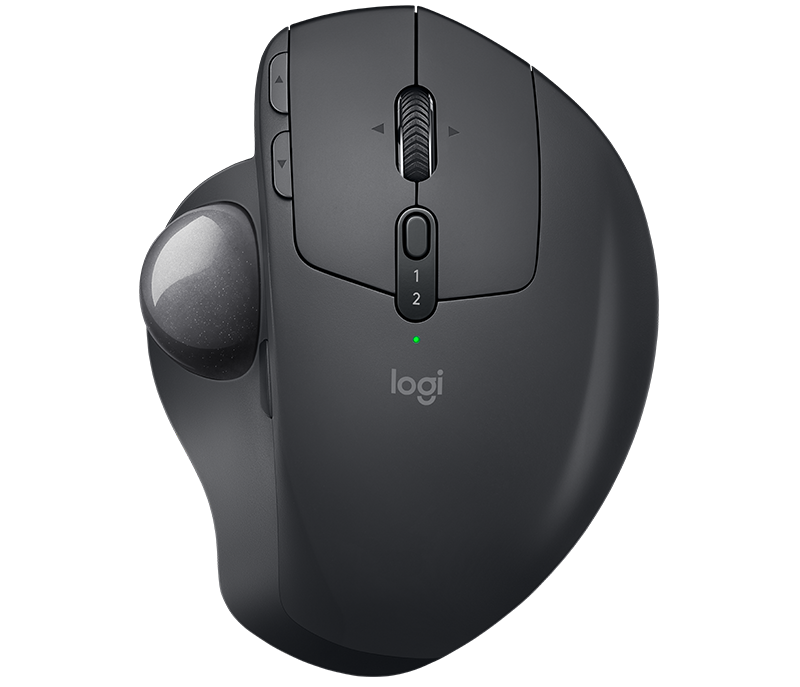
Logitech were the kings of this device category, much as they remain a leader in mice today. So, it’s notable that Logitech are bringing back this creation by popular demand.
And this being 2017, the MX Ergo gets wireless support, modern hardware internals, and modern connectivity. It also addresses the one thing that kept me away from a lot of trackballs in the 90s, particularly the horizontally oriented ones. There’s now adjustable tilt, which means you can fit this to your hand.
I’m intrigued; I might go back to this, especially for studio work. If we get one, of course we’ll do a review. Brings back fond forgotten memories of my Kensington Orbit. Behold:
https://www.youtube.com/watch?time_continue=20&v=Db6ux01T83Q
By way of comparison, Kenginston make trackballs, too – with the key difference being putting the ball on the top instead of on the side. That includes very affordable and portable Orbits for about $30-40. I suspect your choice depends on what you find most comfortable for your hand.
Really love working with trackballs. Still have one, but unfortunately they murder my thumb joint. To point where I can’t move it anymore after extended usage.
See the above comment – Kensington make top-mounted models, which shouldn’t do that. And… that’s for sure a sign you shouldn’t use this (!)
A Marble Mouse is surely more ergonomically sound as it it doesn’t focus all movement on one digit. Kensington are really the kings of this niche (love my slimblade)
Oh, yeah, good point – I’ve added that link.
I think the ergonomics there may be to do with preference rather than science, but I honestly don’t know. Now I really do miss my Orbit – this might be an Amazon temptation here 😀
Pair this up with a keyboard without the number pad (or maybe a number pad on the opposite side) and you can really reduce how much you have to extend between moving your cursor and typing. If your mileage is high, it can make a big difference.
How do you find the SlimBlade’s scroll function?
Looks like something that would never work quite like a decent scroll wheel (or even the Orbit’s scroll).
The scroll on my slimblade works absolutely perfectly, no issues whatsoever. My friend couldn’t believe it wasn’t a mechanical scroll.
I really like it. It didn’t take long for me to get used to it at all and there are fewer moving parts compared to the trackballs with a collar for scrolling. I think it’s certainly better than the Orbit’s or the Expert Mouse – it’s just a lot smoother. The click feedback is also useful.
It’s a little bit disappointing going back to a regular mouse or trackball.
It’s hard for others to use my machine though…they usually reach for it and then give me a really baffled look!
Wow, very interesting. It looks like one of those gimmicks that are never going to work. I’m looking for one to try before I commit to buying it.
Do you guys find it easy to drag and scroll? That looks impossible to do.
I’m able to fly around inkscape (vector graphics editing package)
I can’t say anything feels unnatural – if you’re used to a trackball – scrolling is good and I can’t say I’ve had an issue with dragging.
If anything, I think having 4 buttons is a gimmick…I only ever use 2 as the ball is under my finger tips so my thumb is never that far forward.
As with all these devices, crud can build up at the contact points/in front of the optical sensors. I tend to have quite sweaty hands. I think they have finally got the design acceptable and you just have to clean the ball and rollers every so often.
I highly recommend the Kensington Slimblade. Top mounted large trackball, four assignable buttons, scroll wheel functionality by spinning the ball on a different axis, and flat enough against the desk to be much more ergonomic than other top mounted trackballs. The downside is that it’s fairly expensive.
I used this trackball for many years and i couldnt find a replacement. I cant use thumb-ball trackballs, only thumb-button ones. The thumb is the only finger capable of clicking abuse without cramps.
http://xahlee.info/kbd/logitech_cordless_optical_trackman.html
Also it is one of the few cordelss models and maybe the only thumb-button one. This is a must if you use desktop computers.
The benefit of wireless in this use case is far smaller than for a regular mouse, I think. You’re not moving it around as much etc and there’s a downside of having to maintain a battery.
Really? Whats the downside of having to maintain a battery? My logitech m570 has been working for over a year, and I don’t recall ever having to replace the battery even once.
With a mouse there’s a really clear argument for getting rid of cables but with a trackball, which is designed to be used in a single position, the advantage not as pronounced.
Batteries (rechargeable) can exhibit a number of different behaviours in-life dependent on how you treat them – if they are user-replaceable from stock items then it’s less of a problem.
Non-rechargeable may let you down when you don’t want to risk it – and you’d replace batteries in an active pre-amp/stompbox before a gig.
On balance, I don’t perceive there to be that much by way of advantage for wireless in this use case…but if you do, then all power to you, you pays your money…
“Bring back” ? I’ve been using the m570 for a decade now. This feels like an upgrade to that particular model.
Same here. I’ve been using trackballs since… well, for a long time. Since the original Marble maybe, which didn’t have a scroll wheel or more than two buttons.
Right handed only? Lucky there’s not that many left handed creative types.
A Magic Mouse 2 beats these things every time.
Sorry Logitech, I used trackballs years ago, but they just can’t compete with a MM2.
This is a joke right?
As others have pointed out, this is an RSI nightmare. A top-mounted ball allows for large motor movement, out to the elbow and shoulder. This isolates the thumb, and you’re going to die. No hyperbole.