Universal Audio just brought their DSP platform – and top-notch audio interface tech – to a box that’s Thunderbolt, bus-powered, and under US$500.
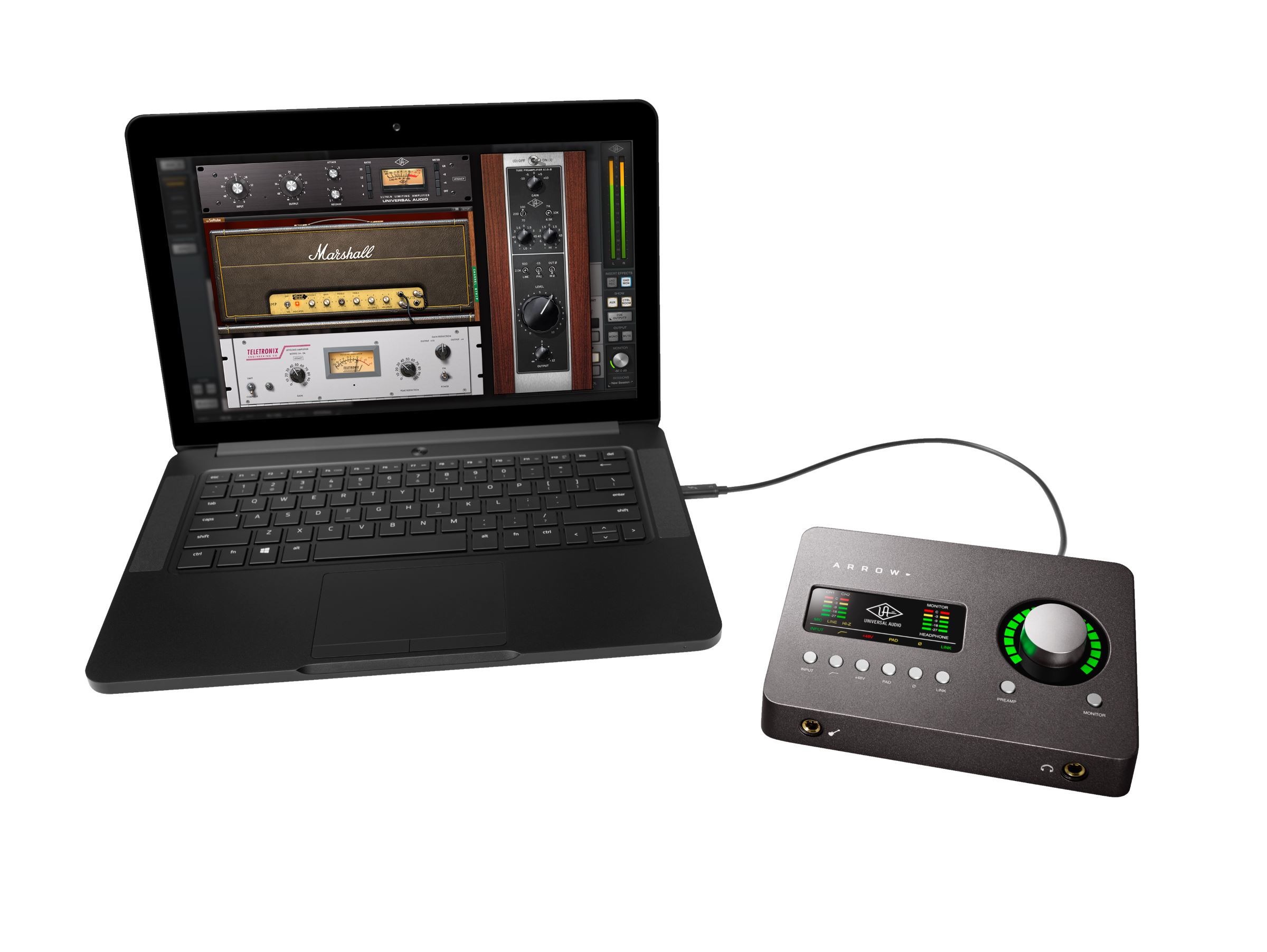
Here’s the thing: if someone asks you the age-old question “which audio interface should I buy,” it’s actually pretty hard not to mention Universal Audio. While the company may have gotten started selling pricey high-end DSP cards for their platform of vintage gear emulations and sound tools, starting with Apollo, they also happened to make one of the best audio interfaces. The Apollo line boasts high-end converters and audio circuitry and rock-solid performance. And it’s been steadily reaching more and more people, with the smaller Twin bringing the price down, and Windows support following Mac.
The Apollo Twin is good enough, in fact, that you can almost recommend it just for its audio interface capabilities – not only as a gateway into the catalog of UAD studio effects and sound processors and the like.
But the Apollo Twin still represents some outlay of cash. And it’s portable, but not quite throw-it-in-a-laptop portable – especially once you figure in that power brick.
So, the Arrow starts to look really smart as an entry level device. Its estimated street is just US$499. It’s still 2×4 like the Apollo Twin – so you can have a separate monitor mix. And there are two mic preamps.


But it’s sleeker, prettier, more portable, and it runs on bus powered Thunderbolt 3 on both Mac and Windows. (Gone are the days of interface companies catering just to Apple – the press kit even came with shots both of a MacBook Pro and a Razer Blade, my respective favorite high-end Mac and Windows choices.)
Now, if you were just spending $500 on an interface alone, this might still not make sense. So then you have the value-add of the UAD DSP platform. While native processing is powerful these days – running VST and AU plug-ins and the like – it still means contending with some latency. So, you have to listen to the dry signal of your instrument or voice while you’re recording, and then add compressors and reverb and pitch correction and whatever else afterwards.
UA’s ongoing argument is that they can deliver their signal processors with near-zero latency, thanks to their onboard DSP (the “UAD SOLO” is what they call it). The mic preamps feature Unison technology, which models gain structure on the hardware for more accurate emulation of studio tools. And you can take your vocals and guitars and synths and keyboards and everything else and add their library of effects as if you’ve got the actual gear there, without hearing a delay as you track.
Those plug-ins don’t all come cheap, once you buy a lot of them. But the Arrow has newcomers to UAD in mind, bundling a full 14 full-featured “Realtime Analog Classics” in the box.

Ah, remember the days of expensive hourly studio time? Meet the bundled analog gear – software UAD form.
The bundle’s not too shabby, either. You don’t get the latest models of everything, but you do get the full UA 610-B channel strip for taking advantage of that Unison technology, ideal for recording. And there’s a nice selection of EQ, compression, and the like (from the still very decent previous generation), plus excellent Marshall Plexi and Softube Bass Amp room additions (great on instruments). You’ll want to budget more if you’re really in this for the UA stuff, but it’s not a bad start. UA of course hopes this gets you hooked so you buy more, so – here’s their explanation of their various hardware/software bundles:
UAD-2 / Apollo Plug-In Bundles Explained [scroll down]
Really, the only catch is that the Arrow has just one UAD SOLO processor. That means you can’t layer on a whole lot of those UAD effects at once – you’re limited by available processing power. I like the form factor of the Arrow enough that I hope UA will offer a DUO version with two DSP cores – my experience has been that on the Apollo Duo that’s more than enough horsepower for solo musician/producer needs. The single core, though, I suspect will feel a bit cramped for UAD addicts. (Those Legacy models in turn will be lighter on the SOLO, so there’s a certain wisdom to their inclusion.) Oh, and one other niggle – that extra x2 out is only on the stereo headphone jack, though – it’s missing the Twin’s separate rear channel jacks, useful for spatialization or other external outputs.
As a live device, though, and as an entry point to UAD, this one looks like a winner. UA keep iterating on their accessibility, and this one is sure to be a big breakthrough. That real-time functionality and library of plug-ins also makes it more fun to buy than competing audio interfaces, which only act as, you know, audio interfaces.
Arrow is shipping now. I’ll try to get one in to review.

and about those plug-ins:
uaudio.com/uad-plug-ins.html
Looks great! Shame I ‘upgraded’ to an old Mac Pro (pre TB) last year so I don’t fit in the everybody group. I could do with a better headphone pre too: using the Maschine mk3 lately and the headphone preamp is really weak (for 250ohm cans).
you could consider more sensitive earphones too. I always like to solve problems with the least amount of “new extra gear” as in physical presence and in the machine mk3 case ,, portability 8in case you ever move it-carry it around) . You will have to carry another device which will need power , so another thing that either needs power supply (+1 physical body) or batteries which you will always have to check. Don`t know. Ok for use if you are at home only then yes . Ear-Pre is ok. Don`t get me wrong. Just thinking out loud 🙂
The Mk3 was the ultimate less stuff strategy (replacing a separate firewire unit), but alas the weak preamps. I think i’ll keep the headphones, I’ve had them for 18 years so they’ve proved the test of time.
18 years the same headphones? I respect this so much i will shut my mouth now 🙂
Just look what Slate Digital does. They get same near zero latency with AU plugins. But they use same UAD interfaces. So i would say there is no need for more DSP as any current MBP can run more plugins with near zero latency.
Slate plugins not only sound superb, but they are also supert light for CPU. UAD dsp is more more just a copy protection dongle.
But i’m on market for TB3 desktop interface so could use this and skip the UA plugins. This just has the bare minimun iO that is not so good. 2018 will be the year for TB3 interfaces so lets see whats coming.
Agree. This UA is completely overpriced. What`s the actually worth of plugins these days for a company like UA? Nothing basically. So they throw a bunch in there and tell you while closing one eye “come to me . gonna take care of you. give you 300 dollars of plugins. For free! (which you can only use when you use our interfaces). 500 for 2 line in. Might as well buy a zoom tac 2 or a tac 2 r for half the price. Oh wait. UA has “pristine quality” …..
Slate stuff looks really nice.
I just want to clarify this “latency” comment. Since you are monitoring audio through the “Arrow”, there really is little to no latency. Slate plugins may not have much latency on their own but you are still monitoring a signal which has already gone “in the box” and then back out. Also – once you add any other plugins, latency will potentially increase as you need to up your buffer.
There is a tradeoff with this though – with Arrow you are locked into only using UAD plugins in their console for mixing when tracking (if you want no latency). Once recorded in your DAW, its a different story.
Bottom line is, if tracking with no latency is critical for you, this is an important thing to keep in mind.
this is an important distinction to make. “Near Zero” latency can easily be interpreted as a marketing term for “some latency.” Is it measured in samples or milliseconds? Because “some latency” when live tracking is a deal breaker, particularly when monitoring playback and recording in the box. Even if single-digit latency in ms is something you can modify your performance timing around, you’re still going to hear combing or something foreign to what you are doing. And a rhythm section player is going to be even less accommodating than I’m being here.
So my questions are,
1) will direct monitoring an arrow sound like the signal I’m playing into a live mic, or will I still have this mild out-of-body experience like I do when I hear myself talking to another person on the phone?
2) are the routing schemes flexible enough that I can monitor both my input directly along with accompanying playback from a DAW?
3) Can I use the DSP as a monitor mix but print only the tracking performance? or
4) Can I use a little of both effects for the performance monitors and print some to a track? Say, record with mild compression to help slot the performance, manage plosives etc, but also send the performer some supportive, non-committed ambience/reverb (a “singing in the shower” effect) How about recording to two separate tracks? One raw, one processed?
5) How many effects can I have before I max out with a single processor? Why would my computer’s chip influence that? Can I create a fairly robust vocal channel strip? PreAmp emulation, EQ, Compression?
6) How does it sound compared to some modest analog gear, like an RNC, or an Art Voice Channel, or other thunderbolt interfaces with analog insert points, like a Focusrite Clarett Octopre?
On this final question, I think for the price this is a real contender. And for those who are not building a studio rack, it’s smaller than the other solutions I can think of (including rerouting a Clarett 4pre, which is surprisingly bulkier than a batch of brownies). Plus you get an interface. Plus, you get the DSP for what I think it was really intended.
I don’t think this need fan the flame of your effects spending spree. Assuming the latency thing truly is a non-issue, then you have a single solution already bundled out of the box. I think that much can be sincere about the marketing. It could really be a standalone solution for tracking. Is it that one rare and coveted rack-mount emulation that you always wanted? If not, then sure, go covet or buy in. I’m not trying to appeal to that desire with this argument.
I can see the reservation about leaning on DSP in the mixing phase. There you might be getting sticky. And personally, with just enough DSP for a couple instances of an effect, I don’t think it’s worth committing your money just to replace an AU or VST here and there, nor worth limiting your compatibility with other collaborators. But if you’re only committing some mild processing to the tracking phase, you can avoid all forward incompatibility with other engineers and studios etc.
Hey James!
1) From my experience with Apollo I can say the built in latency with hardware monitoring is absolutely imperceptible. The only latency I notice is midi latency due to DAW buffer settings. Hardware units sound direct monitored.
2) Yes! Apollo mixes and delay compensates DAW and direct monitoring properly. There are virtual buses as well for more complex routing but I haven’t used them.
3 / 4) You can either print or not print UAD inserts. Not sure how sends work with printing FX. I’d read up over on the UAD site – lots of info there 🙂
5) Probably not many / not enough. I’m seriously disappointed this is a SOLO unit.
6) UAD plugins sound top of the line to me – I’ve used quite a few alternatives including slate. However – you’re locked into a proprietary platform that costs $$$!
Hope that helps!
This seems like a slightly nicer solution for live performance than my Twin… Bus powered!!!
I wonder if it is compatible with UAD’s “Apollo Link” which bridges and sums DSP power across interconnected Apollo devices…
> It’s still 2×4 like the Apollo Twin – so you can have a separate monitor mix.
Apollo Twin is 2×6 analog; 10×6 total. Doesn’t change much of your argument but let’s have the facts straight.
I’m being lazy, please forgive me, but are we counting the headphones as a separate output? If that’s the case, then even if it shows up as a separate cue mix, I’d still want to know if it could drive enough volume for my applications, DJ headphones, active near field speakers, etc (Personally, I’d be hesitant to use this in a live setting, like djing, simply because it’s flat, has some led readout and buttons on the top surface, it’s fancy, and has added points of failure with the internal DSP)
Again, I will get around to looking this up, but might as well ask if these interfaces are typically designed to also include Output stage processing? IE, could I have this set up with a limiter on the output or some mild tune-the-room processing for performance purposes?
Someone needs to make up his mind if softtube sounds mediocre or not ^^
i’m a noob at home recording. I’m about to purchase this as my first audio interface but I have 2 doubts:
1. will I be able to record myself singing and applying the common effects as plugin – compressor, eq, reverb – with a latency low enough to monitor the result in my headphones and not getting that annoying out of time sensation?
2. the same with electric guitar adding a tube amplifier simulator to the aforementioned plugins
3. Is it possible bypassing Arrow’s dsp and applying plugins by pc cpu? can it result in a lower latency if cpu is powerful enough?
thanks to anyone who may answer to my questions