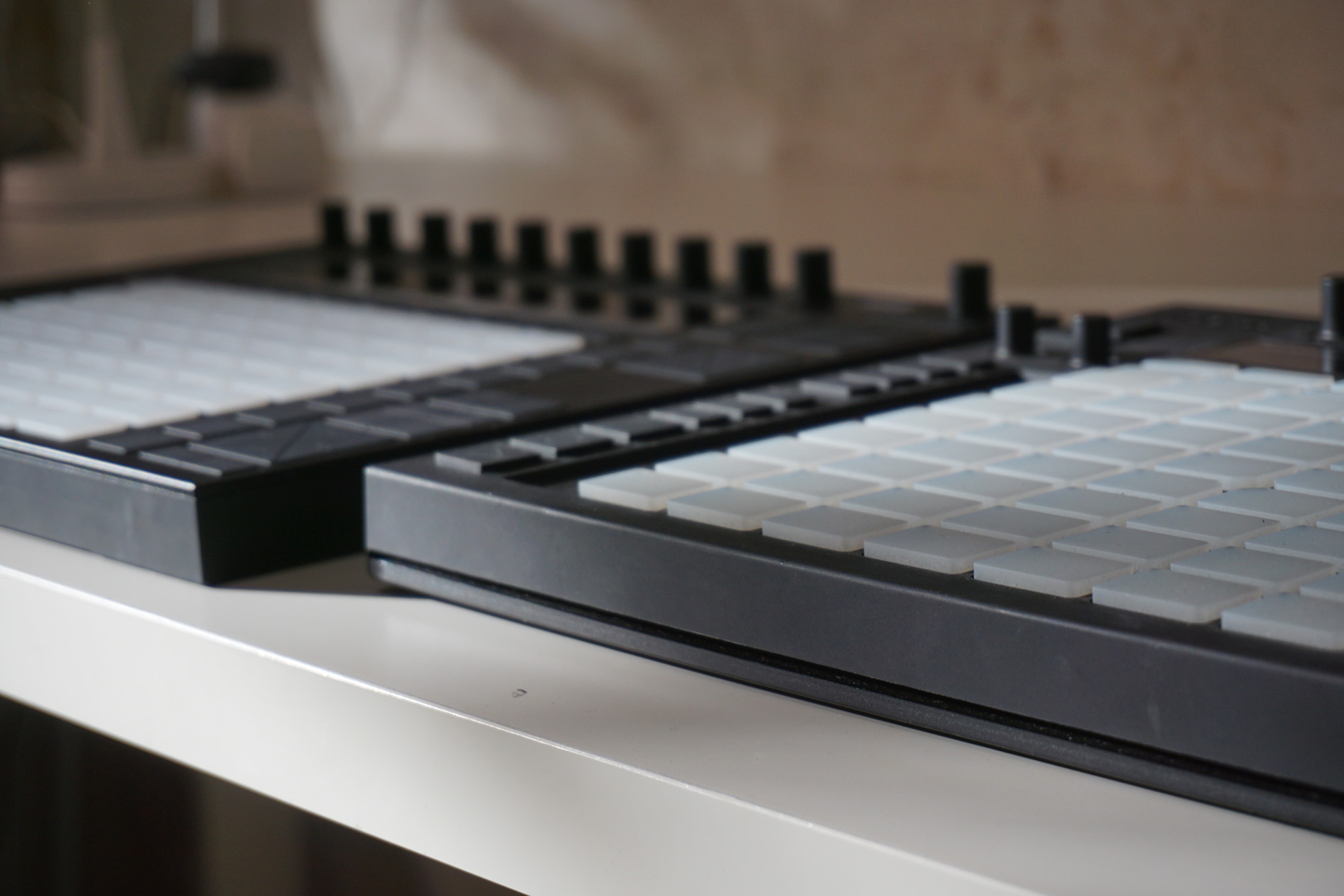
Yesterday’s Push 2 review covered what Ableton is bringing to users via new hardware. But what does that mean if you have the original Push – or no Push at all?
It’s a question worth asking. Not everyone can buy the new Push. (I heard in particular from friends in Russia, where the currency is collapsing and distribution is a challenge.) Others may opt not to use the trade-in, and keep an original Push at home and a Push 2 in the studio. And because Push is hardware integrated with software, just understanding what’s changing independent of the new hardware tells you a lot about how the host is changing. After all, Live 9 brought a lot of enhanced workflows across controllers that were originally developed for Push but wound up benefiting everybody.
Here’s what you can do with both Push 1 and Push 2 – which also highlights some of the subtle but cool new Push 2 features and what’s new in Live 9.5:
You can duplicate pads. Copy one pad to another location in your Drum Rack, via the Duplicate button. (Hold down Duplicate, press the “source” pad, then press the “destination” pad.) You can even swap devices that way, but keep notes – so this is a good way to change instrumentation of a pattern.
Control plug-ins on your original Push easily – without Racks. Plug-in control is available on the original hardware, too. Sure, you could control plug-in parameters before, but you couldn’t save default sets; now you can. Edit: An earlier draft didn’t make clear that this is what I meant; unless you have plug-ins with just 8 parameters, this is a big deal!
Load VST and AU plug-ins, or hotswap AUs. You can not only control plug-ins from Push 1 and Push 2, but load them, as well. If you’re browsing presets for Audio Units, you can even hotswap for previewing sounds.
Browser has preview.
Scales are saved in the Live set.
Mappings make more sense for Ableton Devices. Based on community input, Ableton says they’ve improved every layout for every single Device in Live. I mentioned this in the Push 2 review – things like seeing only a parameter for frequency or beats depending on LFO settings, rather than both. It will apply to Push, as well.

And more features that work in Push 1 as well as third-party hardware (sometimes with a little extra work):
Simpler’s biggest new features are in Push 1, too (and can be mapped to other hardware). Start, End, Mode, Playback, Sensitivity, Pad Slicing, and Nudge are all coming to Push 1, as well. (They aren’t yet in the build you can download today, but they’re coming in an update.) That’s actually huge – it means all the good stuff I said yesterday about sampling in Push soon applies to original Push owners, too.
Browse samples directly. That new Simpler has another neat new trick – it instantiates to let you browse samples more quickly. That works nicely with the Browser in
Adjust clip length down to 1/16th notes.
Press Fixed Length and looping works properly. Ableton phrases this as well as I can: “When pressing Fixed Length during a recording, the last portion of the recording will be looped of the specified length.”
Finally, while Simpler is better integrated with Push 2 than Push 1, a little elbow grease will help Push 1 and other third-party controllers take advantage of Simpler’s new features. Ableton’s advice:
In order to improve your experience when using Simpler with Push 1, you might want to:
While Simpler can be controlled via Push 1, it was designed with Push 2 in mind, and some parameters cannot be accessed via Push 1 as of now.
In order to improve your experience when using Simpler with Push 1, you might want to:
Save an empty Simpler preset for Simpler in Classic, One-Shot and Slicing mode respectively.
Group each of these presets in an Instrument Rack, so to assign your favorite 8 parameters to the instrument’s macro. This way, the 8 parameters will be available right after selecting the device.
Note however that certain Simpler parameters cannot be automated in Live (Sample Start, Mode, Warp Settings, Sensitivity Threshold), thus these cannot be assigned to Macros neither.
You might also want to tweak your Default for “Dropping Samples on Device View” accordingly, so that each time you load a Sample from Push, this will be instantiated in a Simpler device with your preferred settings and Macros.
Find out more on how to use device defaults in a dedicated article and in the manual.
To be honest, while this was perhaps intended as a workaround for original Push owners, I found the default preset setting a good refresher – it’s a power tip for anyone (even if you’re getting the new Push).
Some other tips about Push 2:
Outside of the stuff Ableton supports, there are some other considerations we’re researching.
1. Yes, it’s a MIDI controller. Communication is bi-directional over MIDI, and it operates without drivers – it’s USB class-compliant. That means some intrepid inventor could build some sort of dock that let Push make sounds and do MIDI on its own, without a computer. I hope we’ll have a “hacking guide” for the new Push soon, but it’s already pretty similar to the original in this regard.
2. You can use a Push 1 and Push 2 together – but it’s not so useful yet. Here’s a dream – play with a friend with two Push units, or hook up your Push 2 next to your first-generation Push. So far, we’ve found this works, but it isn’t useful, as track focus on one impacts track focus on the other. Needless to say, I’m chatting with a lot of people on it, and hackers are working away. Stay tuned. Edit: As observed in comments, you can lock one device, so there is a workaround. But I’m hopeful some hack may make something even better.
Previously:
Ableton Push 2 Hands-on Review [the CDM review]
Will Push 1 work with Live 9.5?
I’m curious if push 2 still has all the grab and release functionality in M4L. I’ve put quit a bit of time making my max creations integrate with the push and would hate to give that work up (or reimplement it with a new system). Any idea?
The grab and release functionality in M4L should be exactly the same, except for the display of course. If not, let Ableton tech support know!
I’m curious if push 2 still has all the grab and release functionality in M4L. I’ve put quit a bit of time making my max creations integrate with the push and would hate to give that work up (or reimplement it with a new system). Any idea?
The grab and release functionality in M4L should be exactly the same, except for the display of course. If not, let Ableton tech support know!
I’m curious if push 2 still has all the grab and release functionality in M4L. I’ve put quit a bit of time making my max creations integrate with the push and would hate to give that work up (or reimplement it with a new system). Any idea?
The grab and release functionality in M4L should be exactly the same, except for the display of course. If not, let Ableton tech support know!
“Control plug-ins on your original Push. Plug-in control is available on the original hardware, too.”
I’m confused. Ableton has always had this ability. I keep reading this everywhere but when could you not control plug-ins on Push? You open a VST, click configure, map the controls you want and they show up in Push in order. Is that what you mean or something else?
I know you can load VSTs directly now but that is referenced in this next statement:
“Load VST and AU plug-ins, or hotswap AUs”
Yeah, that has been there forever, the only thing they added is that now you can save as default the plug in configuration, so you don’t need to rack’em now. This IMHO is good new feature and hope they expand it with bank renaming.
got it, yes this should actually help, i have to check it out, i’m guessing all i have to do is save
Right click on the device header and “save as default”, just like the other Live device.
Doest hat work with all plugins and not only with Push?
I have been waiting that for long time so i can do custom controllers with iPad.
saving efault configirations? yes, because it is done in Live.
“Control plug-ins on your original Push. Plug-in control is available on the original hardware, too.”
I’m confused. Ableton has always had this ability. I keep reading this everywhere but when could you not control plug-ins on Push? You open a VST, click configure, map the controls you want and they show up in Push in order. Is that what you mean or something else?
I know you can load VSTs directly now but that is referenced in this next statement:
“Load VST and AU plug-ins, or hotswap AUs”
Yeah, that has been there forever, the only thing they added is that now you can save as default the plug in configuration, so you don’t need to rack’em now. This IMHO is good new feature and hope they expand it with bank renaming.
got it, yes this should actually help, i have to check it out, i’m guessing all i have to do is save
Right click on the device header and “save as default”, just like the other Live device.
Doest hat work with all plugins and not only with Push?
I have been waiting that for long time so i can do custom controllers with iPad.
saving efault configirations? yes, because it is done in Live.
“Control plug-ins on your original Push. Plug-in control is available on the original hardware, too.”
I’m confused. Ableton has always had this ability. I keep reading this everywhere but when could you not control plug-ins on Push? You open a VST, click configure, map the controls you want and they show up in Push in order. Is that what you mean or something else?
I know you can load VSTs directly now but that is referenced in this next statement:
“Load VST and AU plug-ins, or hotswap AUs”
Yeah, that has been there forever, the only thing they added is that now you can save as default the plug in configuration, so you don’t need to rack’em now. This IMHO is good new feature and hope they expand it with bank renaming.
got it, yes this should actually help, i have to check it out, i’m guessing all i have to do is save
Right click on the device header and “save as default”, just like the other Live device.
Doest hat work with all plugins and not only with Push?
I have been waiting that for long time so i can do custom controllers with iPad.
saving efault configirations? yes, because it is done in Live.
I really wonder why the Push 1 does not reflect the new colours of the Channelstrips on the Track Buttons. We´ve been able to do this with m4l, so i guess it should be a breeze for the Company itself? I hope this happens, would add a lot to the navigation.
I really wonder why the Push 1 does not reflect the new colours of the Channelstrips on the Track Buttons. We´ve been able to do this with m4l, so i guess it should be a breeze for the Company itself? I hope this happens, would add a lot to the navigation.
I came here JUST to ask this question…. when i saw the push 2 demo and saw the colours reflecting the track colour in ableton, i didn’t even think for a second it would NOT be on the push 1. i took it as a obvious update to push 1 and 2 since it’s so simple! but i discover that no. it isn’t. the ONLY reason i can think of why is for marketing reasons and to give push 2 a higher edge for people to lean towards buying it instead of keeping the push 1. which in my book is a big bad no no. shame on this manipulation. i just hope that eventually when they get nice big sales for the push 2 (which i’m surprised the amount of people already having it especially with its price point) they’ll give us those easily available updates to push 1 (like the simpler controls as well…. seriously making the NEW features of simpler that everyone is raving about, NOT midi mappable even is also a veeeeeryyy low blow.)
All in all i still think push 2 is a sexy controller that is waay too expensive for me and i’m actually planning on buying a push 1 because of simpler.
I hope someone from ableton reads this: PLEASE DON’T HOLD OUT ON US JUST TO MAKE SOME $$… BE LEGIT AND GIVE US ALL YOU CAN, WE STILL OWN YOUR GEAR AND PAY FOR YOUR LICENSE! WE DESERVE GREAT UPDATES TOO.
also, tom could you point me towards that m4l patch that you mentioned that reflects the channelstrip colours on push?
I really wonder why the Push 1 does not reflect the new colours of the Channelstrips on the Track Buttons. We´ve been able to do this with m4l, so i guess it should be a breeze for the Company itself? I hope this happens, would add a lot to the navigation.
I came here JUST to ask this question…. when i saw the push 2 demo and saw the colours reflecting the track colour in ableton, i didn’t even think for a second it would NOT be on the push 1. i took it as a obvious update to push 1 and 2 since it’s so simple! but i discover that no. it isn’t. the ONLY reason i can think of why is for marketing reasons and to give push 2 a higher edge for people to lean towards buying it instead of keeping the push 1. which in my book is a big bad no no. shame on this manipulation. i just hope that eventually when they get nice big sales for the push 2 (which i’m surprised the amount of people already having it especially with its price point) they’ll give us those easily available updates to push 1 (like the simpler controls as well…. seriously making the NEW features of simpler that everyone is raving about, NOT midi mappable even is also a veeeeeryyy low blow.)
All in all i still think push 2 is a sexy controller that is waay too expensive for me and i’m actually planning on buying a push 1 because of simpler.
I hope someone from ableton reads this: PLEASE DON’T HOLD OUT ON US JUST TO MAKE SOME $$… BE LEGIT AND GIVE US ALL YOU CAN, WE STILL OWN YOUR GEAR AND PAY FOR YOUR LICENSE! WE DESERVE GREAT UPDATES TOO.
also, tom could you point me towards that m4l patch that you mentioned that reflects the channelstrip colours on push?
“but it isn’t useful, as track focus on one impacts track focus on the other. ” just track focus or all focus ? can I ( on the same track ) have my Push 1 mapped to a first plug in, while my Push 2 maps to parameters of a second plug in ? I’m guessing no, but I’d love to be wrong … and then, is there any way to use Push 1 to step sequence the segments of a chopped up groove that you are at the same time editing via the new pad per segment capability of the new simpler / drum rack thang on the Push2 display ?
I do appreciate that what seems simple conceptually is not necessarily so easy to implement within the current software paradigm, but if some of this sort of 2xPush functionality could be implemented, it would make for both more happy Push 1 owners and more potential Push 2 customers …
If you want one push to “lock” to a plugin/device you can right-click on the appropriate device and select “lock to control surface” and choose the appropriate push. This will stay locked no-matter which track you’re on. It’s far from an ideal solution, but it would cover your first case you mentioned.
Yes, you can sequence segments on push 1 that were chopped while you edit them on push 2.
The two push workflow is far from ideal, but this should help you out a little bit at least.
“but it isn’t useful, as track focus on one impacts track focus on the other. ” just track focus or all focus ? can I ( on the same track ) have my Push 1 mapped to a first plug in, while my Push 2 maps to parameters of a second plug in ? I’m guessing no, but I’d love to be wrong … and then, is there any way to use Push 1 to step sequence the segments of a chopped up groove that you are at the same time editing via the new pad per segment capability of the new simpler / drum rack thang on the Push2 display ?
I do appreciate that what seems simple conceptually is not necessarily so easy to implement within the current software paradigm, but if some of this sort of 2xPush functionality could be implemented, it would make for both more happy Push 1 owners and more potential Push 2 customers …
If you want one push to “lock” to a plugin/device you can right-click on the appropriate device and select “lock to control surface” and choose the appropriate push. This will stay locked no-matter which track you’re on. It’s far from an ideal solution, but it would cover your first case you mentioned.
Yes, you can sequence segments on push 1 that were chopped while you edit them on push 2.
The two push workflow is far from ideal, but this should help you out a little bit at least.
“but it isn’t useful, as track focus on one impacts track focus on the other. ” just track focus or all focus ? can I ( on the same track ) have my Push 1 mapped to a first plug in, while my Push 2 maps to parameters of a second plug in ? I’m guessing no, but I’d love to be wrong … and then, is there any way to use Push 1 to step sequence the segments of a chopped up groove that you are at the same time editing via the new pad per segment capability of the new simpler / drum rack thang on the Push2 display ?
I do appreciate that what seems simple conceptually is not necessarily so easy to implement within the current software paradigm, but if some of this sort of 2xPush functionality could be implemented, it would make for both more happy Push 1 owners and more potential Push 2 customers …
If you want one push to “lock” to a plugin/device you can right-click on the appropriate device and select “lock to control surface” and choose the appropriate push. This will stay locked no-matter which track you’re on. It’s far from an ideal solution, but it would cover your first case you mentioned.
Yes, you can sequence segments on push 1 that were chopped while you edit them on push 2.
The two push workflow is far from ideal, but this should help you out a little bit at least.
It’s probably very easy to make a teensy based USB to physical MIDI port converter. Teensy midi support is all there, I was able to make a MIDI Clock via USB to CV clock in a couple of days. If ableton really wanted to open the doors, they could have used OSC to talk back and forth with push2.
It’s probably very easy to make a teensy based USB to physical MIDI port converter. Teensy midi support is all there, I was able to make a MIDI Clock via USB to CV clock in a couple of days. If ableton really wanted to open the doors, they could have used OSC to talk back and forth with push2.
so teensy can also act as a usb host? i was under the impression that teensy can only send out midi over usb but not receive midi through usb as well!
https://www.pjrc.com/teensy/td_libs_USBHostShield.html
It’s probably very easy to make a teensy based USB to physical MIDI port converter. Teensy midi support is all there, I was able to make a MIDI Clock via USB to CV clock in a couple of days. If ableton really wanted to open the doors, they could have used OSC to talk back and forth with push2.
so teensy can also act as a usb host? i was under the impression that teensy can only send out midi over usb but not receive midi through usb as well!
https://www.pjrc.com/teensy/td_libs_USBHostShield.html
Is there any word on the “convert button” functionality on push1 ? Is this even possible to do on a Push1?
Is there any word on the “convert button” functionality on push1 ? Is this even possible to do on a Push1?
also interested in this
Is there any word on the “convert button” functionality on push1 ? Is this even possible to do on a Push1?
also interested in this
Can it browse the library? i.e External music on HD?
Can it browse the library? i.e External music on HD?
Can it browse the library? i.e External music on HD?
Why in the name of god are we still denied access to the warp settings? If they can be adjusted on screen then why can’t we use them with controllers?
Why in the name of god are we still denied access to the warp settings? If they can be adjusted on screen then why can’t we use them with controllers?
Why in the name of god are we still denied access to the warp settings? If they can be adjusted on screen then why can’t we use them with controllers?
I wish they’d allow to configure more than 8 parameters and add pagination of configured parameters. seems like a no brainer.