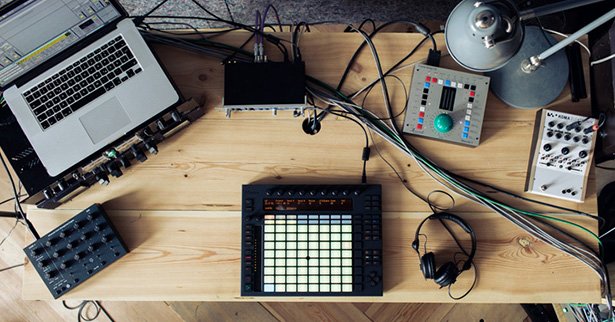
A free update to Ableton Live, version 9.2, is now available and out of beta. We covered this in some detail before:
Live 9.2 Answers Your Warp, Automation, Tuner, and Pad Wishes
Hands on with the Ableton Live 9.2 Tuner [Video]
But today, in addition to the release, we get a closer look at the free Mad Zach sample pack included to help you exploit all 64 pads of Ableton’s Push hardware — plus some insider details on changes to the Live API that will impact power users and add-ons for Live.
First, let’s review what 9.2 adds. It’s some subtle stuff, but details I think a lot of you were anticipating:
- Better latency compensation. Lower latency for plug-ins and Max for Live, plus latency-compensated automation.
- Warping sounds and works better. Downbeat detection is better (phew!) and you can Warp Selection for the first time. Also, warping is more precise and punchier (in the better-sounding Complex and Complex Pro modes).
- There’s a tuner. Hardly earth-shaking, but good that’s finally standard – whether you’re using a guitar or synth.
- Max 7. The latest-and-greatest Max is now baked into Live – and that’s a great thing, given the cool stuff Max 7 includes (a lot of it waiting on this very Ableton update).
- Push is better at aftertouch. Push harder. Aftertouch implementation itself is improved, and it’s supported in more factory sound patches, too.
- Push touch strip does mod. You can now add modulation with the Push touch strip – maybe even more useful than pitch bend (already supported).
- Push has a 64-pad layout. Whereas previously triggering samples and such split the Push layout into a separate step sequencer and pads, now you can use all 64 pads if you choose.
And, the bonus: to exploit those 64 pads, you get a free pack from Mad Zach pre-loaded with samples to try out. He walks you through that video here:
It’s called “The Lab,” and the sound pack and accompanying video walkthrough help you work with those 64 pads (at least if you haven’t already lined up four MPCs in your sets), sound design, and production.
There’s more in Live 9.2 though, beyond just the features Ableton announced today. The developers at Isotonik tell us they’re excited about new improvements to the API. In fact, it brings some of the first major Live Object Model updates since Max for Live was released half a decade ago.
Say wha?
Well, the “LOM” is the means by which add-ons built by users and third-party developers in Max for Live interact with Live itself.
If you’re a hard-core Live geek, this means more power for you to create new tools. But even if you aren’t, it means that those add-ons will be able to do things they couldn’t previously.
And some of these changes came from – well, you. You users asked developers like Isotonik and the Crashologists team for changes. They asked Ableton for those changes. And Ableton – as of today – delivers.
I’ll cover the first round of add-ons separately, but here are some highlights under the hood:
- Load a clip into RAM, right from the API (for greater performance
- Move around playhead positions without losing sync with Live
- Integrate more tightly with hardware
- Set loops to resolution as fine as 1/32 notes (not just quarter notes)
If you’re interested, we can go into more detail.
But all in all, this looks like a good update – and it makes me excited to see what’s next from Ableton in terms of Live itself, and support for external hardware.
Live 9.2 Out Now [Ableton]
Can’t wait to download this update. Though I would like to see better accessibility in Push. I can only use one hand so have trouble with having to hold down buttons like Shift whilst tweaking another control. I have contacted Ableton and they seem keen to help using M4L. I’m going to look closer at M4L, LOM and hardware integration myself.
Can’t wait to download this update. Though I would like to see better accessibility in Push. I can only use one hand so have trouble with having to hold down buttons like Shift whilst tweaking another control. I have contacted Ableton and they seem keen to help using M4L. I’m going to look closer at M4L, LOM and hardware integration myself.
Can’t wait to download this update. Though I would like to see better accessibility in Push. I can only use one hand so have trouble with having to hold down buttons like Shift whilst tweaking another control. I have contacted Ableton and they seem keen to help using M4L. I’m going to look closer at M4L, LOM and hardware integration myself.
+1 for further API / LOM details, please, especially the bits relating to hardware!
+1 for further API / LOM details, please, especially the bits relating to hardware!
+1 for further API / LOM details, please, especially the bits relating to hardware!
I’d like very much to know more about changes introduce to the Live API. I more or less gave up on patching against the M4L API a couple of years ago due to what felt like a half-baked (and then abandoned) set of capabilities. I’ll be very happy if Ableton are indeed devoting resources to API developers again.
I’d like very much to know more about changes introduced to the API. I more or less gave up on patching against the M4L API a couple of years ago due to what felt like a half-baked (and then abandoned) set of capabilities. I’ll be very happy if Ableton are indeed devoting resources to supporting API developers again.
I’d like very much to know more about changes introduced to the API. I more or less gave up on patching against the M4L API a couple of years ago due to what felt like a half-baked (and then abandoned) set of capabilities. I’ll be very happy if Ableton are indeed devoting resources to supporting API developers again.
NO MORE COMPATIBILITY WITH WINDOWS XP?!
Wait, there are still people out there who may expect it to still work with XP? Wow.
As someone who bought a Push during the recent sale, these new features are an even bigger box of delights to those I’m currently ploughing through. Would also be interested, as well for anyone who knows of a good M4L tutorial? It’s always looked interesting, but my brain has issues with getting around it.
I’m totally pissed I can’t run Live on Windows 3.11!
lol
You would be surprised at how many people still use XP, although I’m sure the numbers are dwindling (as an anecdotal example, transition to Windows 7 was quite smooth for me even with an older machine at the time).
On the other hand I know many musicians that still use OSX 10.6 because their system still works perfectly for their needs. We’re talking about a 6 year old system running in 6 year old computers. Not exactly stone age stuff. And now they are being coerced into buying new hardware that they don’t actually need. I think support for earlier Intel based OSX is being dropped way too soon.
I agree 100%. I was on 10.6.8 until I read that 9.2 would not support it anymore.
I needed that PDC fix is so bad 😉 I bought an ssd and went for mavericks on a 2010 mbp
System is really stable and faster compared to my older one, I also doubled the RAM fearing the higher new OS requirments.
If needed I can still boot my older os for ancient projects and 32bit stuff.
^ This x100.
NO MORE COMPATIBILITY WITH WINDOWS XP?!
Wait, there are still people out there who may expect it to still work with XP? Wow.
As someone who bought a Push during the recent sale, these new features are an even bigger box of delights to those I’m currently ploughing through. Would also be interested, as well for anyone who knows of a good M4L tutorial? It’s always looked interesting, but my brain has issues with getting around it.
I’m totally pissed I can’t run Live on Windows 3.11!
lol
You would be surprised at how many people still use XP, although I’m sure the numbers are dwindling (as an anecdotal example, transition to Windows 7 was quite smooth for me even with an older machine at the time).
On the other hand I know many musicians that still use OSX 10.6 because their system still works perfectly for their needs. We’re talking about a 6 year old system running in 6 year old computers. Not exactly stone age stuff. And now they are being coerced into buying new hardware that they don’t actually need. I think support for earlier Intel based OSX is being dropped way too soon.
I agree 100%. I was on 10.6.8 until I read that 9.2 would not support it anymore.
I needed that PDC fix is so bad 😉 I bought an ssd and went for mavericks on a 2010 mbp
System is really stable and faster compared to my older one, I also doubled the RAM fearing the higher new OS requirments.
If needed I can still boot my older os for ancient projects and 32bit stuff.
^ This x100.
NO MORE COMPATIBILITY WITH WINDOWS XP?!
Wait, there are still people out there who may expect it to still work with XP? Wow.
As someone who bought a Push during the recent sale, these new features are an even bigger box of delights to those I’m currently ploughing through. Would also be interested, as well for anyone who knows of a good M4L tutorial? It’s always looked interesting, but my brain has issues with getting around it.
I’m totally pissed I can’t run Live on Windows 3.11!
lol
You would be surprised at how many people still use XP, although I’m sure the numbers are dwindling (as an anecdotal example, transition to Windows 7 was quite smooth for me even with an older machine at the time).
On the other hand I know many musicians that still use OSX 10.6 because their system still works perfectly for their needs. We’re talking about a 6 year old system running in 6 year old computers. Not exactly stone age stuff. And now they are being coerced into buying new hardware that they don’t actually need. I think support for earlier Intel based OSX is being dropped way too soon.
I agree 100%. I was on 10.6.8 until I read that 9.2 would not support it anymore.
I needed that PDC fix is so bad 😉 I bought an ssd and went for mavericks on a 2010 mbp
System is really stable and faster compared to my older one, I also doubled the RAM fearing the higher new OS requirments.
If needed I can still boot my older os for ancient projects and 32bit stuff.
^ This x100.
I hope my issues with using multiple interfaces is solved.
I get massive conflicts using a Launchpad, Akai APC Mini, and any other stuck-on-midi-channel-1 device, even when setting the ports separately.
This is a conflict of the controller not of Live, you’ll need an editor to change the messages they send, if ones not natively available then i’d suggest BOMEs as the answer….
Trying to avoid any 3rd party software “solutions” as it introduces another link in the chain that can go wrong.
On this issue without a controller editor you have no choice…
Novation Automap could solve the problem changing the Launchpad commands, but I’ve found my APCmini doesn’t play too well with other controllers. luckily (for me!) the only other controller I’m using at the moment is my Monome, which you can select a channel for.
I get conflicts no matter what controller I’m using. :/ It’s not just the APC.
Thing is I need a trigger and toggle interface, with customizable LED feedback.
I’ve tried Launchpad, APC Mini, Alias8 (the Alias8 was great but too small for my needs). Also using a Novation Launch Control XL (thank gawd you can change the channel on that). I’m trying to stay away from the monome just for the sole reason it requires 3rd party software to be running, right? Which isn’t optimal. As for Automap? No thanks. If gives me way more headaches than it’s worth, plus I’ll have hundreds of wrapped plugins as a result, with no hard drive space to spare.
Just wish the manufacturers would sell a device that’s customizable and *works* 100% for the power users.
If you’re using multiple control surfaces with session mode, you may want to try out the “DontCombineAPCs” flag in options.txt: https://www.ableton.com/en/help/article/optionstxt-file-live/
Holy crap, I never heard of this.
This could solve 99% of my issues… if it works, I’ll buy you a french fry.
I played with this option sometime ago but it didn’t help with what I needed. The only thing I recall it helping with is allowing the two controller grids (in my case, 2 apcs) to move independently instead of being locked together side by side. While that might be useful for some things, it still doesn’t get around the fact that both controllers are sending control data on the same channels. So any custom mappings are useless because they apply to both controllers. As a workaround, we had to read apc data into Max first, filter the controllers on the 2nd apc and remap them to different channels / controller numbers. A total pain in the ass. Shocking that Ableton and Akai didn’t provision for this in the original design.
Well, in my case, it’s a Launchpad and a APC Mini. You’d think just by selecting their port (Launchpad, APC Mini) in the dropdown MIDI selector on the channel I would be okay; but somehow there’s still a midi conflict. I have it set correctly in the preferences as well. I’ve had problems with the Launchpad and other controllers aside from the APC Mini too; and problems with the APC Mini and other controllers without the Launchpad. What this tells me is that neither the Launchpad nor the APC Mini are USB class compliant, at all.
This is supposed to be fun, right?
But thorny problems like this make the whole thing a pain in the ass and forces me to shut the rig down for a few days out of sheer frustration.
I hope my issues with using multiple interfaces is solved.
I get massive conflicts using a Launchpad, Akai APC Mini, and any other stuck-on-midi-channel-1 device, even when setting the ports separately.
This is a conflict of the controller not of Live, you’ll need an editor to change the messages they send, if ones not natively available then i’d suggest BOMEs as the answer….
Trying to avoid any 3rd party software “solutions” as it introduces another link in the chain that can go wrong.
On this issue without a controller editor you have no choice…
Novation Automap could solve the problem changing the Launchpad commands, but I’ve found my APCmini doesn’t play too well with other controllers. luckily (for me!) the only other controller I’m using at the moment is my Monome, which you can select a channel for.
I get conflicts no matter what controller I’m using. :/ It’s not just the APC.
Thing is I need a trigger and toggle interface, with customizable LED feedback.
I’ve tried Launchpad, APC Mini, Alias8 (the Alias8 was great but too small for my needs). Also using a Novation Launch Control XL (thank gawd you can change the channel on that). I’m trying to stay away from the monome just for the sole reason it requires 3rd party software to be running, right? Which isn’t optimal. As for Automap? No thanks. If gives me way more headaches than it’s worth, plus I’ll have hundreds of wrapped plugins as a result, with no hard drive space to spare.
Just wish the manufacturers would sell a device that’s customizable and *works* 100% for the power users.
If you’re using multiple control surfaces with session mode, you may want to try out the “DontCombineAPCs” flag in options.txt: https://www.ableton.com/en/help/article/optionstxt-file-live/
Holy crap, I never heard of this.
This could solve 99% of my issues… if it works, I’ll buy you a french fry.
I played with this option sometime ago but it didn’t help with what I needed. The only thing I recall it helping with is allowing the two controller grids (in my case, 2 apcs) to move independently instead of being locked together side by side. While that might be useful for some things, it still doesn’t get around the fact that both controllers are sending control data on the same channels. So any custom mappings are useless because they apply to both controllers. As a workaround, we had to read apc data into Max first, filter the controllers on the 2nd apc and remap them to different channels / controller numbers. A total pain in the ass. Shocking that Ableton and Akai didn’t provision for this in the original design.
Well, in my case, it’s a Launchpad and a APC Mini. You’d think just by selecting their port (Launchpad, APC Mini) in the dropdown MIDI selector on the channel I would be okay; but somehow there’s still a midi conflict. I have it set correctly in the preferences as well. I’ve had problems with the Launchpad and other controllers aside from the APC Mini too; and problems with the APC Mini and other controllers without the Launchpad. What this tells me is that neither the Launchpad nor the APC Mini are USB class compliant, at all.
This is supposed to be fun, right?
But thorny problems like this make the whole thing a pain in the ass and forces me to shut the rig down for a few days out of sheer frustration.
I hope my issues with using multiple interfaces is solved.
I get massive conflicts using a Launchpad, Akai APC Mini, and any other stuck-on-midi-channel-1 device, even when setting the ports separately.
This is a conflict of the controller not of Live, you’ll need an editor to change the messages they send, if ones not natively available then i’d suggest BOMEs as the answer….
Trying to avoid any 3rd party software “solutions” as it introduces another link in the chain that can go wrong.
On this issue without a controller editor you have no choice…
Novation Automap could solve the problem changing the Launchpad commands, but I’ve found my APCmini doesn’t play too well with other controllers. luckily (for me!) the only other controller I’m using at the moment is my Monome, which you can select a channel for.
I get conflicts no matter what controller I’m using. :/ It’s not just the APC.
Thing is I need a trigger and toggle interface, with customizable LED feedback.
I’ve tried Launchpad, APC Mini, Alias8 (the Alias8 was great but too small for my needs). Also using a Novation Launch Control XL (thank gawd you can change the channel on that). I’m trying to stay away from the monome just for the sole reason it requires 3rd party software to be running, right? Which isn’t optimal. As for Automap? No thanks. If gives me way more headaches than it’s worth, plus I’ll have hundreds of wrapped plugins as a result, with no hard drive space to spare.
Just wish the manufacturers would sell a device that’s customizable and *works* 100% for the power users.
If you’re using multiple control surfaces with session mode, you may want to try out the “DontCombineAPCs” flag in options.txt: https://www.ableton.com/en/help/article/optionstxt-file-live/
Holy crap, I never heard of this.
This could solve 99% of my issues… if it works, I’ll buy you a french fry.
I played with this option sometime ago but it didn’t help with what I needed. The only thing I recall it helping with is allowing the two controller grids (in my case, 2 apcs) to move independently instead of being locked together side by side. While that might be useful for some things, it still doesn’t get around the fact that both controllers are sending control data on the same channels. So any custom mappings are useless because they apply to both controllers. As a workaround, we had to read apc data into Max first, filter the controllers on the 2nd apc and remap them to different channels / controller numbers. A total pain in the ass. Shocking that Ableton and Akai didn’t provision for this in the original design.
Well, in my case, it’s a Launchpad and a APC Mini. You’d think just by selecting their port (Launchpad, APC Mini) in the dropdown MIDI selector on the channel I would be okay; but somehow there’s still a midi conflict. I have it set correctly in the preferences as well. I’ve had problems with the Launchpad and other controllers aside from the APC Mini too; and problems with the APC Mini and other controllers without the Launchpad. What this tells me is that neither the Launchpad nor the APC Mini are USB class compliant, at all.
This is supposed to be fun, right?
But thorny problems like this make the whole thing a pain in the ass and forces me to shut the rig down for a few days out of sheer frustration.
The tuner may not be earth-shaking for some but it is for me! I record a lot of guitar and until now was using a 3rd party device. The new one in Live is not only handy in that it is visible with the track selected, but it is a FANTASTIC tuner. Simple, extremely easy to read, and much more accurate than the one I was previously using. For me, when it comes down to it, it’s always these little things that help in my creative process than some of the big new features.
I’d love to hear more about the API changes as well.
True. There are other more pressing issues, but I also think the tuner, while not essential, does have its place. I always felt like it was something that was missing in Live, since a lot of us use it with real instruments (and not just guitars).
ha ya me too! i’ve been going to the prefs screen for the A test tone.
The tuner may not be earth-shaking for some but it is for me! I record a lot of guitar and until now was using a 3rd party device. The new one in Live is not only handy in that it is visible with the track selected, but it is a FANTASTIC tuner. Simple, extremely easy to read, and much more accurate than the one I was previously using. For me, when it comes down to it, it’s always these little things that help in my creative process than some of the big new features.
I’d love to hear more about the API changes as well.
True. There are other more pressing issues, but I also think the tuner, while not essential, does have its place. I always felt like it was something that was missing in Live, since a lot of us use it with real instruments (and not just guitars).
ha ya me too! i’ve been going to the prefs screen for the A test tone.
The tuner may not be earth-shaking for some but it is for me! I record a lot of guitar and until now was using a 3rd party device. The new one in Live is not only handy in that it is visible with the track selected, but it is a FANTASTIC tuner. Simple, extremely easy to read, and much more accurate than the one I was previously using. For me, when it comes down to it, it’s always these little things that help in my creative process than some of the big new features.
I’d love to hear more about the API changes as well.
True. There are other more pressing issues, but I also think the tuner, while not essential, does have its place. I always felt like it was something that was missing in Live, since a lot of us use it with real instruments (and not just guitars).
ha ya me too! i’ve been going to the prefs screen for the A test tone.
They still have not addressed these core problems: I’ve rendered a track, why isn’t it on my phone? Current procedure: Render to WAV, import to Itunes, make MP3, navigate to folder, delete big Wav, move MP3 to desktop, plug in phone, transfer. Crazy. Next: difficult to merge multiple tracks into a live set. They should have a Setlist (playlist). Also, difficult to save / catagorize tracks by band / project. All you have is one bucket (open or recent). Ugh. This is the stuff that matters.
Yeah, direct render to mp3 should be standard, and merging projects is a nightmare – swapping around sets is as hard as starting from scratch.
who cares about phone support ??? really man ???
Agreed.
agreed 2
Yeah I thought that was a joke. Really? Once a track is rendered I treat it like any other track I want to live on my phone. Dump it into iTunes, sync.
One thing i *would* like, however, is good metadata support in Live. I’d like to add that crap that I later add in iTunes. Artist name, album name, etc. Like photos in Lightroom.
wouldn’t they have to them pay for LAME encoding? and do you want to be able to add meta tags to the MP3?
Render to Wav
Convert to MP3
Upload to OneDrive/GDrive/Dropbox
Download to phone
how hard is that?
Well, it shouldn’t be too hard either to implement direct MP3/AAC export option (like in Logic), and maybe even start using existing APIs from Apple (saving to iCloud) or Dropbox to package all of this into a nice and lean user experience. Soundcloud integration is already there and works pretty well, in my experience at least.
Exactly. What does everyone in the world do after a session? Get in the fucking car and give it a listen.
Rendering tracks directly to a phone is certainly not what I would call a “core issue”.
If Ableton ever develops an equivalent to FL Studio Mobile, then you can worry about it.
Personally I want to check out whether latency has improved and how Warp Mode has improved – now *those* are core issues for performance and production.
The phone debacle and the fact that Live still won’t make me a sandwich (I have been requesting this since version 2 and they continue to ignore me) really makes me think that Ableton has lost the plot. It’s like all they care about is making sure Live does everything you’d need to create music, and they forget about all of the other stuff.
Would it kill them to maybe add a pastrami and swiss on rye in the download? It’s not like I want the pastrami to be peppered or anything fancy.
+1
I have a Folder Action set up in Mac OS X. I render WAV to that folder, it then encodes anything that goes into it into 320kbps MP3, then moves that MP3 to the “Automatically Add to iTunes” folder. I have iTunes Match, so anything that gets added to iTunes, gets into the cloud, which is then accessible from my iPhone.
All without me having to think about it. Set it up once, and it will keep working.
So yes you can do that already.
no, you can’t. because today you are in the mood to send 30 sec. of audio in aac to a friend via email, he should listen in and tell you if your latest idea is any good.
All those workarounds are just to time-consuming. 😉
I always have to laugh when ableton says workflow improvements – when they are not willing to implement standard export formats (aac/mp3).
You’re complaining about converting to a lossy format & uploading? My point is that in the same time you took to complain about consuming time, you could set up an automated system to do it yourself every time effortlessly. I’m glad that Ableton isn’t wasting engineering time with something as trivial file conversions and uploading.
I like that they’re doing stuff that MATTERS. Can you improve a back end API? No. But you can convert a file. They’re doing real engineering work that you can’t fix.
Huh, what? This is supposed to be a digital audio workstation.
What is a daw that only outputs wav? no daw 😉
It’s a like a photo editor that can’t output JPEG from raw … 😉
It’s 2015 not 1995.
If you’re outputting files fast enough that you’re worried about this, I’m frankly jealous of your productivity.
That said, on Mac, you can very easily set up an Automator action that would do much more sophisticated stuff than any DAW can on export. Just attach an action to a particular folder and export there.
There are a *lot* of things I can complain about with Ableton, but I must confess I think this particular one is pretty low on the list. 😉
Yes, it’s a really low hanging fruit to implement. And I am fed up with all the excuses and workarounds.
Okay, so what I’m describing is *not a workaround* – and don’t get pissy with me, I don’t work for Ableton. 😉
Anyone who is doing heavy-duty export workflows should investigate Automator as it’ll do more than any DAW. Actually should probably be the subject for another story.
And anyway, yes, you’re of course entitled to want any missing feature you like … just imagine what happens when you add up 8 million users who are “fed up with all the excuses” for not implementing whatever it is they think is essential and you begin to imagine the job of product management for a DAW.
I agree with you that they should add this, though, and that it’s annoying, and that something like this having enough export options is actually better than gimmicky “upload to SoundCloud” features and whatnot. 😉
Lol, we agRee. 🙂
I render into a dropbox synced folder. Then I have the track immediately on the phone via the dropbox app. Crazy.
They still have not addressed these core problems: I’ve rendered a track, why isn’t it on my phone? Current procedure: Render to WAV, import to Itunes, make MP3, navigate to folder, delete big Wav, move MP3 to desktop, plug in phone, transfer. Crazy. Next: difficult to merge multiple tracks into a live set. They should have a Setlist (playlist). Also, difficult to save / catagorize tracks by band / project. All you have is one bucket (open or recent). Ugh. This is the stuff that matters.
Yeah, direct render to mp3 should be standard, and merging projects is a nightmare – swapping around sets is as hard as starting from scratch.
who cares about phone support ??? really man ???
Agreed.
agreed 2
Yeah I thought that was a joke. Really? Once a track is rendered I treat it like any other track I want to live on my phone. Dump it into iTunes, sync.
One thing i *would* like, however, is good metadata support in Live. I’d like to add that crap that I later add in iTunes. Artist name, album name, etc. Like photos in Lightroom.
wouldn’t they have to them pay for LAME encoding? and do you want to be able to add meta tags to the MP3?
Render to Wav
Convert to MP3
Upload to OneDrive/GDrive/Dropbox
Download to phone
how hard is that?
Well, it shouldn’t be too hard either to implement direct MP3/AAC export option (like in Logic), and maybe even start using existing APIs from Apple (saving to iCloud) or Dropbox to package all of this into a nice and lean user experience. Soundcloud integration is already there and works pretty well, in my experience at least.
Exactly. What does everyone in the world do after a session? Get in the fucking car and give it a listen.
Rendering tracks directly to a phone is certainly not what I would call a “core issue”.
If Ableton ever develops an equivalent to FL Studio Mobile, then you can worry about it.
Personally I want to check out whether latency has improved and how Warp Mode has improved – now *those* are core issues for performance and production.
In any case, I’m with you on sets management and you’re right to point it out. Definitely could use an overhaul.
The phone debacle and the fact that Live still won’t make me a sandwich (I have been requesting this since version 2 and they continue to ignore me) really makes me think that Ableton has lost the plot. It’s like all they care about is making sure Live does everything you’d need to create music, and they forget about all of the other stuff.
Would it kill them to maybe add a pastrami and swiss on rye in the download? It’s not like I want the pastrami to be peppered or anything fancy.
+1
I have a Folder Action set up in Mac OS X. I render WAV to that folder, it then encodes anything that goes into it into 320kbps MP3, then moves that MP3 to the “Automatically Add to iTunes” folder. I have iTunes Match, so anything that gets added to iTunes, gets into the cloud, which is then accessible from my iPhone.
All without me having to think about it. Set it up once, and it will keep working.
So yes you can do that already.
no, you can’t. because today you are in the mood to send 30 sec. of audio in aac to a friend via email, he should listen in and tell you if your latest idea is any good.
All those workarounds are just to time-consuming. 😉
I always have to laugh when ableton says workflow improvements – when they are not willing to implement standard export formats (aac/mp3).
You’re complaining about converting to a lossy format & uploading? My point is that in the same time you took to complain about consuming time, you could set up an automated system to do it yourself every time effortlessly. I’m glad that Ableton isn’t wasting engineering time with something as trivial file conversions and uploading.
I like that they’re doing stuff that MATTERS. Can you improve a back end API? No. But you can convert a file. They’re doing real engineering work that you can’t fix.
Huh, what? This is supposed to be a digital audio workstation.
What is a daw that only outputs wav? no daw 😉
It’s a like a photo editor that can’t output JPEG from raw … 😉
It’s 2015 not 1995.
If you’re outputting files fast enough that you’re worried about this, I’m frankly jealous of your productivity.
That said, on Mac, you can very easily set up an Automator action that would do much more sophisticated stuff than any DAW can on export. Just attach an action to a particular folder and export there.
There are a *lot* of things I can complain about with Ableton, but I must confess I think this particular one is pretty low on the list. 😉
Yes, it’s a really low hanging fruit to implement. And I am fed up with all the excuses and workarounds.
Okay, so what I’m describing is *not a workaround* – and don’t get pissy with me, I don’t work for Ableton. 😉
Anyone who is doing heavy-duty export workflows should investigate Automator as it’ll do more than any DAW. Actually should probably be the subject for another story.
And anyway, yes, you’re of course entitled to want any missing feature you like … just imagine what happens when you add up 8 million users who are “fed up with all the excuses” for not implementing whatever it is they think is essential and you begin to imagine the job of product management for a DAW.
I agree with you that they should add this, though, and that it’s annoying, and that something like this having enough export options is actually better than gimmicky “upload to SoundCloud” features and whatnot. 😉
Lol, we agRee. 🙂
I render into a dropbox synced folder. Then I have the track immediately on the phone via the dropbox app. Crazy.
They still have not addressed these core problems: I’ve rendered a track, why isn’t it on my phone? Current procedure: Render to WAV, import to Itunes, make MP3, navigate to folder, delete big Wav, move MP3 to desktop, plug in phone, transfer. Crazy. Next: difficult to merge multiple tracks into a live set. They should have a Setlist (playlist). Also, difficult to save / catagorize tracks by band / project. All you have is one bucket (open or recent). Ugh. This is the stuff that matters.
Yeah, direct render to mp3 should be standard, and merging projects is a nightmare – swapping around sets is as hard as starting from scratch.
who cares about phone support ??? really man ???
Agreed.
agreed 2
Yeah I thought that was a joke. Really? Once a track is rendered I treat it like any other track I want to live on my phone. Dump it into iTunes, sync.
One thing i *would* like, however, is good metadata support in Live. I’d like to add that crap that I later add in iTunes. Artist name, album name, etc. Like photos in Lightroom.
wouldn’t they have to them pay for LAME encoding? and do you want to be able to add meta tags to the MP3?
Render to Wav
Convert to MP3
Upload to OneDrive/GDrive/Dropbox
Download to phone
how hard is that?
Well, it shouldn’t be too hard either to implement direct MP3/AAC export option (like in Logic), and maybe even start using existing APIs from Apple (saving to iCloud) or Dropbox to package all of this into a nice and lean user experience. Soundcloud integration is already there and works pretty well, in my experience at least.
Exactly. What does everyone in the world do after a session? Get in the fucking car and give it a listen.
Rendering tracks directly to a phone is certainly not what I would call a “core issue”.
If Ableton ever develops an equivalent to FL Studio Mobile, then you can worry about it.
Personally I want to check out whether latency has improved and how Warp Mode has improved – now *those* are core issues for performance and production.
In any case, I’m with you on sets management and you’re right to point it out. Definitely could use an overhaul.
The phone debacle and the fact that Live still won’t make me a sandwich (I have been requesting this since version 2 and they continue to ignore me) really makes me think that Ableton has lost the plot. It’s like all they care about is making sure Live does everything you’d need to create music, and they forget about all of the other stuff.
Would it kill them to maybe add a pastrami and swiss on rye in the download? It’s not like I want the pastrami to be peppered or anything fancy.
+1
I have a Folder Action set up in Mac OS X. I render WAV to that folder, it then encodes anything that goes into it into 320kbps MP3, then moves that MP3 to the “Automatically Add to iTunes” folder. I have iTunes Match, so anything that gets added to iTunes, gets into the cloud, which is then accessible from my iPhone.
All without me having to think about it. Set it up once, and it will keep working.
So yes you can do that already.
no, you can’t. because today you are in the mood to send 30 sec. of audio in aac to a friend via email, he should listen in and tell you if your latest idea is any good.
All those workarounds are just to time-consuming. 😉
I always have to laugh when ableton says workflow improvements – when they are not willing to implement standard export formats (aac/mp3).
You’re complaining about converting to a lossy format & uploading? My point is that in the same time you took to complain about consuming time, you could set up an automated system to do it yourself every time effortlessly. I’m glad that Ableton isn’t wasting engineering time with something as trivial file conversions and uploading.
I like that they’re doing stuff that MATTERS. Can you improve a back end API? No. But you can convert a file. They’re doing real engineering work that you can’t fix.
Huh, what? This is supposed to be a digital audio workstation.
What is a daw that only outputs wav? no daw 😉
It’s a like a photo editor that can’t output JPEG from raw … 😉
It’s 2015 not 1995.
If you’re outputting files fast enough that you’re worried about this, I’m frankly jealous of your productivity.
That said, on Mac, you can very easily set up an Automator action that would do much more sophisticated stuff than any DAW can on export. Just attach an action to a particular folder and export there.
There are a *lot* of things I can complain about with Ableton, but I must confess I think this particular one is pretty low on the list. 😉
Yes, it’s a really low hanging fruit to implement. And I am fed up with all the excuses and workarounds.
Okay, so what I’m describing is *not a workaround* – and don’t get pissy with me, I don’t work for Ableton. 😉
Anyone who is doing heavy-duty export workflows should investigate Automator as it’ll do more than any DAW. Actually should probably be the subject for another story.
And anyway, yes, you’re of course entitled to want any missing feature you like … just imagine what happens when you add up 8 million users who are “fed up with all the excuses” for not implementing whatever it is they think is essential and you begin to imagine the job of product management for a DAW.
I agree with you that they should add this, though, and that it’s annoying, and that something like this having enough export options is actually better than gimmicky “upload to SoundCloud” features and whatnot. 😉
Lol, we agRee. 🙂
I render into a dropbox synced folder. Then I have the track immediately on the phone via the dropbox app. Crazy.
Second (or third, or fourth) more info on the API changes in regards to hardware. Wondering if it will be worth my time to re examine some M4L devices I’m working on that integrate with hardware.
As someone who has been using Max 7 as my M4L editor since it was released, I’m relieved to hear they now officially support it. Gonna go play with that scrub, and ram stuff now…
Second (or third, or fourth) more info on the API changes in regards to hardware. Wondering if it will be worth my time to re examine some M4L devices I’m working on that integrate with hardware.
As someone who has been using Max 7 as my M4L editor since it was released, I’m relieved to hear they now officially support it. Gonna go play with that scrub, and ram stuff now…
Second (or third, or fourth) more info on the API changes in regards to hardware. Wondering if it will be worth my time to re examine some M4L devices I’m working on that integrate with hardware.
As someone who has been using Max 7 as my M4L editor since it was released, I’m relieved to hear they now officially support it. Gonna go play with that scrub, and ram stuff now…
hoping we get some more in depth editing and processing tools in arrangment view. i would love to be able to select a piece of audio right click and reverse it . also in clips mode would be great to edit within clips. i also hope updates get a bit more frequent. love ableton, would like a few more features tho.
Why even right click….how about key command macros?
that sounds even sweeter!!
hoping we get some more in depth editing and processing tools in arrangment view. i would love to be able to select a piece of audio right click and reverse it . also in clips mode would be great to edit within clips. i also hope updates get a bit more frequent. love ableton, would like a few more features tho.
Why even right click….how about key command macros?
that sounds even sweeter!!
hoping we get some more in depth editing and processing tools in arrangment view. i would love to be able to select a piece of audio right click and reverse it . also in clips mode would be great to edit within clips. i also hope updates get a bit more frequent. love ableton, would like a few more features tho.
Why even right click….how about key command macros?
that sounds even sweeter!!
I hope one day the note step sequencer in push will be updated to have a fold option so you can see up to 64 notes at a time instead of having to page through 8 notes at a time.
I hope one day the note step sequencer in push will be updated to have a fold option so you can see up to 64 notes at a time instead of having to page through 8 notes at a time.
I hope one day the note step sequencer in push will be updated to have a fold option so you can see up to 64 notes at a time instead of having to page through 8 notes at a time.
did they make it so i can send separate midi channels out of a vst? as in maschine sends out up to 8 midi channels but only comes out of the one the vst is in ableton, merging it all to that channel…
did they make it so i can send separate midi channels out of a vst? as in maschine sends out up to 8 midi channels but only comes out of the one the vst is in ableton, merging it all to that channel…
did they make it so i can send separate midi channels out of a vst? as in maschine sends out up to 8 midi channels but only comes out of the one the vst is in ableton, merging it all to that channel…
I just want to know some more about the gorgeous crap in that photo, those Ableton pics are always v pretty.
Macbook Pro Retina 15 inch, RME Fireface, Sennheiser HD 25,Crane Song Monitor Controller and more stuff I don’t know.
I just want to know some more about the gorgeous crap in that photo, those Ableton pics are always v pretty.
Macbook Pro Retina 15 inch, RME Fireface, Sennheiser HD 25,Crane Song Monitor Controller and more stuff I don’t know.
I just want to know some more about the gorgeous crap in that photo, those Ableton pics are always v pretty.
Macbook Pro Retina 15 inch, RME Fireface, Sennheiser HD 25,Crane Song Monitor Controller and more stuff I don’t know.