
We’ve seen the future, and it’s … back to wires.
First, we saw midimux connect any MIDI app or hardware on your iOS device to any MIDI software or hardware connected to your Mac. Plus in a 30-pin or Lightning cable, run some software on each end, and connect anything. Then, we saw the promise of audiomux – doing the same thing for audio streams.
Now, audiomux is available on the App Store, not only individually, but as a bundle with midimux. (The developers initially asked midimux users to wait while that bundle became available, to avoid overspending.)
And, as all of this have unfolded, a number of videos and hands-on tests have demonstrated what it can do. Plus, there’s a new (competing) solution out for Windows users, too, so you don’t have to feel left out. Let’s get caught up.
Here’s a great video walkthrough of both midimux and audiomux by the folks at thesoundtestroom:
If you’re low on cash, they’ll actually reward you with a free license for a short “essay contest” – clever!
Midimux & Audiomux Essay Contest
For just a glimpse of what audiomux can do, here’s a one-minute video:
audiomux and midimux are powerful – maybe more powerful than some people need. If you just need one connection for MIDI between an app and your computer, MIDI LE will do the job free. (I think midimux is well worth the money, but sometimes people do prefer simpler solutions!)
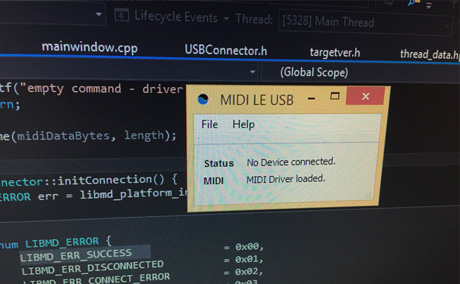
MIDI LE also has one very significant advantage: it’s available now in beta on Windows, whereas midimux is OS X-only.
It’s the work of Matthias Frick, who originally made it for himself but was inspired – partly by your comments here on CDM – to go ahead and release it.
For more on audiomux/midimux, see our past coverage:
Soon Your iPad Will Be Wired Into Your Music Studio: Midimux
Now, Across iOS and Mac, Everything is Musically Connected [Video]
Here’s How To Connect the iPad’s Easiest Pattern Maker to Your Mac [Video Tutorial]
But regardless of which tool you choose, it’s great to see something simply work over a wire. Wireless can be a wonderful thing, but there’s no reason to be forced into it, or allow it to devolve into something that costs time and effort instead of saves it.
really interested ! i’ve a general question about arduino & midi : i see lot of ways to send midi from arduino to devices, but i never see how to send midi from arduino over usb, is it simple impossible? (without shield)
you just need an arduino that does midi over usb. the teensy is great for that.
why is different with an arduino mega?
Yeah, it is possible. I’ve been using that for MIDI over Bluetooth with Arduino. (Check the bottom left part of http://www.s-r-n.de/midile/ )
There’s a nice library for that as well: https://github.com/YuuichiAkagawa/USBH_MIDI
+ 1 for Teensy – it adds a library of MIDI commands I can actually get my head around enough to hack Arduino code and can present to the host machine as a class-compliant MIDI device (or keyboard or joystick or mouse, should you wish) – not up to speed as to whether other Arduinos or clones can do this.
You can now use Arduino Leonardo for midi USB, you can use UNO ( with a little hack), the best choice is Teensy, but you can..
For Leonardo look here you have some good link : http://www.adafruit.com/products/1929
And with older you should make a serial2midi translator plus install the fdti drivers (not possible with ipad because it makes it non class compliant) for desktop without problem.
Teensy or raspberry pi are better choices for class compliance and translators with ipads.
really interested ! i’ve a general question about arduino & midi : i see lot of ways to send midi from arduino to devices, but i never see how to send midi from arduino over usb, is it simple impossible? (without shield)
you just need an arduino that does midi over usb. the teensy is great for that.
why is different with an arduino mega?
Yeah, it is possible. I’ve been using that for MIDI over Bluetooth with Arduino. (Check the bottom left part of http://www.s-r-n.de/midile/ )
There’s a nice library for that as well: https://github.com/YuuichiAkagawa/USBH_MIDI
+ 1 for Teensy – it adds a library of MIDI commands I can actually get my head around enough to hack Arduino code and can present to the host machine as a class-compliant MIDI device (or keyboard or joystick or mouse, should you wish) – not up to speed as to whether other Arduinos or clones can do this.
You can now use Arduino Leonardo for midi USB, you can use UNO ( with a little hack), the best choice is Teensy, but you can..
For Leonardo look here you have some good link : http://www.adafruit.com/products/1929
And with older you should make a serial2midi translator plus install the fdti drivers (not possible with ipad because it makes it non class compliant) for desktop without problem.
Teensy or raspberry pi are better choices for class compliance and translators with ipads.
really interested ! i’ve a general question about arduino & midi : i see lot of ways to send midi from arduino to devices, but i never see how to send midi from arduino over usb, is it simple impossible? (without shield)
you just need an arduino that does midi over usb. the teensy is great for that.
why is different with an arduino mega?
Yeah, it is possible. I’ve been using that for MIDI over Bluetooth with Arduino. (Check the bottom left part of http://www.s-r-n.de/midile/ )
There’s a nice library for that as well: https://github.com/YuuichiAkagawa/USBH_MIDI
+ 1 for Teensy – it adds a library of MIDI commands I can actually get my head around enough to hack Arduino code and can present to the host machine as a class-compliant MIDI device (or keyboard or joystick or mouse, should you wish) – not up to speed as to whether other Arduinos or clones can do this.
You can now use Arduino Leonardo for midi USB, you can use UNO ( with a little hack), the best choice is Teensy, but you can..
For Leonardo look here you have some good link : http://www.adafruit.com/products/1929
And with older you should make a serial2midi translator plus install the fdti drivers (not possible with ipad because it makes it non class compliant) for desktop without problem.
Teensy or raspberry pi are better choices for class compliance and translators with ipads.
Audiomux needs Audiobus that requires iOS7+ 🙁
There is quite a lot iOS5 users out there me including. For iPad controller work there is no need for better iPad than iPad1. Even most synths run it. And you can find those dirt cheap.
Audiomux needs Audiobus that requires iOS7+ 🙁
There is quite a lot iOS5 users out there me including. For iPad controller work there is no need for better iPad than iPad1. Even most synths run it. And you can find those dirt cheap.
Audiomux needs Audiobus that requires iOS7+ 🙁
There is quite a lot iOS5 users out there me including. For iPad controller work there is no need for better iPad than iPad1. Even most synths run it. And you can find those dirt cheap.
how do i get my two analogue inputs on my audiofire 2 soundcard show up in ableton live as well as the usb input from my ipad?
i want to jam my modular and my anode along with the ipad running seekbeats drummachine
ok i figured it out kinda
i have to create an aggregate device in the Audio Midi Setup on my Macbook, which now contains my AudioFire and iPAd – and it works! – But i still get a huge delay when trying to sync drum machines on my Ipad … Synths work fine though..
This article explains the aggregate device https://support.apple.com/en-is/HT202000
how do i get my two analogue inputs on my audiofire 2 soundcard show up in ableton live as well as the usb input from my ipad?
i want to jam my modular and my anode along with the ipad running seekbeats drummachine
ok i figured it out kinda
i have to create an aggregate device in the Audio Midi Setup on my Macbook, which now contains my AudioFire and iPAd – and it works! – But i still get a huge delay when trying to sync drum machines on my Ipad … Synths work fine though..
This article explains the aggregate device https://support.apple.com/en-is/HT202000
how do i get my two analogue inputs on my audiofire 2 soundcard show up in ableton live as well as the usb input from my ipad?
i want to jam my modular and my anode along with the ipad running seekbeats drummachine
ok i figured it out kinda
i have to create an aggregate device in the Audio Midi Setup on my Macbook, which now contains my AudioFire and iPAd – and it works! – But i still get a huge delay when trying to sync drum machines on my Ipad … Synths work fine though..
This article explains the aggregate device https://support.apple.com/en-is/HT202000
Thanks for this. Will see how MIDI LE develops on Windows.
Thanks for this. Will see how MIDI LE develops on Windows.
Thanks for this. Will see how MIDI LE develops on Windows.
Quick update:
We just released the windows Server for midimux. You can get it on our homepage 🙂
Quick update:
We just released the windows Server for midimux. You can get it on our homepage 🙂
Quick update:
We just released the windows Server for midimux. You can get it on our homepage 🙂