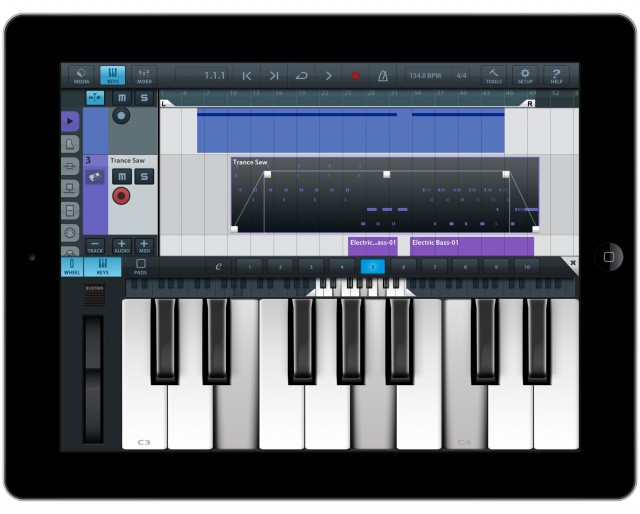
Audiobus may have just gotten its killer app.
See if this scenario is familiar to you: you’ve got some instrument or effect on the iPad or iPhone, and you’re making some cool sounds. But you want to actually get to recording more than one track of that instrument, perhaps even as far as arranging it into something resembling an actual song. You could plug the audio jack of the iPad into your laptop, or go through the dance of trying to get files off your iPad. But there you are, comfortably reclining on the couch with a drum machine, and you don’t want to have to go back to your desk and turn on your computer and get distracted by Facebook, and…
Sorry, I was looking at another browser tab and lost my train of thought. Ah, yes – Audiobus.
We’ve followed Audiobus closely, with an in-depth feature around its release. And when Steinberg released Cubasis, a full-featured production tool for iPad, we talked to them about workflow.
Now, the two technologies meet. Cubasis is a traditional DAW (Digital Audio Workstation), that is, an all-in-one record / mix / arrange app. With the addition of Audiobus, it can now pipe audio from a growing number of compatible apps into the multitrack arranging window. That means you can use your iPad in a way familiar from a desktop computer, but in a much more portable environment.
Of course, at some point you may still want to brave your laptop. Cubase users are well sorted: Cubasis projects can be brought straight into Cubase on your Windows PC or Mac. For users of other tools, you can simply upload the whole project via Dropbox and get at its sounds that way. See the discussion on the Audiobus forum. (Readers, let us know if you try this or find your own workflow.)
All in all, though, this seems this could really be the tool that makes the Audiobus notion take off. And certainly other production tools won’t be far behind.
Cubasis is US$49.99; we’ll have a full review soon (just loaded onto my iPad 3).
http://www.steinberg.net/
Cubasis for iPad on iTunes App Store
Cubasis is I think closest to a traditional, full-featured DAW on the iPad – especially with Audiobus support – but it’s not the only option. See also, for instance, MultiTrack DAW by Harmonicdog. I’m not crazy about the look of the UI, but some users swear by it, it was out front with Audiobus support, and costs only US$9.99.
The best competition for Cubasis seems likely to be Auria. With 48-track support and a wealth of features and effects, it’s deeper than Cubasis in many respects, though Cubase users may appreciate the familiar interface and file exchange in Cubasis. And the big difference: Cubasis does MIDI, which Auria does not.
For more Audiobus apps:
It really does look amazing, but I wish they had a limited free version, just for people to see if it works for theme, before dropping $50.
Cubasis is not expensive if you compare it with other DAW apps that nickel-and-dime you with In-App purchases of plugins, sound libraries, etc. For $50, you get EVERYTHING included in Cubasis. Compare that with Auria that costs $225 when you buy all In-App purchases. Even Alchemy which doesn’t even have a note editor costs much more than $60 when you buy all the sound libraries. You are comparing Chuck-e-Cheeses with Disney. No need to try for free – just get Cubasis – you won’t regret it. Guaranteed.
It really does look amazing, but I wish they had a limited free version, just for people to see if it works for theme, before dropping $50.
It really does look amazing, but I wish they had a limited free version, just for people to see if it works for theme, before dropping $50.
I’m surprised you did not mention Auria, as it was the first full-featured DAW on the iPad to support audiobus and also one of the first to support multiple inputs and outputs with professional soundcards
Actually, I’m surprised, too. And heh, that may have been the mind-numbing one-two punch of NAMM and CTM Festival making me miss the Auria announcement. 😉
Oh, and Steinberg sent me a note; Auria … forgot.
Fixed this story — now it seems since I at last have an iPad capable of running them, a Cubasis – Auria head-to-head is a must (perhaps with A Desktop Computer as the third entry).
Also a strength of Cubasis seems to be that it can record/playback midi, the other daws do only audio.
Yeah, exactly. That’s what wins me over to Cubasis.
NanoStudio doesn’t have an audio sampler.
Auria doesn’t have MIDI.
Cubasis has both and all.
I’m surprised you did not mention Auria, as it was the first full-featured DAW on the iPad to support audiobus and also one of the first to support multiple inputs and outputs with professional soundcards.
EDIT: Multitrack DAW supported Audiobus first, Audiobus support was added to Auria a couple days ago.
Actually, I’m surprised, too. And heh, that may have been the mind-numbing one-two punch of NAMM and CTM Festival making me miss the Auria announcement. 😉
Oh, and Steinberg sent me a note; Auria … forgot.
Fixed this story — now it seems since I at last have an iPad capable of running them, a Cubasis – Auria head-to-head is a must (perhaps with A Desktop Computer as the third entry).
Also a strength of Cubasis seems to be that it can record/playback midi, the other daws do only audio.
Yeah, exactly. That’s what wins me over to Cubasis.
NanoStudio doesn’t have an audio sampler.
Auria doesn’t have MIDI.
Cubasis has both and all.
I’m surprised you did not mention Auria, as it was the first full-featured DAW on the iPad to support audiobus and also one of the first to support multiple inputs and outputs with professional soundcards.
EDIT: Multitrack DAW supported Audiobus first, Audiobus support was added to Auria a couple days ago.
Actually, I’m surprised, too. And heh, that may have been the mind-numbing one-two punch of NAMM and CTM Festival making me miss the Auria announcement. 😉
Oh, and Steinberg sent me a note; Auria … forgot.
Fixed this story — now it seems since I at last have an iPad capable of running them, a Cubasis – Auria head-to-head is a must (perhaps with A Desktop Computer as the third entry).
Also a strength of Cubasis seems to be that it can record/playback midi, the other daws do only audio.
Yeah, exactly. That’s what wins me over to Cubasis.
NanoStudio doesn’t have an audio sampler.
Auria doesn’t have MIDI.
Cubasis has both and all.
Title copy edit: “Edits” should be “Edit”
Title copy edit: “Edits” should be “Edit”
Title copy edit: “Edits” should be “Edit”
Cubasis certainly appears to have an excellent workflow, and audio recording is a great addition. But compared to Nanostudio, Cubasis plugins are really dull, and the lack of a decent synthesiser makes Cubasis an app I don’t really want to spend £35 on. I’m going to hold out and wait, see what happens.
What makes you think Cubasis’ Micrologue synthesizer is dull that is derived from their award winning Retrologue? It has Micro Sonic VST too.
Cubasis certainly appears to have an excellent workflow, and audio recording is a great addition. But compared to Nanostudio, Cubasis plugins are really dull, and the lack of a decent synthesiser makes Cubasis an app I don’t really want to spend £35 on. I’m going to hold out and wait, see what happens.
What makes you think Cubasis’ Micrologue synthesizer is dull that is derived from their award winning Retrologue? It has Micro Sonic VST too. Sounds in Cubasis are dry because they are naked without any effects pre-applied – they left them for you to tweak them as you see fit. But once you apply Reverb, etc – they sound as good as sounds in any other DAW.
Cubasis certainly appears to have an excellent workflow, and audio recording is a great addition. But compared to Nanostudio, Cubasis plugins are really dull, and the lack of a decent synthesiser makes Cubasis an app I don’t really want to spend £35 on. I’m going to hold out and wait, see what happens.
What makes you think Cubasis’ Micrologue synthesizer is dull that is derived from their award winning Retrologue? It has Micro Sonic VST too. Sounds in Cubasis are dry because they are naked without any effects pre-applied – they left them for you to tweak them as you see fit. But once you apply Reverb, etc – they sound as good as sounds in any other DAW.
Cubasis looks good, but is A) expensive, and B) doesn’t offer automation curves for volume/pan etc. that can be drawn into audio tracks. I really need that.
Cubasis is not expensive if you compare it with other DAW apps that nickel-and-dime you with In-App purchases of plugins, sound libraries, etc. For $50, you get EVERYTHING included in Cubasis. Compare that with Auria that costs $225 when you buy all In-App purchases. Even Alchemy which doesn’t even have a note editor costs much more than $60 when you buy all the sound libraries. You are comparing Chuck-e-Cheeses with Disney.
Cubasis looks good, but is A) expensive, and B) doesn’t offer automation curves for volume/pan etc. that can be drawn into audio tracks. I really need that.
Cubasis is not expensive if you compare it with other DAW apps that nickel-and-dime you with In-App purchases of plugins, sound libraries, etc. For $50, you get EVERYTHING included in Cubasis. Compare that with Auria that costs $300 when you buy all In-App purchases. Even Alchemy which doesn’t even have a note editor costs much more than $60 when you buy all the sound libraries. You are comparing Chuck-e-Cheeses with Disney. No need to try for free – just get Cubasis – you won’t regret its great workflow. Guaranteed.
Cubasis looks good, but is A) expensive, and B) doesn’t offer automation curves for volume/pan etc. that can be drawn into audio tracks. I really need that.
Cubasis is not expensive if you compare it with other DAW apps that nickel-and-dime you with In-App purchases of plugins, sound libraries, etc. For $50, you get EVERYTHING included in Cubasis. Compare that with Auria that costs $300 when you buy all In-App purchases. Even Alchemy which doesn’t even have a note editor costs much more than $60 when you buy all the sound libraries. You are comparing Chuck-e-Cheeses with Disney. No need to try for free – just get Cubasis – you won’t regret its great workflow. Guaranteed.
There’s going to be even more talk when BeatMaker 2 finally gets Audiobus support. It’s got a huge amount of features and unparalleled sampling abilities on iOS. It’s got MIDI support and audio tracks. It’s got automation for its effects, volume and panning, etc. There’s very little it doesn’t have. Its effects might not be as good as Auria’s, but neither are Cubasis’.
BM2 isn’t perfect but I think it blows Auria and Cubasis out of the water.
Now Cubasis has all those features too.
There’s going to be even more talk when BeatMaker 2 finally gets Audiobus support. It’s got a huge amount of features and unparalleled sampling abilities on iOS. It’s got MIDI support and audio tracks. It’s got automation for its effects, volume and panning, etc. There’s very little it doesn’t have. Its effects might not be as good as Auria’s, but neither are Cubasis’.
BM2 isn’t perfect but I think it blows Auria and Cubasis out of the water.
Now Cubasis has all those features too.
There’s going to be even more talk when BeatMaker 2 finally gets Audiobus support. It’s got a huge amount of features and unparalleled sampling abilities on iOS. It’s got MIDI support and audio tracks. It’s got automation for its effects, volume and panning, etc. There’s very little it doesn’t have. Its effects might not be as good as Auria’s, but neither are Cubasis’.
BM2 isn’t perfect but I think it blows Auria and Cubasis out of the water.
Now Cubasis has all those features too.
nanostudio and beatmaker just missed out
nanostudio and beatmaker just missed out
nanostudio and beatmaker just missed out
If you’re doing a head to head don’t forget meteor from 4 pockets.
Also has midi and was on the Bus before cubasis.
And we know nano studio has a synth built in, but with audiobus and midi cubasis and meteor have every other audiobus synth built in.
NanoStudio doesn’t have an audio sampler.
Auria doesn’t have MIDI.
Cubasis has both and all.
If you’re doing a head to head don’t forget meteor from 4 pockets.
Also has midi and was on the Bus before cubasis.
And we know nano studio has a synth built in, but with audiobus and midi cubasis and meteor have every other audiobus synth built in.
NanoStudio doesn’t have an audio sampler.
Auria doesn’t have MIDI.
Cubasis has both and all.
If you’re doing a head to head don’t forget meteor from 4 pockets.
Also has midi and was on the Bus before cubasis.
And we know nano studio has a synth built in, but with audiobus and midi cubasis and meteor have every other audiobus synth built in.
NanoStudio doesn’t have an audio sampler.
Auria doesn’t have MIDI.
Cubasis has both and all.
Been playing with this combo for a few days…the only part of the puzzle missing is a way to sync (as in clock) apps properly…. If anyone has a solution, i’d like to hear it…Cubasis does not seem to send clock – so locking up your iMS20 or Animoog LFO’s or arps is a problem…
Been playing with this combo for a few days…the only part of the puzzle missing is a way to sync (as in clock) apps properly…. If anyone has a solution, i’d like to hear it…Cubasis does not seem to send clock – so locking up your iMS20 or Animoog LFO’s or arps is a problem…
Been playing with this combo for a few days…the only part of the puzzle missing is a way to sync (as in clock) apps properly…. If anyone has a solution, i’d like to hear it…Cubasis does not seem to send clock – so locking up your iMS20 or Animoog LFO’s or arps is a problem…
For ANY external Audio recording and for mixdown it is Auria > Cubasis… for MIDI Cubasis obviously (and Audiobus if using iPad2)… For BOTH it is $100… expensive? LFMAO The quality of sound coming from these apps is AMAZING for the price…
Cubasis is not expensive if you compare it with other DAW apps that nickel-and-dime you with In-App purchases of plugins, sound libraries, etc. For $50, you get EVERYTHING included in Cubasis. Compare that with Auria that costs $225 when you buy all In-App purchases. Even Alchemy which doesn’t even have a note editor costs much more than $60 when you buy all the sound libraries. You are comparing Chuck-e-Cheeses with Disney. No need to try for free – just get Cubasis – you won’t regret it. Guaranteed.
For ANY external Audio recording and for mixdown it is Auria > Cubasis… for MIDI Cubasis obviously (and Audiobus if using iPad2)… For BOTH it is $100… expensive? LFMAO The quality of sound coming from these apps is AMAZING for the price…
Cubasis is not expensive if you compare it with other DAW apps that nickel-and-dime you with In-App purchases of plugins, sound libraries, etc. For $50, you get EVERYTHING included in Cubasis. Compare that with Auria that costs over $300 when you buy all In-App purchases. Even Alchemy which doesn’t even have a note editor costs much more than $60 when you buy all the sound libraries. Just get Cubasis – you won’t regret its great workflow. Guaranteed.
For ANY external Audio recording and for mixdown it is Auria > Cubasis… for MIDI Cubasis obviously (and Audiobus if using iPad2)… For BOTH it is $100… expensive? LFMAO The quality of sound coming from these apps is AMAZING for the price…
Cubasis is not expensive if you compare it with other DAW apps that nickel-and-dime you with In-App purchases of plugins, sound libraries, etc. For $50, you get EVERYTHING included in Cubasis. Compare that with Auria that costs over $300 when you buy all In-App purchases. Even Alchemy which doesn’t even have a note editor costs much more than $60 when you buy all the sound libraries. Just get Cubasis – you won’t regret its great workflow. Guaranteed.
NanoStudio doesn’t have an audio sampler.
Auria doesn’t have MIDI.
Cubasis has both and all.
Oh, by the way, Cubasis supports UNLIMITED tracks – not just 48 that Auria does.
Also, Cubasis supports simultaneous recording on 24 tracks.
Dude. Easy on the duplicate comments. Once is enough.
I don’t think it is duplicate or spam because replies go to only the users in the replied thread and other users on other threads are not notified if those threads have same/similar content but not my replies. For instance, you won’t get notified if a reply is posted in another thread on which you did not participate. Thanks anyway 🙂
NanoStudio doesn’t have an audio sampler.
Auria doesn’t have MIDI.
Cubasis has both and all.
Oh, by the way, Cubasis supports UNLIMITED tracks – not just 48 that Auria does.
Also, Cubasis supports simultaneous recording on 24 tracks.
Dude. Easy on the duplicate comments. Once is enough.
I don’t think it is duplicate or spam because replies go to only the users in the replied thread and other users on other threads are not notified if those threads have same/similar content but not my replies. For instance, you won’t get notified if a reply is posted in another thread on which you did not participate. Thanks anyway 🙂
NanoStudio doesn’t have an audio sampler.
Auria doesn’t have MIDI.
Cubasis has both and all.
Oh, by the way, Cubasis supports UNLIMITED tracks – not just 48 that Auria does.
Also, Cubasis supports simultaneous recording on 24 tracks.
Dude. Easy on the duplicate comments. Once is enough.
I don’t think it is duplicate or spam because replies go to only the users in the replied thread and other users on other threads are not notified if those threads have same/similar content but not my replies. For instance, you won’t get notified if a reply is posted in another thread on which you did not participate. Thanks anyway 🙂
Cubasis is from Steinberg – a company with a long track record. Looking at Cubasis will tell you how serious they are and what a great job they did with it.
Auria is a one-man project, UGLY and screams that it is not designed for iPad.
Cubasis is from Steinberg – a company with a long track record. Looking at Cubasis will tell you how serious they are and what a great job they did with it. Cubasis has the BEST UI with a great workflow compared to any other DAW app – it will only get better and sooner. The user interface of Cubasis was meticulously designed by expert user experience designers and tested on a test group at a German university to ensure the best iPad DAW experience. Cubasis is very RESPONSIVE with NO LAG. Comes with Allen Morgan drum kits.
Auria is a one-man project, UGLY and screams that it is not designed for iPad. Plus, it is a MEMORY HOG and doesn’t do MIDI. They did not care to spend a few dollars to hire a UI designer to spruce it up – it goes to show their seriousness. All the developer did was support for plugin developers that would make him more $$. If you are a passionate developer, you would make your app look as good as iOS and worthy of iOS. No wonder Auria still looks like a Windows’y 3.1 app from 1990 and MS-DOS’y app from 1985. Auria went on sale over a month ago and still on sale for $25 even today – that’s desperation to make $$. Cubasis did not offer holiday sale because it is worth more than $50 compared to others.
One-man projects are always slow and inconsistent and no releases/features for years (eg: Auria, NanoStudio). Companies like Steinberg release new features every 2-3 months and have a promising roadmap.
Cubasis is from Steinberg – a company with a long track record. Looking at Cubasis will tell you how serious they are and what a great job they did with it. Cubasis has the BEST UI with a great workflow compared to any other DAW app – it will only get better and sooner. The user interface of Cubasis was meticulously designed by expert user experience designers and tested on a test group at a German university to ensure the best iPad DAW experience. Cubasis is very RESPONSIVE with NO LAG. Comes with Allen Morgan drum kits.
Auria is a one-man project, UGLY and screams that it is not designed for iPad. Plus, it is a MEMORY HOG and doesn’t do MIDI. They did not care to spend a few dollars to hire a UI designer to spruce it up – it goes to show their seriousness. All the developer did was support for plugin developers that would make him more $$. If you are a passionate developer, you would make your app look as good as iOS and worthy of iOS. No wonder Auria still looks like a Windows’y 3.1 app from 1990 and MS-DOS’y app from 1985. Auria went on sale over a month ago and still on sale for $25 even today – that’s desperation to make $$. Cubasis did not offer holiday sale because it is worth more than $50 compared to others.
One-man projects are always slow and inconsistent and no releases/features for years (eg: Auria, NanoStudio). Companies like Steinberg release new features every 2-3 months and have a promising roadmap.