
In the world of VJ apps, CoGe is an intriguing upstart – a semi-modular design, built around integrating Quartz Composer patches, lets you create customized VJ rigs on the Mac. Hungary has produced both the app and a passionate community of users. It’s time to catch up with this app, including a round of new features available last week in 1.4, work from the visual community, and tutorials on how to get started using it.
What’s New in 1.4
CoGe has been a commercial app for just a year, but a stream of updates has enhanced its functionality. New in 1.4, from the 26th of September, in addition to UI enhancements and improved reliability and stability:
- Enhanced effects: dry/wet faders, and (in the app and your own QC patches) Blends, manual slider values
- Core Image Effect support, for GPU-accelerated filters (using this standard Mac format – some 50 ship with the OS, and third-party modules work, too)
- GPU-accelerated layer groups
- MIDI and OSC sends and assignments – which can be used, for instance, to trigger clips via Ableton Live – plus enhanced OSC support for working with tools like TouchOSC and Lemur
- WebFiles with PHP/HTML support
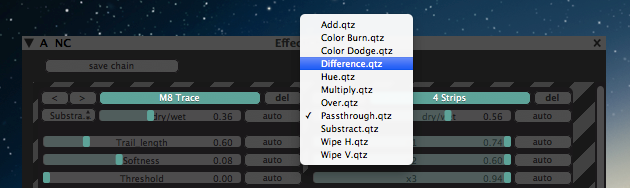
CoGe is a formidable host for Quartz Composer-based and Apple Core Image effects – now more so, with enhanced routing, blending, control, and GPU-accelerated effect support.
See the full details:
CoGe 1.4 With A Bunch of Enhancements [CoGe blog]
Add this to CoGe’s existing semi-modular functionality:
- Make your own handlers for effects and media sources, all using Quartz Composer (Apple’s visual patching environment, integrated with OS X technologies)
- Input from a variety of media sources (even Flash SWF, animated GIF, HTML), Collada 3D mesh support
- Syphon compatibility for inter-app routing to tools like MadMapper
- Audio analysis and modulation
- MIDI clock input and sync
- Sequencer modules for rhythmic clips
- Layer groups
- RAM disk for optimized playback performance
- LFOs, modulation, and even control via other Quartz Composer patches and effects chaining
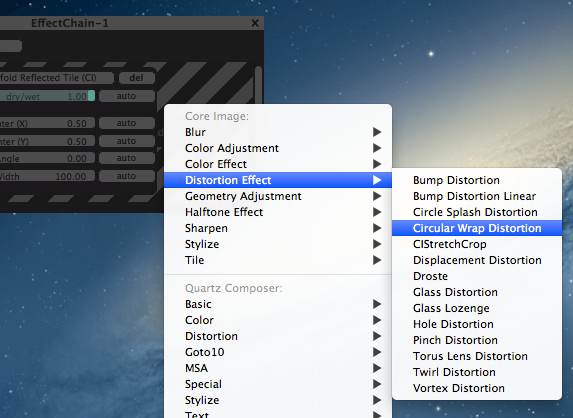
CoGe is all about having lots of effects, via Core Image and Quartz Composer – and version 1.4 makes that doubly so.
So, that’s what’s new in the tool. Now let’s actually see how to use it – and what it can do.
Artist Work
None of this is meaningful without seeing actual visual work. So, I asked developer Tamas Nagy to share some of the work people are doing with CoGe, and selected a few of my favorite examples. They give you a sense of what the tool’s artistic capabilities can be.
The B.P.F. crew – with the help of aforementioned Tamas – completed this sophisticated mapping project in Turin using CoGe. Artists: Marco Boni, Antonio Pipolo, Paolo Ferrari.
avs op01 from vargasz abolcs on Vimeo.
Vargasz Abolcs shares his audiovisual work, combining CoGe with Ableton Live via MIDI. It’s a simultaneous live A/V set, recorded live in CoGe.
celloBeatPulse from vargasz abolcs on Vimeo.
celloBeatPulse is another A/V creation by the same artist, produced entirely in CoGe, also recorded in Syphon. The project was performed by Bios and Vargasz at LPM 2011, VisionR 2011 and VisualBerlin 2010. More:
http://www.beeplogger.blogspot.hu/
There’s another, more recent project involving body mapping I hope to look at soon – stay tuned.
Tutorials
For a look inside CoGe and how it works, the tutorials are your best bet.
The full album of tutorials is on Vimeo:
http://vimeo.com/album/1644643
But here are a few of my favorites, in that they convey some of the software’s most compelling functionality:
CoGe 1.3 – New movie playback function from luma beamerz on Vimeo.
CoGe 1.3 – MIDI/OSC Talkback from luma beamerz on Vimeo.
CoGe 1.2 – Layer Groups from luma beamerz on Vimeo.
CoGe 1.0 – Using the Sequencer from luma beamerz on Vimeo.
More on CoGe:
http://www.cogevj.hu/
The tool is Mac-only, US$99 (+VAT).
And if you’re using the software, we’d love to hear from you – and see your work.
Awesome bit of kit and hats off to Tamas for all the work he puts in to constantly improve what’s already a mint programme. Also, CoGe works great with the Airbeam app featured here recently.
I have been using it for gigs for a few years. It’s getting better and better without being too bloated. Awesome app.
Big up to Tamas!!
any similar tools for windows? do this program or other project on complex surfaces? like a car? sry for the stupid question! 😛