
Are you a World Cup fan annoyed by the constant sound of the South African vuvuzela horn? Wish you could remove that sound from your World Cup viewing experience? Do you want to learn a little bit about powerful modular effects routing can be on Linux? Either? Both? Call it “football”? “Soccer”? Any way round, we’ve got you covered.
(Disclaimer: I have nothing in particular against the vuvuzela. But here you go, anyway.)
Updated: Via comments, here’s a Mac plug-in for filtering the horn, also a notch filter, and a sign that this is getting a little carried away. (Mostly, I think this is a useful way to learn about JACK, something you can use after the World Cup. But knowing football fans, “after the World Cup” may not be a phrase with any meaning at the moment.)
JACK is a powerful audio API on Linux, and thanks to rich application support for the tool, you can route sound arbitrarily between software tools, making everything on your computer into a kind of virtual studio. (Mac users should check out the excellent JACK OS X implementation.)
Felix Kaechele, a German-based Fedora community member and Fedora Ambassador, uses JACK to filter out sound from his live World Cup feed. If you’re curious about how JACK works and how to add effects to your system (or record a system audio feed, etc.), this is the way to go. The trick here is that PulseAudio, the default sound API on Linux, actually gets routed right into JACK.
Read the full instructions here:
Vuvuzela Filter using Fedora [Felix’ Blog]
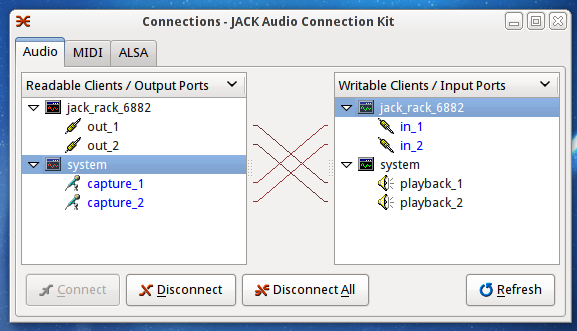
Fedora is a superb distribution, and intelligent JACK packaging is a particular strong suit. (Check out the Planet CCRMA project for more.) But part of the strength of Linux is that it is open, so you’ll find these same instructions work on other distributions. In fact, so long as you replace “yum install” with “apt-get install”, you’ll find most of these packages have the same name. (Only “ladspa-swh-plugins” is missing on Ubuntu, though there are other LADSPA plugs available.)
Note that on vanilla Ubuntu, I did need to do one extra step when setting up JACK. When you launch, JACK will actually advise you to do so right in the message window, but here it is, as a reminder:
Please check your /etc/security/limits.conf for the following lines
and correct/add them:
@audio – rtprio 100
@audio – nice -10
After applying these changes, please re-login in order for them to take effect.
These steps tweak real-time performance for better JACK sound results.
Also, I generally like to launch JACK Control with the following command, in order to disable PulseAudio:
pasuspender qjackctl
But in this event, you’d actually install the Pulse module and route Pulse into JACK, as in the instructions.
Setting up Ubuntu is a topic for another article, but there’s a preview. But the musical applications here should be clear: JACK makes it easy to set up a modular rig. Want to add effects to a Pd patch? Record audio from a system application for sampling? Route together some effects to make a virtual stompbox rig for your guitar? Having JACK is a bit like having an extensive patch bay for software.
Let us know how these tips work out for you, or if you’ve got ideas of your own. (And if someone wants to do a Mac version of the tutorial, let us know!)
Via OSTATIC; thanks, Brad Linder!
The Vuvuzela Horn is actually the best about the World Cup, if you ask me! 90 minutes of hypnotic drone bliss.
Yeah, I love the sound. Well, like I said, apply the instructions above and get ONLY the Vuvuzela, if you like. (actually, if someone wants to try that and post audio, that'd rock)
i dont mind the sound – its just too loud – ya cant hear any of the supporters chants or bands playing – its just that drone constantly
Well, you can also simply attenuate the level of the vuvuzela. 😉
they should have all this stuff set up on site there wherever they are broadcasting it from in africa – or maybe do a vuvezela attenuated broadcast.. the amount of ppl bitching about it is huge – its doing almost everyone i know's heads in
the bbc ran a feature about it on breakfast tv asking their sound engineers about it – and they said it was pretty much impossible – ya should send em a link to this article heh
That's hilarious. Man, times have changed. It used to be *nothing* was impossible for BBC sound engineers.
Acoustic engineer explains why vuvuzelas are annoying:
http://www.boingboing.net/2010/06/15/acoustic-eng…
greetz!
seems like they have changed their choon on that – possibbly offering filtered horn service on the red button thing that basically all ya digital tv broadcasts have (thats most of em now i think in the uk one way or another)
http://news.bbc.co.uk/1/hi/entertainment_and_arts…
Prosoniq also just released "VuvuX" a free Vuvuzela Killer audio unit Plug-In based on their "isolate" technology: http://www.sonicworx.com/sonicWORX/VuvuX.html
Version 1.5 works really well. highly recommended!!
another article about it on the bbc http://news.bbc.co.uk/1/hi/magazine/8738604.stm
it does seem there is a thriving plug in market for filtering out the damm thing lol
An alternative (VST) was released yesterday by the Centre for Digital Music at Queen Mary, University of London:
http://isophonics.net/content/whats-all-about-vuv…
Not aimed to kill the Vuvuzela, just to reduce it.
Available in Windows and Mac versions.
what's really funny to me is i just got an e-mail from waves (you know, the absurdly expensive EQ plugin people?) pitching their new anti-vuvuzuela filters….
Geez, my mailbox was FULL of these Vuvuzela solutions this morning!
Didn't see this one listed…here is one more for certain Wave's product owners (a preset/chain).
http://www.waves.com/content.aspx?id=5798
On Mac, I used SoundFlower in combination with AU Lab (comes with Apple Developer Tools, eg XCode).
You have to make an aggregated device containing the SF input and the Default System Output. Then route your tv-sound to the SF Output.
In AU Lab, you can make a new document with the aggregated device. Then double-click on the audio output and select Stream 2 in the Output Settings. You should now hear the tv-sound coming through.
Then you can insert whatever effects on the input track. I used some of Apple's AUParametricEq with frequencies 233, 466, 932 and 1864 Hz from the http://fetzig.org/ article, and it did seem to help.
I used a test video from youtube: http://www.youtube.com/watch?v=xW5kByJPZos
Cheers!
Well, might as well post the AULab document … 🙂
http://rapidshare.com/files/399372371/DieVuvuzela…
Here's my filter, it is to be used with GarageBand on Mac OS X:
http://imrich.net/2010/06/vuvuzelas-filtern-mit-g…
Hey Peter —
Great read. I sent this to a colleague who wrote a short blurb on opensource.com that links to your article.
Here is the direct link –> http://opensource.com/life/10/6/open-source-score…
[…] Create Digital Music has a tutorial here. […]
[…] Für JACK unter Linux […]
Funny, while watching the USA-England game this weekend several people I knew were asking for *more* Vuvuzela.
I made a remix of the last 14 minutes of the first half of the game that brings the drone of the horns to the foreground. Drone lovers and Vuvuzela fans, check it out:
http://aleatoric.backporchrevolution.com/2010/06/…
aleatoric, this is AWESOME! Thanks a lot…
I'm not bothered by the Vuvuzela, but I did find that switching the broadcast from stereo to mono attenuated the drone so I could hear the announcers more clearly. I soon realized that I preferred the sound of the horns. (This worked watching NHK in Japan. Not sure about other broadcasts.)
Possibly more annoying than the Vuvuzela, is the fact that Prosoniq were giving away the old SonicWorx (OS 9 only) for free, but since introducing this new software – also called SonicWorx, but quite different – they've taken down the link.
That said, it does a pretty impressive job…
[…] Filter The Vuvuzela Horn Out of the World Cup; Learn JACK Routing on Linux Are you a World Cup fan annoyed by the constant sound of the South African vuvuzela horn? Wish you […]
[…] Filter The Vuvuzela Horn Out of the World Cup; Learn JACK Routing on Linux (Linux) […]
[…] case of South Africa’s beloved vuvuzela horns. Yesterday, I used the whole thing as a teachable moment for learning Linux audio routing, but since then, my inbox has been bursting with the […]
I made a Pd patch borrowing this idea.
I analyzed a vuvuzela sound file in baudline then made a four notch Pd patch using the freqs from baudline.
it still only set up to read a sound file but could be modified to look at input from something else.
uses the [plugin~] external found in the flatspace lib
download it from here if you want to mess around with it
http://puredata.info/Members/anechoic/patches/plu…
[…] Se non siete in grado di effettuare da soli queste impostazioni, potete usare quelle predisposte dal Centre for Digital Music della Queen Mary University londinese e pubblicate presso Isophonics.net, dove trovate un plug-in gratuito, denominato Devuvuzelator, che è disponibile in versione Windows (formato standard VST, per qualunque programma compatibile) e in versione Mac OS X. Quest’ultima richiede il programma di elaborazione sonora Audio Hijack Pro, disponibile in prova gratuita. Per gli utenti Linux c’è una serie di proposte analoghe su CreateDigitalMusic.com. […]
There are already programs that do can filter out vuvuzelas, such as this one
does anyone know a plugin that will emphasis the vuvuzela horns? … I like the sound, because if you close your eyes, and don't focus to much on what the announcers say, you can allmost believe its speedway and not fotball.
[…] at espn.com, of the horn as “a major subplot of the World Cup,” and the advice, via createdigitalmusic.com, on how to filter out the sound. A professor at George Mason University named John Nauright […]
Brilliant text Thank you :] Will be back soon.