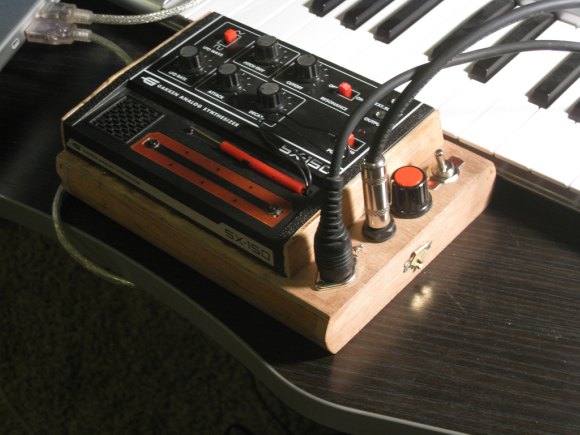
A $50 synth that makes neat noises is fun. But a $50 synth that has a proper housing, audio jacks, and can be MIDI controlled — that’s a whole lot better. So readers were wowed last week as we saw the work MrBook did with his Gakken SX-150.
Now, by popular demand, MrBook shares his techniques with specs, instructions, and code. This isn’t a bad project to get started with if you’ve been thinking of doing something on these lines.
The basic ingredients and process:
- Find the connections on the synth for audio and control, using contact points on the board
- Build a simple circuit that adds MIDI input (control) and audio output – schematic on his site. It’s not a tough circuit at all — this could be fun soldering practice.
- Add the Arduino, the open source, dirt-cheap, accessible microcontroller project board, and some code MrBook has written for you.
That should be fun even for relative newcomers – provided you have basic soldering chops. If you want to get more advanced, there’s room to modify the Arduino code to do fun stuff, or, as MrBook is doing, add a standalone Arduino sequencer or the like to drive your synth in hardware alone. (While I’m still on a crusade to do OSC for stuff that talks to computers, I think MIDI should absolutely be used for what it’s good add – connecting hardware.)
You can also have some fun with the casing. (Someone needs to mod the drab colors on the Gakken, too, I think.)
If you do a project and document it, do let us know! And we’ll be watching for more from MrBook.
You can get your SX-150 kit from our good friends at MAKE. (Nope, I’m not getting any cash for saying that. Hmmm… okay, I need an affiliate account, don’t I? Make?)
SX-150 synth mod instructions, schematics and code [MrBook]
Hi! I have one of these, but I don't plan on sequencing it with the computer, just using it as a hardware synth. If that's the case do I still need the Arduino? Or would the MIDI connector be enough? What do you think?
You need the Arduino to do MIDI with anything else. 😉 But that's another reason to get the Arduino *minus* the USB port… once programmed, you won't need that any more.
If you want to add MIDI, you still need the Arduino, even if you won't be using the computer to sequence it. There are other options, but I using Arduino I think is the simplest.
HMM. Thanks for the quick reply! I've been thinking about getting into Arduino; maybe this'll give me the push I need.
Be sure to check out this library. 😉
http://ruinwesen.com/mididuino
So fancy… so fancy…
Totally sweet. This has been on my to-do list for a while.
Hello, I tried to do it, but I only upload this code http://mrbook.org/downloads/arduinosx150/SX150Dri…
on the arduino. Is that enough or do I need to upload other files?
yup – as far as I can tell, that's all the code you'll need