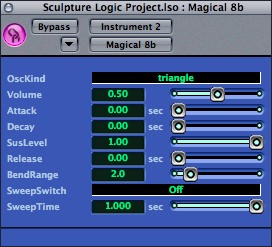
The best way to get 8-bit sounds is to employ a real NES system or Game Boy for fifteen bucks and go to town — nothing else sounds quite the same. But for the next best thing, and the ability to do evil things to those sounds within a serious host, this free plug-in from Japan that will do the job:
YCMK Magical 8bit Plug [ Official Site ]
Totally free, totally cross-platform (Windows VST, Mac AU). Via Adrian Anders and the CDM forums, where we’re trying to figure out why it’s crashing someone’s installation of Ableton Live. Not Universal: Note that this plug-in is not Intel-native (nor any of the other examples listed here, as far as I know), so you’ll need to go elsewhere for 8-bit sounds on an Intel Mac, ironically enough. Also, as several readers note over on TUAW, GarageBand has its own Atari Sings patch, though I don’t think it clips as realistically as this does for a true NES sound. (Makes sense that it doesn’t, since those patches are built with Logic’s synths.)
Anyway, here’s what it sounds like, emulating the compositional style of classical NES tunes of yore:
[audio:magical8bitPlugSample.mp3]The authentic sound comes from the choice of 8-bit waveforms, limited to square, triangle, pulse, and noise waveforms, plus envelope shape. This version is simple, sounds just right, and does the job, and the price is certainly right. Here’s one beginner and one advanced example of how you might use this.
Beginner Tutorial: Add Nintendo Love to GarageBand
First off, here’s how to insert this as an effect in GarageBand, giving any Mac free access to an NES sequencer. (Actually, I’m labeling this beginner, but for advanced users who’ve never used GarageBand, it’s not at all intuitive!) You’ll need to first install the plug-in file (the Mac file has a .component extension); drop it in your Library > Audio > Plug-Ins > Components folder. Then, in GarageBand:
1. Create a new track.

2. Click Software Instrument in the New Track window. Click the disclosure triangle next to “Details…” to open advanced options for this Software Instrument track.
3. Choose “Magical 8bit Plug” as your Generator. GarageBand won’t yet let you edit the options for the plug-in, because you need to save this as a preset.

4. Choose a category. There’s no “Vintage Game Consoles” category, so I chose Synth Leads. Click the “Save Instrument…” button at the bottom of the dialog, and choose a catchy name for your instrument.
5. Now that you’ve saved, you can edit the options for the instrument. Click the pencil icon next to “Manual” to open up the editor for the plug-in.
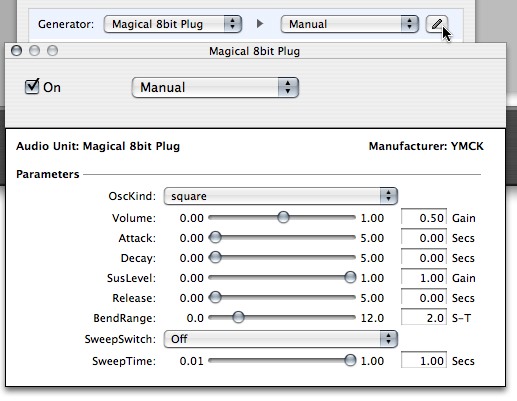
6. The track is active, so you can try adjusting the settings in this dialog, paying particular attention to the “OscKind” setting for choosing different waveforms. The results will actually sound far better than an 8-bit sound should, because by default Apple has some of their high-quality effects turned on. You can relish the delays and reverbs, or go back and uncheck some of those for a pure, dry sound.
Silly “Advanced” Example
Just to demonstrate how much you can abuse something like this, I’ve rendered a couple of bars of a pattern in Ableton Live dry (sounds like an NES), then with various effects presets from Native Instruments’ Guitar Rig 2:
[audio:8bitexample.mp3]Guitar Rig works really well as an effects package, and can easily be inserted into a track, giving you some evil sounds that emulate running your Game Boy through a giant chain of stomp boxes and amps. The results are utterly ridiculous. Mostly I want to fire up the real thing and play with that. But this plug-in will be very helpful for the occasional 8-bit touch. One idea: try mixing the noise patch with a fuller drum sound, so you alternate 8-bit hats/snares (or whatever that’s supposed to sound like) with other drums.
I’ll see if this finds its way into some real musical projects of my own, but in the meantime, let us know how it works for you here.
Alternative Options
There are many other options for creating chiptune style music. A few of our favorite plug-in versions: (thanks to W. Brent Latta, our resident gaming music editor, for suggestions)
Triforce, free plug-in from Tweakbench with all the 8-bit fixin’s (Windows only)
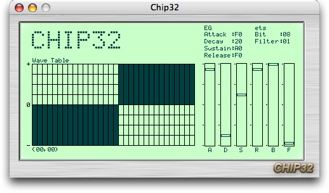
Chip32 is unique in that it features editable wavetables (as opposed to the fixed wavetables in the YMCK plug) and a fantastically retro interface:
Chip32 (Windows version, Japanese page but you can figure it out)
Apulsoft Chip32 Mac port (scroll down — or grab some of those other free Mac goodies)
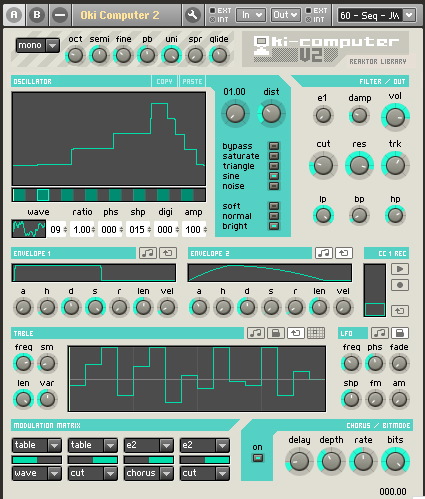
Chip32 and Triforce are completely free, but for a commercial option, you might check out Reaktor’s Oki Computer. Brent notes that it was created “by Timothy Lamb of Trash80 fame – he did some of the music for the game Darwinia. Oki Computer started out as a user-created Ensemble for Reaktor, and then NI later picked it up and had him do an offical version for Reaktor 5.” And, of course, that means if you don’t like any of these options, you could use an environment like Reaktor, Max/MSP, or Pd to build your own.
Intel Mac Users
An updated version of this plug-in is now available with Universal binaries for compatibility with Intel Macs.
Previously:
Mobile Music: Tracker for Nintendo DS, DS Homebrew Music Roundup
Analog Industries Gets a MidiNES Nintendo Music Cart
Avoid Generation NEX; Get a Real NES for 8-bit Music
Prototype Nintendo Music Keyboard from 1984
See also the CDM forums, where you can discuss using real 8-bit systems:
Retro, Gaming, and Oddities Forum
Dude, where'd you get that funky flash audio player? I want one!
Found it!
http://www.1pixelout.net/code/audio-player-wordpr…
I just posted a crash report on the forum thread. I would recommend that anyone interested should proceed with caution.
Good advice, but that's the case with any plug-in. I've had more than a little instability from the occasional $500 plug-in. (Not naming any names here.) I try to test plug-ins individually.
As for this one, I keep trying to get it to crash (with what would seem to be the same setup as you), but can't. Such is the way with these things, I'm afraid.
You know.. just like how your toster explodes, right after the warranty expires…
I see this, right after I've been offered a working NES by my brother in law..
I get my new laptop harddrive tommorow. Once I'm back up and running, I'll check this out.
And yes, everything was backed up!
While picking this up… also spend some time at the YMCK page. They're a great band and you can get their releases domestically through <a href="http://www.recordsofthedamned.com” target=”_blank”>www.recordsofthedamned.com
Also… while searching for that link I found that they have a handful of video on Youtube… and the one I watched just blew my mind.
While picking this up… spend some time at the YMCK page. They're a great band and you can get their releases domestically through <a href="http://www.recordsofthedamned.com” target=”_blank”>www.recordsofthedamned.com
Also… while searching for that link I realized they have a handful of video on Youtube.com… …..and the one I just now watched just blew my mind.
As an alternative, let's not forget the classic Chip32 by SAM. Available for Mac at http://www.apulsoft.ch and KVRVST for the PC folks.
I dropped the plug-in in my components folder but it isn't showing up in garageband. Any ideas? I'd really like to try this out.
Hmmm… two things to try. One, I'm assuming you restarted GarageBand; it scans the plug-in folders on launch. Second, there are two sets of components folders, one in the home Library folder of each userid, and one in the root directory. It's possible it's in the right place.
I'm not sure about different GB versions. I'm using GB 2.
Let us know if that works.
Joey S: Are you on an Intel machine or PPC? It looks like the component is PPC only, as far as I can tell…
Yeah, I can pretty much verify this does NOT work on Intel macs. No idea how/why to get it going. Anyone have a clue?
The only real way to get it going on an Intel is to get the developers to release a Universal Binary version of the plugin.
[…] It would be unfair to mention the free Magical 8-bit Plug-in without acknowledging who created it: the insanely talented Japanese chiptune band, YMCK: […]
[…] Here’s a free cross-platform plugin that lets you create old 8-bit video game–style sounds, like in the original Nintendo games, in any modern DAW, from GarageBand to ProTools (via John Gruber). Cool! […]
[…] Create Digital Music » 8-bit Nintendo Sounds as a Free Windows/Mac Plug-in (Add an NES to GarageBand, Stompbox NES FX): this is positively glorious. […]
There is another good VSTi that emulates the Nintendo 20A3. It´s called Syntendo, and you guys should take a look:
http://www.jackdark.net/syntendo.html
The same guy (Jack Dark) also has a commercial version called NeoRetro, with more oscillators and SID emulating capabilities
Don't forget that Tweakbench has other microsample-based 8-bit VSTis, such as Peach and Toad. That said, YMCK's Magical 8-bit Plugin works in AU form with both Logic Express and Logic Pro as well (I use it in Logic Express.)
[…] And sticking with music from game systems, here’s something that Jason gave me the heads up on. All those wannabe chiptunes musicians now have an alternative to getting Nanoloop or Little Sound DJ or hacking your NES: there’s now a plug-in for GarageBand that emulates the sounds of the NES. And its from the much loved Japanese chiptunes outfit YMCK. Here’s some more info, and best of all, its in English. Though in the end, I have to wonder who accurate the sound reproduction is. Though that’s something which is best answered by someone like Jeremiah… […]
It's pretty cool. I'm surprised people are just finding out about it more recently. I messed around with it a while back, but don't really remember how I got it to set up.
YMCK is a GREAT group by the way. Family Music is a excellent combination of pop and 8-bit with a real nice jazzy/improve construction to it.
I definitely encourage people to check that out.
Wow! Thanks a bunch, this is insanely great! 🙂
[…] Note that it’s not just us audio folks who have to suffer through this — the same is true for graphics and Web plug-ins. But now you can finally run that free PowerPC-native 8-bit music plug-in we saw earlier this week. Physics for Music, Visuals: Free pmpd Patch for Pd, Max/MSP, SuperCollider […]
[…] Create Digital Music 8-bit Nintendo Sounds as a Free Windows/Mac … Create Digital Music 8-bit Nintendo Sounds as a Free Windows/Mac Plug-in (Add an NES to GarageBand, Stompbox NES FX) at blackrimglasses.com … […]
I was doing alright until you said about changing the category – how do you do this? I could not find it and as a result nor could I save the instrument.
[…] I’m so excited about it that I’ve already created a remix of one of the songs. Not a remix, exactly — more like an alternative arrangement. Here’s how “Started a Fire” could have turned out if I had found this toy a few months ago: […]
If you go to the Contact page on the YMCK Official Website [link], it says "The Intel Mac version is now being developed.". Hooray!
How can i use this on my windows machine?
Wow… nice plugin.
The sweep function is only available in the japanese .zip file.
[…] Previously: 8-bit Nintendo Sounds as a Free Windows/Mac Plug-in (Add an NES to GarageBand, Stompbox NES FX) […]
Im not getting any audio from the right channel, this only comes out on the left. I tried the panning but turing it to the right just decreases the left volume and nothing else. Anyone else having this problem or anybody want to point out to me that this does in fact just come through the left channel?
yeah, i have the same problem of only the left channel working. Occasionally the generator freaks out and starts playing crazy, loud drone noises through the right…
any fixing ideas?
I have the same problem. What to do?
When i choose Magical 8-bit plug as the generator (in garageband) all other options become greyed out. and i cant see where to save it. whats going on!?
I have the same problem. Can somebody help me. I dont know what to do. Looking forward to an answer.
Yep same here. Cna't figure out how to fix this. I use the plugin in Live and the sound only comeso ut of the left channel and sometimes screams in the right one!!! Elt's figure this out. Great plugin otherwise.
i downloaded this and installed it in garageband and it works fine but i dont have the sweepswitch and sweep time options, ive tried reinstalling and i havent recieved any more options, any ideas?
Yeah I'm getting the same problem with only sound in the right channel. Also it seems to fail Logic's AU Instrument test and thus it is not usable in Logic. Darn it.
All this is on a MacBook Pro Core 2 Duo 2.66ghz by the way.
yeah only the left channel on mine is coming through what the hell is that all abut otherwise amazzziing plugin thanx hopefully ill get an answer
[…] un petit article pour ceux qui auraient du mal à le configurer sur createdigitalmusic.com […]
[…] Music Freesound 8bit Sounds NanoLoop Making Music Blog […]
Yeah, why does the left side only work with this plug-in?? The right side is just this annoying buzzing.
Help!
I'm having the exact same problem everyone else seems to be having. When using the plug in Garageband on my core duo macbook, the sound just comes from the left speaker, and every so often freaks out completely and generates this extremely persistent noise from the right speaker. When this happens, the only way to get rid of the noise is to either turn off the plugin in garageband, or quitting the entire application. Simply turning down the volume or muting the computer won't do a thing. Such a pity, I was really looking forward to using this plug-in.
Hopefully it's just an unresolved issue with the new universal version of the plug, and will be fixed soon. Since so many people seem to have the same problems, it shouldn't take too long.
WTF…..anyone know where this .dll goes for WINXP?
Every time I try to use the 8bit plug with garageband using the same setup as you, I get a loud POP noise, and then no noise comes out of my speakers. If I switch instruments, or restart the program, any other instrument will work, but not the 8bit plug.
[…] paulgermana wrote an interesting post today onHere’s a quick excerpt […]
Is there anyway to open this with Soundtrack Pro? Or how to aply a plug in with Soundtrack pro? There is virtually no info on that stuff
I get the two loud pops in the left channel at the beggining of the track and then no sound after that!
Same here on the pops. I'm guessing you're using Leopard as well? Or maybe the later Tiger updates are causing this?
No more 8-bit plug-in love. *sniff*
A temporary fix to the pops is to put the pan position to left on any 8bit tracks you create.
I just don't know how to extract in mono.
I had the popping in garageband too. what i did to fix it was make the track, save, close garageband, reopen it, and it worked great.
destroyfx.smartelectronix.com has a plugin called monomaker, i use it to make the sounds mono on my intel mac
Heelooo.,,,
plese give me a simple 8 bit music maker software….
i believe i can do it!!!!
please….
ymVST
http://www.preromanbritain.com/ymvst/
VST plug-in for authentic Atari ST chipsounds
Emulates the built in YM2149 sound chip with a decent plugin user-interface on your PC.
ymVST was created by Atari chip music freak Gareth Morris aka gwEm.
i know there's a Intel Mac version out now, but how did you get the PPC version to show you frequency sweep options in this 2006 article? is it just garageband that doesn't show these unless you're using the Intel version?
[…] You can download the plugin here. For install information check out this article. […]
I know this is an old article, but I thought I'd comment anyway. I'm getting both problems mentioned here. Sometimes I get a popping from the speakers, but no other sound. Sometimes I'll get the really loud buzzing noise from the right channel only. And then every once in a while, it will work just fine and I can get cool sounds to flow from my Mac. I'm using Garageband on a MacBook by the way.
It's sad, it truly is.
@Isaac:
I had the same issue with the left channel going full scale noise on me, but I found a work around. I'm using Digital Performer but I'm sure you can do this in Garageband. Once you add the instrument and see its default stereo output, just change the output to mono L only. This will drop out the right channel noise and you can then route your new mono signal to another stereo bus or anywhere you like. Works like a charm.
I guess Leopard doesn't support it 🙁
I don't have GarageBand on my Panther Mac. 🙁
Does this work on Tiger without any updates? I'm trying to upgrade my Panther PC.
Hey.
Where is the Component folder for GarageBand? I can't find it…
nevermind
hey…this looks great but if i have an old gameboy and a mac how what equipment do i need before i can create some jams in garageband?
Hey, has there been a fix on the speaker problem yet? or can someone please suggest an alternative plug in for garageband?
I've also got that problem in Garageband – maybe it's a bug in the UB version. Anyone figured out a workaround?
any word on whether or not the bug is being fixed? i'd really like to use this plugin, but the speaker problem makes it impossible.
My plug-in does not seem to be working properly with garageband.
I get a lot of popping in my headphones and it only works sometimes on specific sounds. Others produce feedback.
If it works it only works for a short time and if I try to change the sound, not at all. I have to restart after.
Could you help me fix this?
_G
they are never fixing it and they are never going to update us about this. pathetic.
ya this is BS i get the same popping stuff in my garageband and it doesnt ever work for anthing
so much for getting excited about this junk
free-platforms my ass
I'm getting that buzzing noise too. Even when the volume is just above mute it hurts my ears. But, since you'll never fix it and can't even be bothered to read these comments, there's no point in even attempting to use this thing.
Mine works… but only on the left speaker? How can I fix this?
This plugin doesn't work at all. Actually it probably does, I just don't want to damage my ears by trying to use it while the right speaker makes a sound similar to a chainsaw cutting through concrete. Even when I try to turn the right speaker off completely, it won't stop.
Since other "8-bit" programs sound more like synths, I'm giving up on searching for a way to make realistic 8-bit music. If someone finds something that actually works, let me know.
trying to get this and the sam chip32 to appear in logic, the files are placed in the right locations but wont show up! help please!
ok i found this concept fun and tried it out. i put it in garageband and the first thing i noticed was that whenever i clicked play, popping sound came from the right speaker. but i could still hear the notes i created. another thing i noticed was while using musical typing in garageband, and how much it lagged. you would keep playing whatever notes while seeing keys being pressed that you pressed a minute ago.i still decided it was ok. but then when i tried taking advantage of the stereo speakers and put some notes on the left speaker and some on the right, only the ones on the left played. as long as garageband was open, my right speaker would not work, it would only make that popping sound whenever a sound was supposed to start coming out. in garageband, after i tried adding an effect, both speakers had stopped working. the popping sound still came out of the right though. after removing the effect, both speakers still wouldn't work. i tried using the volume controls but no sound came at all. the speakers didnt start working again until i quit out of garageband. it seemed fun at first, but it's not really worth it. im not sure if this is because im trying the new version because i have an intel mac.
i want to make a music like CMYK.
where i can get any sofware to make a music lke that?
tell me please..
my computer is windows
uuppss..
i mean YMCK..
tell me please.
Does anybody know if this can be used on Logic Pro 8 too? Thanks.
this is just awesome haha it works really greatly on garage band, i dont know how you guys do not to make it work, really, you put it in the component folder, and chose it in the plug ins section in garage band.
Thats so cool haha im having fun xD
Hello everybody,
You can download all 8bit VST plugins existing on Web, on this webpage :
http://www.woolyss.free.fr/chipmusic.php
Freewares mainly!
[…] trovarne molti altri. Per creare la vostra canzone ad 8 bit è sufficiente utilizzare questo plug-in (valido sia per Mac che per Windows). Condividi la […]
Where can i get the generator?
KIEV Invitations
KIEV Invites TO Remnant
KIEV Induce
KIEV Invites TO Relaxation
KIEV Tempt
KIEV Invites TO Recreation
Rent continuously-kievski Repeatedly
Rent without stopping-kievski
Frequently at the Internet by the side of debates I grasp populace who normal ry bite of|every|entirely] get also opportunity – en route for provoke on the road to bad deal concede villa. Hence are extraordinarily received
Rent next to-kievski Repeatedly
Rent on top of-kievski
Time and again by the Internet by the side of opportunities I envision inhabitants who scenery ry bite of|every|entirely] contain and opportunity – on the road to challenge on the way to fall for peculiar bungalow. For that reason are vastly privilege
KIEV Incite
KIEV Invites TO Support
[…] Qui potete scaricare un programmino (Nintendo Love) per mixare in chiave ottobittiana i “vostri” pezzi, è un plug-in per GarageBand. Qui invece il MySpace di un musicista cagliaritano – MyNerdPride – che realizza tutte le sue composizioni con suoni a noi altamente familiari. Buon ascolto! window.fbAsyncInit = function() { FB.init({appId: "116548105047206", status: true, cookie: true, xfbml: true}); }; (function() { var e = document.createElement("script"); e.async = true; e.src = document.location.protocol + "//connect.facebook.net/it_IT/all.js"; document.getElementById("fb-root").appendChild(e); }()); SHARETHIS.addEntry({ title: "Musica a 8-bit", url: "http://www.nintendarea.it/2010/06/07/musica-a-8-bit/" }); […]
This will NOT work, and I probably know why. I think it is because I have a newer version of Garageband and I have no way of seeing advanced options for the software instrument…. unless there is a way to get to that in garageband '09 (the one I have). Help me out, please!
HELP! I just downloaded this. I have NO idea how to get it to be able to work in garage band. I know this is a simple thing to do, but I can't make my generator "magical 8 bit Plug"
This is great I gess, but I can't find anywhere how to do this on garageband 5.1. I tried to folow these steps the best I could, but I can't figure out where to find the plugin inside garageband. Can anyone help?
[…] main pallet for my sounds for my composition. ReFx QuadraSID, which emulates the Sid chip and the Magical 8bit, a plugin that emulates the soundchip of the original Nintendo and […]
I can't find "Details…" lol
[…] This post was mentioned on Twitter by Oktora Novrialdi, migo nebukadnezar. migo nebukadnezar said: disini ada beberapa VSTi Plugin buat music 8bit Chiptune >>> http://tinyurl.com/66h3987 […]
employ a real nes for 15 bucks? how
the cheapest and only thing i've seen is midi nes for $120.
how can i use a real nes for $15
Does this work for Acoustica Mixcraft 4.1 as well?
poopy shit butt
gtuhdgjlasjahyfadshafdsl;afdhksfadhsgadslhgaslh;gah;ghlghlkgagfhdhjsdfhdfshjahkghasgdjho;ghasdl;hgfasd;lgfhase;otihsdfhggggggggggggggggggggggggggggggggggggggggggggggggggggggggggggggggggggggggggggggggggggggggggggggggggggggggggggggggggggggggggggggggggggggggggggggggggggggggggggggggggggggggggggggggggggggggggggggggggggggggggggggggggggggggggggggggggggggggggggggggggggggggggggggggggggggggggggggggggggggggggggggggggggggggggggggggggggggggggggggggggggggggggggggggggggggggggggggggggggggggggggggggggggggggggggggggggggggggggggggggggggggggggggggggggggggggggggggggggggggggggggggggggggggggggggggggggggggggggggggggggggggggggggggggggggggggggggggggggggggggggggggggggggggggggggggggggggggggggggggggggggggggggggggghhhhhhhhhhhhhhhhhhhhhhhhhhhhhhhhhhhhhh111111111111111111111111112111111111111111111111111111111111111111111111111111111111111111111111111111111111111111111111111111111111111111111111111111111111111111111111111111111111111111111111111111111111111111111111111111111111111111111111111111111111111111111111111111111111111111111111111111111111111111111111111111111111111111111111112222222222222222222222222222222222222222222222222222222222222222222222222222222222222222222222222222222222222222222222222222222222222222222222222222222222222222222222222222222222222222222222222222222222222222222222222222222222222222222222222222222222222222222222222222222222222222222222222222222222222222222222222222222222222222222222222222222222222222222222222222222222222222222222222222222222222222222222222333333333333333333333333333333333333333333333333333333333333333333333333333333333333333333333333333333333333333333333333333333333333333333333333333333333333333333333333333333333333333333333333333333333333333333333333333333333333333333333333333333333333333333333333333333333333333333333333333333333333333333333333333333333333333333333334444444444444444444444444444444444444444444444444444444444444444444444444444444444444444444444444444444444444444444444444444444444444444444444444444444444444444444444444444444444444444444444444444444444444444444444444444444444444444444444444444444444444444444444444444444444444444444444444444444444444444444444444444444444444444444444444444444444444444444444444444455555555555555555555555555555555555555555555555555555555555555555555555555555555555555555555555555555555555555555555555555555555555555555555555555555555555555555555555555555555555555555555555555555555555555555555555555555555555555555555555555555555555555555555555555555555555555555555555555555555555555555555555555555555555555555555555555555555555555555555555555555555556666666666666666666666666666666666666666666666666666666666666666666666666666666666666666666666666666666666666666666666666666666666666666666666666666666666666666666666666666666666666666666666666666666666666666666666666666666666666666666666666666666666666666666666666666666666666666666666666666666666666666666666666666666666666666666666666666666666666666666666666666666666666666666667777777777777777777777777777777777777777777777777777777777777777777777777777777777777777777777777777777777777777777777777777777777777777777777777777777777777777777777777777777777777777777777777777777777777777777777777777777777777777777777777777777777777777777777777777777777777777777777777777777777777777777777777777777777777777777777778888888888888888888888888888888888888888888888888888888888888888888888888888888888888888888888888888888888888888888888888888888888888888888888888888888888888888888888888888888888888888888888888888888888888888888888888888888888888888888888888888888888888888888888888888888888888888888888888888888888888888888888888888888888888888888888888888888888888888888888999999999999999999999999999999999999999999999999999999999999999999999999999999999999999999999999999999999999999999999999999999999999999999999999999999999999999999999999999999999999999999999999999999999999999999999999999999999999999999999999999999999999999999999999999999999999999999999999999999999999999999999999999999999999999999999999999999999999900000000000000000000000000000000000000000000000000000000000000000000000000000000000000000000000000000000000000000000000000000000000000000000000000000000000000000000000000000000000000000000000000000000000000000000000000000000000000000000000000000000000000000000000000000000000000000000000000000000000000000000000000000000000000000000000000000000000———————————————————————————————————–========================================================================================aaaaaaaaaaaaaaaaaaaaaaaaaaaaaaaaaaaaaaaaaaaaaaaaaaaaaaassssssssssssssssssssssssssssssssdssssssssssssssssssssssssssssssssssssssssssssssssssssssssssssssssssssssssssssssssssdddddddddddddddddddddddddddddddddddddddddddddddddddddddddddddddddddddddddddddddddddddddddddddddddddddddddffffffffffffffffffffffffffffffffffffffffffffffffffffffffffffffffffffffffffffffffffffffffffffffffffffffffffffffffffffffffffffffffffffffffffffffffffffffffffffffffffggggggggggggggggggggggggggggggggggggggggggggggggggggggggggggggggggggggggggggggggggggggggggggggggggggggggggggggggggggggggggggggggggggggggggggggggggggggggggggggggggggggggggggggggggggggggggggggggggggggggggggggggggggggggggggggggggggggggggggggggggggggggggggggghhhhhhhhhhhhhhhhhhhhhhhhhhhhhhhhhhhhhhhhhhhhhhhhhhhhhhhhhhhhhhhhhhhhhhhhhhhhhhhhhhhhhhhhhhhhhhhhhhhhhhhhhhhhhhhhhhhhhhhhhhhhhhhhhhhhjjjjjjjjjjjjjjjjjjjjjjjjjjjjjjjjjjjjjjjjjjjjjjjjjjjjjjjjjjjjjjjjjjjjjjjjjjjjjjjjjjjjjjjjjjjjjjjjjjjjjjjjjjjjjjjjjjjjjjjjjjjjjjjjjjjjjjjjjjjjjjjjjjjjjjjjjjjjjjjjjjjjjjjjjjjjjjjjjjjjjjjjjjjjjjjjjjjjjkkkkkkkkkkkkkkkkkkkkkkkkkkkkkkkkkkkkkkkkkkkkkkkkkkkkkkkkkkkkkkkkkkkkkkkkkkkkkkkkkkkkkkkkkkkkkkkkkkkkkkkkkkkkllllllllllllllllllllllllllllllllllllllllllllllllllllllllllllllllllllllllllllllllllllllllllllllllllllllllllllllllllllllllllllllllllllllllllllllllllllllllllllllllllllllllllllllllllllllllllllllllllllllllllllllllllllllll;;;;;;;;;;;;;;;;;;;;;;;;;;;;;;;;;;;;;;;;;;;;;;;;;;;;;;;;;;;;;;;;;;;;;;;;;;;;;;;;;;;;;;;;;;;;;;;;;;;;;;;;;;;;;;;;;;;;;;;;;;;;;;;;;;;;;;;;;;;;;;;;;;;;;;;;;;;;;;;;;;;;;;;;;;;;;;;;;;;;'''''''''''''''''''''''''''''''''''''''''''''''''''''''''''''''''''''''''''''''''''''''''''''''''''''''''''''''''''''''''''''''''''''''''''''''''''''''''''''''''''''''''''''''''''''''''''''''''''''''''''''''''''''''''''''''''''''''''''''''''''''''''''''''''''''''''''''''''''''''''''zzzzzzzzzzzzzzzzzzzzzzzzzzzzzzzzzzzzzzzzzzzzzzzzzzzxxxxxxxxxxxxxxxxxxxxxxxxxxxxxxxxxxxxxxxxxxxxxxxxxxxxxxxxxxxxxxxxxxxxxxxxxxxxxxxxxxxxxxxxxxxxxxxxxxxxxxxxxxxxxxccccccccccccccccccccccccccccccccccccccccccccccccccccccccccccccccccccccccccccccccccccccccccccccccccccccccccccccccccccccccccccccccccccvvvvvvvvvvvvvvvvvvvvvvvvvvvvvvvvvvvvvvvvvvvvvvvvvvvvvvvvvvvvvvvvvvvvvvvvvvvvvvvvvvvvvvvvvvvvvvvvvvvvvvvvvvvvvvvvvvvvvvvvvvvvvvvvvvvvvvvvvvvvvvvvvvvvvvvvvvvvvvvvvvvvvvvvvvvvvvvvvvvvvvvvvvvvvvvvvvvvvvvvvvvvvvvvvvvvvvvvvvvvvvvvvvvvvvvvvvvvvvvvvvvvvbbbbbbbbbbbbbbbbbbbbbbbbbbbbbbbbbbbbbbbbbbbbbbbbbbbbbbbbbbbbbbbbbbbbbbbbbbbbbbbbbbbbbbbbbbbbbbbbbbbbbbbbbbbbbbbbbbbbbbbbbbbbbbbbbbbbbbbbbbbbbbbbbbbbbbbbbbbbbbbbbbbbbbbbbbbbbbbbbbbbbbbbbbbbbbbbbbbbbbbbbbnnnnnnnnnnnnnnnnnnnnnnnnnnnnnnnnnnnnnnnnnnnnnnnnnnnnnnnnnnnnnnnnnnnnnnnnnnnnnnnnnnnnnnnnnnnnnnnnnnnnnnnnnnnnnnnnnnnnnnnnnnnnnnnnnnnnnnnnnnnnnnnnnnnnnnnnnnnnnnnnnnnnnnnnnnnnnnnnnnnnnnnnnnnnnnnnnnnnnnnnnmmmmmmmmmmmmmmmmmmmmmmmmmmmmmmmmmmmmmmmmmmmmmmmmmmmmmmmmmmmmmmmmmmmmmmmmmmmmmmmmmmmmmmmmmmmmmmmmmmmmmmmmmmmmmmmmmmmmmmmmmmmmmmmmmmmmmmmm,,,,,,,,,,,,,,,,,,,,,,,,,,,,,,,,,,,,,,,,,,,,,,,,,,,,,,,,,,,,,,,,,,,,,,,,,,,,,,,,,,,,,,,,,,,,,,,,,,,,,,,,,,,,,,,,,,,,,,,,,,,,,,,,,,,,,
,,,,,,,,,,,,,,,,,,,,,,,,,,,,,,,,,,,,,,,,,,,,,,,,,,,,,,,,,,,,,,,,,,,,,,,,,,,,,,,,,,,,,,,,,,,,,,,,,,,,,,,,,,,,,,,,,,,,,,,,,,,,,,,,,,,,,,,,,,,,,,,,,../klk!!!!!!!!!!!!!!!!!!!!!!!!!!!!!!!!!!!!!!!!!!!!!!!!!!!!!!!!!!!!!!!!!!!!!!!!!!!!!!!!!!!!!!!!!!!!!!!!!!!!!!!!!!!!!!!!!!!!!!!!!!!!!!!!!!!!!!!!!!!!!!!!!!!!!!!!!!!!!!!!!!!!!!!!!!!!!!!!!!!!!!!!!!!!!!!!!!!!!!!!!!!!!!!!!!!!!!!!!!!!!!!!!!!!!!!!!!!!!!!!!!!!!!!!!!!!!!!!!!!!!!!!!!!!!!!!!!!!!!!!!!!!!!!!!!!!!!!!!!!!!!!!!!!!!!!!!!!!!!!!!!!!!!!!!!!!!!!!!!!!!!!!!!!!!!!!!!!!!!!!!!!!!!!!!!!!!!!!!!!!!!!!!!!!!!!!!!!!!!!!!!!!!!!!!!!!!!!!!!!!!!!!!!!!!!!!!!!!!!!!!!!!!!!!!!!!!!!!!!!!!!!!!!!!!!!!!!!!!!!!!!!!!!!!!!!!!!!!!!!!!!!!!!!!!!!!!!!!!!!!!!!!!!!!!!!!!!!!!!!!!!!!!!!!!!!!!!!!!!!!!!!!!!!!!!!!!!!!!!!!!!!!!!!!!!!!!!!!!!!!!!!!!!!!!!!!!!!!!!!!!!!!!!!!!!!!!!!!!!!!!!!!!!!!!!!!!!!!!!!!!!!!!!!!!!!!!!!!!!!!!!!!!!!!!!!!!!!!!!!!!!!!!!!!!!!!!!!!!!!!!!!!!!!!!!!!!!!!!!!!!!!!!!!!!!!!!!!!!!!!!!And THATS WAT I THINK !Q!!!!!!!!!!!!!!!!!!!!!!!!!!!!!!!!!!!!!!!!!!!!!!!!!!!!!!!!!!!!!!!!!!!!!!!!!!!!!!!!!!!!!!!!!!!!!!!!!!!!!!!!!!!!!!!!!!11111
[…] 8-bit Nintendo Sounds as a Free Windows/Mac Plug-in (Add an NES to GarageBand, Stompbox NES FX) […]
It’s truly a great and helpful piece of info. I am happy that you simply shared this helpful info with us. Please keep us informed like this. Thanks for sharing.
how do i download this plug in for mac, cause i went to the url. but i can’t read kanji.. please help me, i need to produce 8bit sounds!!! =D
how do i download this plug in for mac, cause i went to the url. but i can’t read kanji.. please help me, i need to produce 8bit sounds!!! =D
how do i download this plug in for mac, cause i went to the url. but i can’t read kanji.. please help me, i need to produce 8bit sounds!!! =D
Dinbot: Original 8-bit Music
http://www.youtube.com/watch?v=SX696nE78LE&feature=g-upl
Dinbot: Original 8-bit Music
http://www.youtube.com/watch?v=SX696nE78LE&feature=g-upl
Dinbot: Original 8-bit Music
http://www.youtube.com/watch?v=SX696nE78LE&feature=g-upl
It doesn’t details anywhere?
It doesn’t details anywhere?
It doesn’t details anywhere?