Laptops are wonderful things. But they’re not always the best tool for the job, particularly when it comes to visuals. Notebook computers with even basic video cards command a huge price premium, and they’re not upgradeable. Desktop computers offer cheap, fast, upgradeable components, from the processor to storage to the video card. I didn’t want to sacrifice either: I wanted a powerful machine that I could take with me on a subway. Think fragbox for live visualists. In this series, I’ll set up, configure, and then gig with a Small Form Factor (SFF) PC running live visuals and audio.
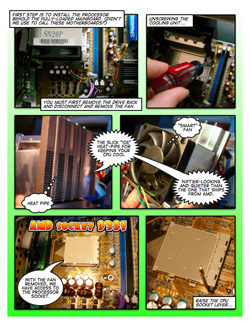
First up: assembling the custom PC. For a little twist, you get to watch me do it comic book form, courtesy the fun Mac app Comic Life from plasq. If you’ve never built a PC before, or never an SFF machine, this will show you what it’s about. (Hey, I was a mostly-Mac person from 96 through ’04 before returning to a cross-platform setup!) If you’re an old pro at custom machine building, you can laugh heartily at my mistakes.
Before we get into the how-to comic, though, a word about the Shuttle SN26P and why I’m so excited to be using it as a portable visual powerhouse.
Background: Shuttle SN26P and XP17
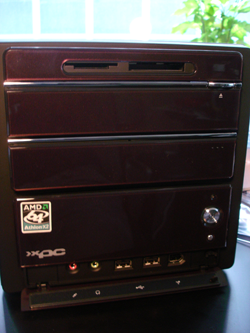
Shuttle has long specialized in just the kind of machine I was imagining, and while early models required some significant sacrifices, their current models cram a lot of power into a tiny space. Shuttle makes pre-built systems, but I’ve long wanted to build my own: I’d rather choose and configure the components. At the same time, building entirely from scratch can be tricky in an SFF enclosure, especially if you want the system to be fast but quiet; cooling becomes a huge issue.
So I opted for a middle ground: Shuttle’s barebones systems include the motherboard (aka mainboard), fan/cooling unit, case, and all the cables and brackets and extras you need. You add your own storage, video card, and processor. The SN26P model was exactly what I needed: configured for quiet running, but with a fully-loaded AMD Socket 939 mainboard, RAID support, lots of I/O, and two PCIe card slots with dual SLI support. These are specs you usually expect only in a mid- or full-sized desktop. (I’ll talk more about the SN26P later in this series.) I need to be able to see what I’m doing, and most LCDs are likely to break under repeated moves, so I went with Shuttle’s portable XP17 display. The results are “luggable” in comparison to a laptop, but they’re still a lot lighter than even most sound racks I’ve carried around. And compared to huge desktop beasts, like the Power Mac G5? Fuggedaboutit.
I went a little modest on the video card for now, figuring I would upgrade later. With NVidia 7600 GT cards going for just $150, just popping in one of these was a no-brainer. (These are really mid-range, not low-end cards.) I can always double the 7600 later, or upgrade to a single, faster card. For now, I already have a card that’s sweeter than the ATI Radeon 9650 in my Power Mac, which, may I mention again, I can barely lift.
Building the System
Now, let’s get into the fun part: from bare kit to fully-loaded, Internet-connected Linux install, courtesy Ubuntu. If you’re building your own SN26P or similar model, these certainly won’t substitute for the included directions, but you may find them useful.
To view the pages of the comic, click the thumbnail.


I’ll be back shortly with part 2 of this series. In the meantime, if you enjoyed the comic approach, be sure to check this out:
Superstar VJ: The Animated Comic
You get to live vicariously via VJ Holly Daggers, touring the country giving people the chance to get groovy with a green screen. She even gets to rip apart her Edirol V4 video mixer down to the motherboard to make an on-the-road repair.
Thrilling!
It seems that the lightbox photo script goes under the flash image replacement. Slightly whoops..
Love the comic strip format! You rule!
Thanks, Tom! 🙂
Oh, and thank these guys:
http://plasq.com
Comic Life is really a joy to use. Now I need to do a Mac-specific strip with it, given that it is (ahem) not available for Windows!
[…] Building a Portable SFF PC for Live Visuals, Music Gigs: Part 1, Assembly in Comic Book Form […]
[…] What are you going to do when the revolution comes and power goes out? You won’t be able to fire up your small form factor visuals bomb and knock out storyboard cells for that zombie/nature documentary that’s been orbiting your head all day. Don’t worry though, the GTD nerds have visualists covered too. […]
[…] What are you going to do when the revolution comes and power goes out? You won’t be able to fire up your small form factor visuals bomb and knock out storyboard cells for that zombie/nature documentary that’s been orbiting your head all day. Don’t worry though, the GTD nerds have visualists covered too. […]
[…] In our last episode, I was assembling my fantastic new portable Shuttle PC in glorious comic book form. I got as far as booting Ubuntu Linux off a CD, but obviously I wouldn’t want to stop there. Next steps: getting the onboard NVIDIA RAID working, and making a lean, livable Windows XP install I won’t hate (always a great reason for building your own machine). Happily, both problems have a single solution: nLite. (Shown below, with its awe-inspiring tweakability.) […]
[…] read more | digg story […]
[…] Custom Shuttle XPC mini-PC with NVIDIA 7600 GT video card (as seen previously being built on this site) […]
[…] Building a Portable SFF PC for Live Visuals, Music Gigs: Part 1, Assembly in Comic Book Form […]
[…] DIY: Building your own computer for Digital Video. Ed.: See also our DIY Shuttle XPC assembly, which is kind of the portable version of this — only cheaper, and I didn’t dress up like Darth Vader. This looks great as a desktop machine, however, and you’d be hard pressed to match bang-for-buck and customization on the Mac. -PK […]
Woah! You used too much thermal compound, too! You only want enough goop to fill the microscopic pores and tiny, tiny spaces between the heat spreader on the CPU and the base of the heatsink. That seems like well over ten times the necessary amount!
Looking back at the photo … it's not as much as it looks like there. There's a very tiny packet, and my understanding was that AMD recommends the use of the amount in the packet (which in this case I spread out in advance of adding the heat sink).
i was wondering what was the cost of the whole project
@sly: It was about US$1700 all told, including display. It'd be significantly less than that now, however; prices came WAY down on the graphics card and the old AMD 939 chips. Or you could spend about as much and go Core 2 Duo and get a better graphics card or two. (That's part of why I only put in the one graphics card to start; with DX10 around the corner I knew we'd see price drops. In the end, it looks like we might even get cheap DX10 cards that would work in my setup.)