“What midi controller should I use for VJing?” is similar to “How long should my piece of string be?”. Without knowing what you’re using the string to produce, what kind of environment the string is going to be used in and what programs the string is going to control, there isn’t really an answer. So I’m going to start with “How are the midi-controller requirements for VJing unique”, and then give you my current solution for “What midi controller should I use for VJing with Resolume, if I don’t have enough money to buy the ReACT custom Resolume controller?”.

VJing doesn’t require so much in velocity sensitivity or aftertouch, so those fully-weighted super-responsive keyboards aren’t really going to help. Piano keys work fine for triggering clips and applying effects – programs such as Arkaos have taken advantage of the proliferation of keyboard style midi controllers – but for the VJ’s traditional grid-o-clips a couple of rows of pads or a simple qwerty keyboard is a much more intuitive method of triggering source material.
The unsubtle triggering control is made up for with knobs and sliders. With each image layer requiring controls for opacity, speed and scratch (or playhead position), filter parameters, filter opacity, in point, out point… The slider and knob requirements build up quickly.
Controlling Resolume (on a budget)
Obviously if you can use a purpose-built controller such as the ReACT or Edirol’s MD-P1, but where’s the fun in that! The whole point of midi is spending weeks assigning controls and tweaking until you’ve got a finely tuned setup which is second nature to you and completely incomprehensible to anyone else so those backseat drivers in the club will have no idea what you’re doing or how you’re doing it.
I tried out Evolution/M-Audio’s UC-16 and X-session, but 16 knobs is only just enough to dip your toes into the pool of ninja fast Resolume control. I was considering a Trigger Finger (while bemoaning the prevalence of 4×4 pad controllers) when one of my bandmates picked up a Behringer BCR2000.
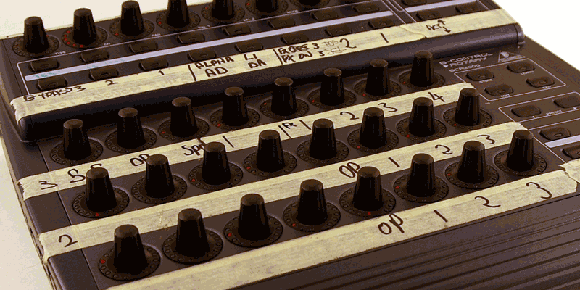
10 minutes with it plugged into Resolume and I was hooked. I’m fully aware of the… interesting reputation Behringer audio gear has picked up over the years. But set your prejudice aside for a moment and marvel in the hottest combination of cheap and midi control in one knob encrusted box.
32 endless rotary controllers (8 of which have push function) and 24 buttons. Over 500 LEDs. AU$265 (US$195) street.
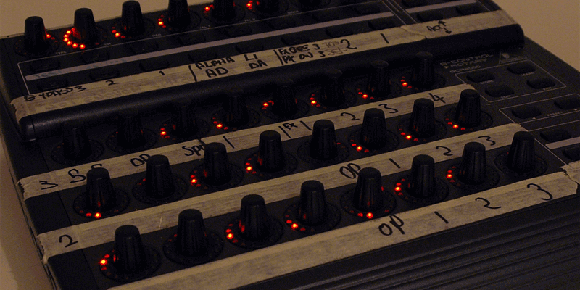
This is a particularly attractive controller for Resolume because the 3 main groups of knobs mirror its 3 layer control scheme. Even the ReACT requires the use of shift or layer select keys to choose which layer you’re tweaking. Clip triggering is covered by a qwerty keyboard (handy hint: recent model Thinkpads have a built in LED to illuminate your keyboard in dark clubs), but most other controls can be covered with a BCR2000.
After a year of use (and several iterations of assignment tweaking) here’s my BCR setup for Resolume. This allows for extremely detailed and intuitive live control. The biggest drawbacks being:
- Scratching with a rotary encoder is never going to be as fast as a jog wheel or fader
- The magic number for opacity is 50%, this is the level at which layer modes such as Add, Darken and Lighten show both the current amd underneath layer at proper luminance while showing as much of each as the blend mode allows. It would be nice to have a “sweet spot” so exactly 50% was easier to select at 2am and 7 beers. Perhaps some of the top pushbutton rotaries could be remapped as “layer x, value 128”
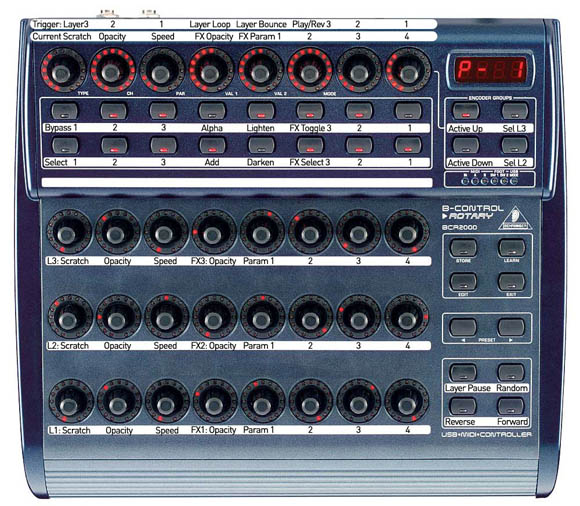
Midi mapping is as personal as operating system setup or plugin selection. I expect every VJ to have their own method of control and preferred layout. There’s no way I’m going to tell you my kung foo is superior, but if you’re still VJing with a qwerty keyboard and mouse it may be time to take a little of that gig money and see how much further your style can go.
I work with and use ultrasonic sensors which measure distance and speed of movement to generate midi information, called Soundbeam – it uses up to four invisible sensors and eight proportional switches – allowing group participation in music composition and VJ ing.
[…] Aside from the potential with DIY gadgets or hacked midi controllers, this device will allow visualists to integrate better with the musicians we collaborate with or support. I have a gig on Friday in which I’m providing visual tastiness for the whole gang, but shall be rocking the midi triggered visuals with Segue. This kind of thing is technically quite simple (midi out of MPD24 or MPC, into BCR2000, done), but logistically can be horrible. Tiny stages and often a lack of decent cable length from the projector can leave a VJ stranded on the opposite side of the dancefloor from their band. Fortunately Friday should be smooth sailing, but I think I’ll be getting a MidAir when they drop, if only for those gigs which can’t be guaranteed to run so smoothly. […]
thanks a lot for the info, I thinks is very useful, for all those that are starting in this wonderful world of vj, I´m writing from Argentina..CAn you tell me if the BCR 2000,shows the leds (lights) from the feedback of resolume???? this is one question that i have…
I wanto to buy this behringer controller or the M audio Evolution UC 33e… but i thinks that the BCR is the best option…
thanks in advance…
Leonel.
hola, i hope you can help me, i want 4 diferent outputs from my desktop computer(2 video cards with 2 outputs each one) and i only want to control them for the start and the end of each one, what kind of controller you can recommend me and what software, i was thinking use isadora, but i dont know. sorry about my bad english
hey guys! it would be great to update this one to current gear 😉
great work, hug
[…] BEHRINGER BCR2000 How to Choose a MIDI Controller for VJing […]