Ah, “undocumented features.” Here’s my least favorite MIDI and audio “feature” in Windows: since Windows 2000, the operating system imposes an arbitrary limit of ten 32-bit audio (wave) and MIDI device drivers on the system. These are actually 10 driver entries in the Registry, so you don’t have to have 10 USB keyboards to hit the limit — almost anyone is suscpetible to the problem. Many USB devices now install both an audio and a MIDI device driver. “Virtual devices” like the Pamela virtual audio cable for Skype or the excellent MIDI Yoke interapp MIDI driver take up entries. You can even use up entries by installing device driver updates, or (now this gets truly absurd) just by plugging your device into a different USB port. Internal devices are affected as well as USB devices, and sometimes entries get used up in apparent spontaneous ways.
Here’s how to find, and fix, the problem (thanks to a tutorial from RME; picture below):
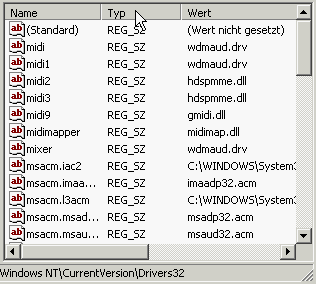
The symptoms: This is my favorite part. You’ll just wind up installing a driver, and it won’t work, often without an error message. Or you’ll find yourself constantly re-installing hardware drivers, because the system “forgets” the driver between reboots.
Diagnosis: If you select Properties of the device (e.g., via the Device Manager), you should see a status of “Driver enabled but not functioning properly.” The driver is installed, but Windows can’t use it, in other words.
Cure: RME has a set of instructions for editing your Registry. When I’ve run into this problem, as when I couldn’t get MIDI Yoke to operate, I turned to RME’s suggestions and got things working again. Registry editing seems to be the only way to go; as always, backup your machine before messing with Registry values because a typo can hose your system. (In fact, I wouldn’t have found the RME instructions at all had it not been for the copious support information at the MIDI-OX site. Do yourself a favor: if you ever use MIDI, install MIDI-OX and MIDI Yoke today, and read the installation instructions completely before plowing ahead!)
Will it ever get fixed? So far, it hasn’t. Windows 2000 through the current release of Windows XP still have this problem. Now the big question is, can Microsoft get it fixed in Vista? If they don’t, they’re going to hear it from me (and you, too, now). The only good news here is that 64-bit drivers are unaffected, and PCs are clearly going 64-bit — but that’s not really an excuse, is it, especially since a lot of the aforementioned drivers run in 32-bit and a single device can wind up filling up a whole host of slots.
Midiman has a little tool which might come handy for all purposes of the limit problem. served wel for my audiosport quattro.
direct download
<a href="http://www.m-audio.com/index.php?do=support.drivers&k=driver&s=8&o=Windows+XP&f=84" rel="nofollow">Download Page
I had a chat by email with Larry Osterman from Microsoft who is a developer of the audio feature of Vista regarding this bug and he had no idea what I was talking about. Here's is weblog : http://blogs.msdn.com/larryosterman/
Maybe if enough people report the problem they'll do something about it. Pretty sad there is no MIDI related features being worked on in Vista, won't be a really interesting update for audio pros..null
I'll give that M-Audio tool a try and see if it works . . . might ask around on this one, too.
I do think Vista will be an interesting update for audio pros, just on the audio front rather than MIDI. Now, some people at Microsoft may not realize just how important MIDI is. But I am excited about the audio features (if not the branding — see separate rant), and we should know more soon.
It's funny, this is the kind of bug that won't show up on a test machine, yet it shows up all the time in the real world. So yeah, let's get some real world – to – Microsoft communication going. 🙂
Amazing.
I'm so surprised.
What's a trip for me is that all of a sudden, neither of my midi devices were working on either computer I use!
Ugh!
For me, it seems that there are more Bugs in the Windows USB->Midi drivers. I have found an USB->MIDI adapter, that is not installing and working automaticly on every Windows XP. I have read that Vista has a full USB-MIDI device support, but why doesn't know Vista this device, too?
But with Ubuntu 6.10 this device can be used with the live-cd start!
Thanks for posting this. I was going nuts trying to figure out why stuff wasn't working!
thanks for the infos, i hope de midifix utility works for me, the RME link is not working.
If somebody knows which registry entries need to be edited i would be gratefull for the details.
Big thanks i needed this info!!