Welcome, Computer Music readers — feel free to drop me a line. Here’s a roundup of Max/MSP resources, as a companion to the feature story on Max I wrote for Computer Music Magazine. Max is a deep, deep program, but to get you started, I’ve lined up:
Unusual controllers for performance (tablets to game controllers)
Cool Max projects (flaming sound organs to musical punching bags)
Essential Max tools (my favorite add-ons and upgrades)
It’s everything you need to start making weird, futuristic music and art. Well, not quite everything, but enough to blow my mind, anyway. I’m planning more online tutorials and possibly another print follow-up soon, so stay tuned!
Unusual Controllers for Use with Max
Part of the fun of using Max is that it’s easy to manage incoming data from devices in performance — not only the usual items (keyboards, drum pads), but unusual controller, as well. In particular, you’ll want to take a look at the built-in “hi” object (human interface), which enables use with a broad range of USB devices, even if not intended for music. More resources from CDM:
Guitar Hero PlayStation Guitar Controller, a prime target for Max hacking
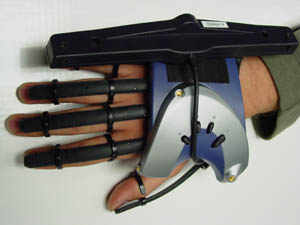
The P5 Data Glove is an inexpensive game controller that works especially well with Max (even though one of my colleagues insists on using it with Macromedia’s Director, which is trickier)
Wacom Tablet External for using a graphics tablet (only works with OS X, though there are other options, too)
USB-to-real-world sensor interface lets you attach sensors, other devices; as an alternative, my personal favorite device in this category is the real world – to – MIDI device, the US$149 MidiTron
Great Max/MSP Projects
Max is the undisputed champ for designing sophisticated experimental installations, instruments, and other prototypes quickly. Here are a few of my favorites I’ve written up on CDM (some combining Max with other software):
Musical punching bag / disco floor
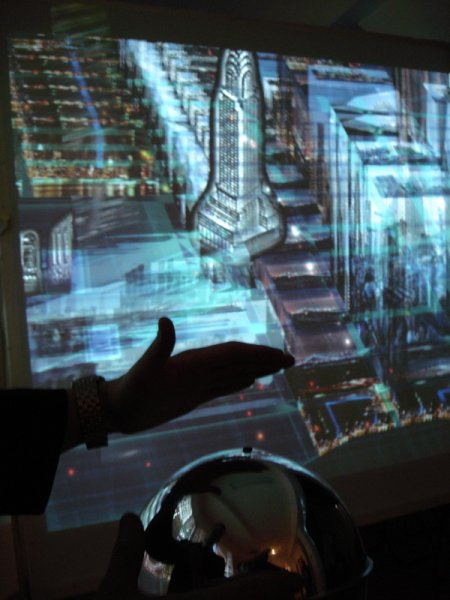
Minority Report-like Virtual Reality Environment (shown at top, navigating the NYC skyline)
Flaming Propane-powered Pyrophone Organ Game (shown below)
String Thing fretless cello-like instrument
Turntable-Controlled Vibrating Chaise Longue
Coal-Powered, Steam-Driven Power Plant Music plus further details of interfacing coal-powered hardware with laptops

More Max Tools
Worth adding to your arsenal:
Jitter 1.5 and Max/MSP 4.5.5: Starting with the mothership, here’s why you should upgrade to the latest version
Game sound objects for emulating Atari, Nintendo, Sega, Coleco Sound
Cycling ’74 distributes the Lemur multi-touch control surface, ideal for Star Trek-like control of Max patches; see recent update to the software
Tap.Tools is my favorite Max add-on; an indispensible collection of time-savers at a really low price
Sounds amazing! I haven't been able to check out Max yet… hopefully someone will show me the first steps sometime so I can see if it's worth it.
Unfortunately, Computer Music mag is hard to get here in Germany… hope I can track down a copy somehow…
Roland
Great to hear. I'm studying Max/MSP at the moment and am always amazed at what it possible to create/do with the program. Can you recommend any other online tutorials? I'll have to check with my local news agency down here in Aus, pretty sure they get the UK computer music edition shipped over here.
:zzz
Just finished reading the CM article. It really got me interested in Max/MSP. Looking forward to your additional extras. Thanks for a very useful and inspiring article.
Please forgive the emoticon, it was an accident. I really did enjoy the article!!!
[…] for some very interesting, interactive and experimental projects, like these over at Musicthing and these over at Create Digital Music. There’s a guy who uses turntables to video mix, someone who created an invisible violin […]
[…] Trimpin used the Max computer music program to reconfigure photos of bark patterns taken from trees in the Gurs region into a score performed […]
[…] speakers that blast recordings of train sounds captured in Europe. Additionally, Trimpin used the Max computer music program to reconfigure photos of bark patterns taken from trees in the Gurs region into a score performed […]
[…] Trimpin used the Max computer music program to reconfigure photos of bark patterns taken from trees in the Gurs region into a score performed […]
[…] Trimpin used the Max computer music program to reconfigure photos of bark patterns taken from trees in the Gurs region into a score performed […]
[…] Trimpin used the Max computer music program to reconfigure photos of bark patterns taken from trees in the Gurs region into a score performed […]
[…] Trimpin used the Max computer music program to reconfigure photos of bark patterns taken from trees in the Gurs region into a score performed […]
[…] Trimpin used the Max computer music program to reconfigure photos of bark patterns taken from trees in the Gurs region into a score performed […]
[…] Trimpin used the Max computer music program to reconfigure photos of bark patterns taken from trees in the Gurs region into a score performed […]