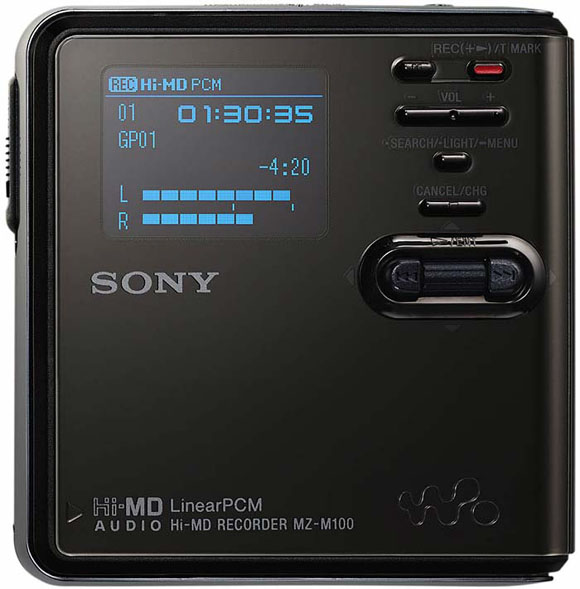
Still like your recorded media removable? A 1GB MiniDisc is just US$7 — meaning you can stock up on them a lot more easily than you can CompactFlash cards. While previous MiniDisc recorders suffered from fidelity loss and timing issues due to their ATRAC compression, new Hi-MD recorders use standard uncompressed PCM.
Sony has two new Hi-MD recorders (via Harmony Central): the MZ-M100 and MZ-M10. They include stereo mics, USB connections for PC or Mac, and rechargeable batteries. You sacrifice a lot: 16-bit/44.1 kHz only (not even 48 kHz for video work), no mic pres, no digital in. I can’t even find a line in jack (though those are common on previous models, so maybe I’m missing something). For pro applications and extras, you’ll want to wait for our solid-state/CompactFlash recorder roundup. But if you need to record a lot of media, cheap, this is the recorder you’ve been waiting for. Bottom line: You’ll use this to record band practice, but not your soundtrack for your next film.
Pricing/availability: $439.95 and $329.95, due in August
CDM 5 words: Cheap removeable, no pro features.
When we started the Fake Science Lab Report podcast we started looking at possible mobile rigs for doing interviews and segments remotely. Initially we where looking at the Marantz PMD660 as our recorder of choice. Our good friend Jack Herrington was starting research for the upcoming Podcast Hacks book and he had one on hand.
We tried it out on the Nick Mason interview and somewhere it picked up this insane harmonic whine that we had to EQ out. After doing more digging it seems that people have seen some nasty issues with compact flash cards losing data and this lead us back to the MiniDisc.
After talking to some local radio djs, reading up on some NPR correspondents it seems that most use a MiniDisc recorder, a mini-jack to XML cable and a battery powered shotgun mic for their rig. We grabbed the Sony mz-rh10 and the new Audio-Technica 897 shotgun.
The rig has done a great job for us so far (and sounds wonderful) but my only real problem is the supposed Mac USB support. We initially assumed that when Sony says that it records PCM that we could mount the MD as a drive and just pull off the source files. In actuality, Sony records the PCM in a proprietary format that you need to have their special software to pull it off of the device. The only issue I have with this (okay, I have a lot of issues with it) but the main one is that they don’t support Mac with the software!
We luckily have access to many PCs but we are highly disappointed with this aspect of it. Overall, it’s a great sounding simple rig, but as Peter mentioned, don’t expect miracles. You can read more about it at my blog; Life and Times of a Backyard Producer if any one is interested.
I'm assuming this recorder will have the same issue — it supports USB, but you'll have to deal with the files and it sounds like the conversion is Windows-only.
In fairness, though, it's NOT a proprietary Sony PCM format. It's linear PCM, which is a common pro/broadcast encoding; you've used it without knowing it if you've ever encoded DVD video. (At least, that's my understanding.)
I'm not sure why QuickTime seems unable to support it directly — I think it just can't automatically decode it. Do a search for linear PCM AIFF, though, and you'll see at least one Mac utility that can convert it — could solve your problem, if you haven't tried it yet.
When I say no pro features, I mean the fact that you can't run timecode to it (for video production), or input digital audio, and you can't power mics with it. But that's not a deal-breaker for doing what you're doing, for instance — so maybe I should use "missing some pro features" as it's certainly possible to use it in some pro settings.
Peter
Interesting, we will look into this. My initial search on the file extension that the Sony MD put on came back as the Sony specific file type so that is where my assumption came from. We will try this out in the studio tonight and see what happens. Thanks for the tip!
James
Just to clear things up for you guys, The mz-m10 and m100 are basically clones of previous models (rh10, and rh910) but are bundled with mics and a new software for dumping files directly onto macs via USB. No other mini's are able to interface with macs as yet. There are still all sorts of issues here (why no USB2? Why can't I go from my Mac to the MD?) but these newer models will interact with the macs, as long as you use the software included. The rh10 and rh910 models won't. I'm in the process myself of trying to decide if this is the way to go for field recording. I'm leaning that way.
Stephen
That's news to me — I had no idea. What's the Mac software bundle? Anyone tried this?
I'm afraid I'm still more interested in the non-MD recorders; looks like more flexibility and higher record quality. Though if you're doing a lot of field recordings, of course, you'll run out of memory, so I see the trade-off.
Which recorders give better quality than the hi-md decks? I'm just curious since one of the good things about the hi-md's is that they will record 94 minutes of uncompressed sound (cd quality or a little better) on one of the disks. At $7 per disk, that makes it not very expensive to go with that full quality recording. I haven't run into any flash or non minidisc units that will approach that quality for less than $500 or so, which makes the MZ-M10 I mentioned above a pretty good deal at $275 (which includes a decent mic, even) I'd love to know what you've run into that might match that quality with no moving parts. Thanks.
Stephen
I tried several "pro" sony md recorders – I hated their push button level controls via sub-menus with special key strokes. I finally found a setup I really like: The HHB MDP-500 with a Audio Technica AT825 stereo microphone. The reasons I went with the MDP-500 included dedicated level controls AND the limiter. This is a great setup for recording live music.
you get A READ ERROR!!!! Yep.. a big fat read error… junky piece of junk!!
Hey!
I am wanting to make a movie, Im new at this so it's not something super pro, but I am looking for something to pick up sound instead of the camera. Not really music, but more like voice over, footsteps, gunshots, etc. My friend is into all this and said this would be a good product. What is your opinion? MZ-M100 or something else? Something under $300 would be nice.
Thanks Josh
I keep seeing the comment that these Minidisks do not have digital input, but they do. It is optical Sp/Diff but it works just fine. What I miss is digital OUTPUT as I'd like to be able to bounce material from my portable directly to my computer but alas, that is only a USB (2) function and it requires Sony software. One other odd item is that while using the USB jack to dump recorded material you are unable to use the power supply in jack – you are stuck using battery power while dumping your data. This is more than an oversight, it's a Communist plot. For a device capable of 30+ hours of recording, it is not unreasonable to avoid using batteries. The early versions of Sony software also included a further penalty: you got ONE chance and one only to successfully dump your data. If you failed for ANY reason, your data was stuck forever on the MiniDisk with no way to get it onto computer. This has been fixed, however.
I personally love MiniDisk and have been using it since the very first units hit the US market. I have some batch tricks I do with Sound Forge (also now a Sony product) that make these recordings shine brightly. I have fooled many people with dubs I've done with the MiniDisk – they think it's a DAT or some other true digital media. The sound is the thing and it's really tough to fault MiniDisk in that department. I love it.
Tom Moore