Scott Wilkie from M-Audio
talked to Scott Sheppard's Inside Mac Radio show on April 9. Obviously
M-Audio's new iControl is the first controller designed specifically
for GarageBand, but what about other applications? Scott's answer was
clear:
- If you're using Logic Express or Pro, YES
- If you're using anything else, NO
Does that mean even track parameters can be edited with the iControl in
Logic? Possibly: GarageBand's ties to Logic Pro 7.x are fairly tight.
But if you look at the design of the iControl, you wouldn't really want
to use it with anything other than GarageBand: the layout is designed
specifically for Apple's entry-level app. If you use Logic or a similar
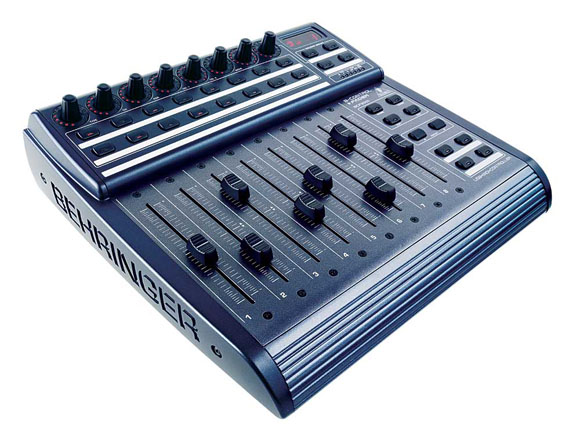
program and you're on a tight budget, you might consider Behringer's
B-Control BCF2000.
It's got everything the iControl lacks, like real MIDI/USB support for
other apps, faders, and automated motorization, and it's still just
over US$200. Readers and I have expressed concerns about Behringer
reliability, but reports on this box have been very positive (including
a couple of readers who chimed in.)
That doesn't mean the iControl isn't a cool product: on the contrary,
this is further evidence that instead of a lot of lame look-alike
boxes, the growing computer music market could mean new interfaces that
are more thoughtfully tailored to different programs and different user
preferences. Meanwhile, if you've tried the BCF2000 or you have your
own fader box of choice, let us know.
I bought a BCF2000 a while back. It certainly works, although as a mixer, controling 8 channels at once is a bit limiting – you end up trying to move the channels about to get them to fit, then new VST channels pop up in the wrong place. The flying faders are WAY cool, but once you've, like, seen them move, the thrill does wear off. The software editor is good – it was a 10 minute job to set it up to control various delay functions in my PodXT. With hindsight, I'd probably buy the knob-box version, or wait for Behringer to produce something with proper LCDs to show which knob controls which parameter.
There's also Behringer's very shifty business practices…
I just bought a BCF2000, though I can manage to get Logic express to recognize the controller, I'm having a bit of a problem getting the controller to recognize logic. I didn't receive any drivers or plugins for an automatic plug in play. If you set your unit up in 10 minutes I need your help!
I bought a BCF2000, when they first came out, and it works great in HUI emulation mode with ProTools LE (v7). It was a snap to setup, and there are firmware updates on the Behringer site as well, if need be.
Yeah the bank switching is a bit of a pain, but for $199 each, extra ones can be bought, and switched to different banks of 8, for still less than the price of one controller from Digi ro Mackie, or whoever.
All in all, I love mine, and it has left my mouse feeling lonely…
For those of you who want to get up and running quick in Logic Express 7.2 with your Behringer BCF2000… I made a How-To here:
Get up and running in Logic Express with your Behringer BCF2000
With Behringer it seems you save money on the hardware, but you pay it back in time learning how their gear works. There is no free lunch.
Hope my link helps.
g-lo.
I have 2 BCF2000's working fine in Logic Express 8. They will be recognized by it as long as you put them into LC mode on startup (see manual). Remember though that as well as tracks, the software takes 2 "channels" for the 1-2 I/O and for the master. So with one BCF, you can control 6 tracks out of the box (and the 2 I mentioned earlier)
My twin BCF's save me a load of time and a rake of money rather than buying a dedicated Logic controller. Worth the money.