What does a hardware synth have to do to compete with
software these days? How about offer the same fantastic virtual analog
sound for about the same price, for starters?
The Alesis Micron is the kid brother to the Alesis Ion
synth, with the exact same 8-voice, 4-part multitimbral VA engine. Each
voice has 3 oscillators, 2 multimode filters, 3 envelopes, 3 LFOs,
sample and hold, and a tracking generator.
There are filters galore on offer here, 20 different types in all, many
are nearly exact replicas of filters from Moog, ARP, Oberheim, and
Roland. Alesis has even modeled in the drift associated with analog
oscillators. Rudimentary FM capabilities allow you to create fairly
realistic pianos, organs, and bell tones, a real plus in a synth this
inexpensive. One thing unique to the Ion/Micron is being able to
access all of these different sounding filters in a single synth.
Flexible envelopes provide control over your sound sculpting. A mod
matrix delivers much of the power of the semi-modular synths of old.
The synth can also be used to process external signals. (read more)
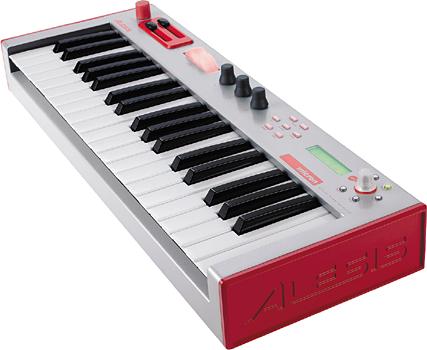
The Micron packs all off this into an even more compact 37-key package
that also contains a phrase sequencer and an analog-style drum machine.
It has the same 40-band vocoder and arpeggiator found in the Ion, and
the same effects, with the addition of reverb.
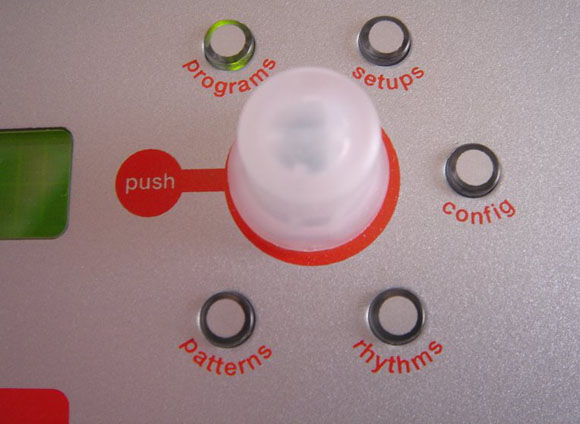
You trade-off the "knob for every job" and large LCD user interface of
the Ion for a single data knob and two-line LCD for editing. In actual
use, the control system on the Micron is quite ingenious. Keys are used
for quickly navigating to particular sections when editing or switching
between patch banks. It's a breeze once you've gotten used to it.
Whether this works for you will depend largely on how you use a synth.
It's not quite as much fun to craft your own sounds on the Micron as on
the Ion, but its more than doable and the lack of controls is not
unprecedented in a performance synth. The Moog Source, perhaps the most
direct ancestor, was a similar size and employed a similar method of
data entry.
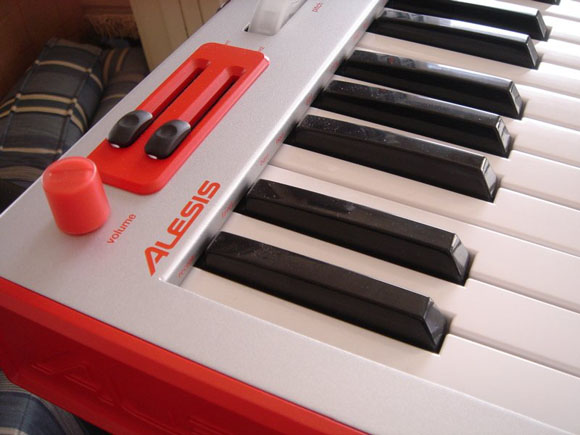
Performance controls include two mod sliders (m1 and m2) and a pitch
bend wheel, and three endless analog knobs, labeled x,y,z that can
control envelope attack, filter resonance, or just about anything you
want. By default m1 is mapped to vibrato and m2 to filter cutoff in
most patches but they are freely assignable. Some will hate their
horizontal orientation but, if you think about it, it's actually a more
intuitive way to indicate pitch. There are also octave select buttons,
a latch button, a tap-tempo button and a button for on-the-fly phrase
recording.
Yes, the Micron is the kid brother to the Ion but there's more here
than hand-me downs. In fact, I can see existing Ion users adding a
Micron to their set-up, particularly if they gig a lot. Since the
Micron contains the exact same sound engine as the Ion, patches can be
freely swapped. You could, for example, use the superior editing
interface of the Ion to build patches for the Micron.
This is not only a great synth for US$400 street, it's a great synth
period, with the best analog emulation I've ever heard. Put this baby
on the second tier of your keyboard stand and you'll have the perfect,
bass, lead, and pad machine. Due perhaps to its size and low price, a
lot of people are wondering how the Micron stacks up to the microKORG.
I've owned both and aside from the more intelligible vocoder in the
microKORG and the ability to run on batteries, there's simply no
comparison. The Micron bests the microKORG with decent full size synth
action keys (not the best I've ever experienced, but far from the
worst), and a much warmer, truer analog sound. The microKORG is also
limited to 128 sounds while the Micron can store hundreds. Some people
like the grittier sound of Korg's analog emulation (and I've still got
an ElecTribe in my collection for that) but if you're looking for
analog sound that is as close as digital comes, this is the one.
San Francisco-based tech writer and musician Lee Sherman has written for magazines like Keyboard and Electronic Musician — and even NeXTWorld. Check out his great blog Music Matters.
I'm wondering – would it be very difficult to use this as a controller for virtual instruments? (In addition to all of the digital-analog goodenss that it already does.)
Sure, easily used as a controller, though if that's your primary interest, you should check out Alesis' Photon. It has more onboard controls than the Micron. (Lee, want to add anything?)
Peter
Do you have a favorite controller? Right now I'm considering the Photon, the Korg Kontrol 49, and the Novation Remote 49, and, as mentioned above, the Micron!
Thanks in advance!
My Novation 49 is coming today via UPS, Korg Kontrol 49 I'm waiting on, and Lee just got the Photon. So you can expect more reviews real soon! But as I said, Micron is really best thought of as a synth rather than just a controller, so if you want sounds, too, Micron is the way to go. (the Novation is also a synth; I'll be testing that this weekend)
Yes, the Micron can be used as a basic controller, you can at least hook it up to your computer and play the keys but the lack of assignable controls and templates make it a poor choice for this purpose, especially if you have a lot of virtual instruments to control. Controllers are cheap these days and getting better all the time. Watch the reviews section where we'll be covering them in depth.
Lee
I'm looking forward to your reviews. When you review the Novation (X-Station?) – please also comment on the quality of the audio inputs. Thanks!
i was looking into buying this synth for a synth pop band but.. i was hoping to step out from my drums and use the sequencer on this. whats the quality on it and is it useable for writting full songs?
can you use the drum patterns and play the synth at the same time?
you can have several different programs playing at once, such as a rhythm, an arpeggiated bassline, and a pad, but tere is a limit to 8 polyphony. still that's enough for me.
I´ve had the MICRON for 2 weeks now and I just love that MEGA LO-FI sound. Very 80's electro feeling in it. The sounds in Reason synths feel engineered to me. This has that thight electrifying sound you get from the old guys like the MOOG, Jupiter and so on..
hey all, sadly i traded my micron in with some cash to buy a triton….although a triton is cool and all, its just a little too manufactured for me. It was almost to clean sounding and i even tried to dirty it up in the filter section…sorry i rambling. Needless to say, i am getting another Micron within the next two weeks. I played it at guitar center yesterday for the first time in about 6 months and i honestly felt inspired. Thats a rare thing nowadays. I played with it for at least 30 minutes and didnt even realize that time had passed, it was so fun. To eveyone that already owns one….bless you and to all that are considering…consider no more!
The photon has way more programmable knobs and faders, not to mention the 3d dome controller which is pretty cool. Plus it's about 150+ cheaper than the Micron. Just bought my micron yesterday, couped up in this stupid office. I've got to get out of here!!!
One of the main reasons for buying a hardware synthesizer is that it can be used without a PC or Mac, and the boot-time/fan noise/bugs that come with them. I find it very relaxing to use only my workstation keyboard sometimes.
Have had a micro korg for about 6 months and love it…but needed the sequencing capabilities of something like the Alesis Micron…just got it in the mail today…havnt plugged it in yet ['cus the power supply here is different to the US] but im stoked already…cant wait to hook these puppys up together and get all jiggedy wid it!
See you on the other side 🙂
i have an alesis photon x25 and have started mucking about with soft synths on my laptop/cubase le… i'm am thinking of buying the micron (sorry, bit of a newbie dumb question coming your way)….
… will i be able to hook up the photon to the micron and use all the knobs to alter all the filters and whatnot without going thru the laptop first (for some reason i can only trigger my zoom drumbox when going into the laptop then backout thru a midiman usb)?
I've had a Micron for 1 and a half years, and let me just say that if you're thinking about getting one, just do it! The sounds are great, and while the sequencer may seem limited, you can do a ton of stuff if you just plan right and set up the keyboard good. If you really wanted to you could have a different lick or part on each key, and just pitch shift it to whatever you want if the key it should be on is taken, and then just play whatever 8 parts you want at a time. As you can see you could switch that up alot just by changing keys. And you could do that for each setup(song). Anyway, figuring out how to be creative with the Micron is half the fun imo. They rock.
ok.. i got a micron on ebay for a bargain price so should get it in the next few days… then i can start tinkering!
Nice! You'll definitely have fun with it. I'm currently working on a remix of an Ecco the Dolphin song using only the Micron. It's a lot of fun.
And to answer your question, I think you'd be able to alter the Micron's program parameters with your Photon if you set it up right. I'm not positive though.
By the way, do you have AIM wiggy? It'd be cool to chat about Microns or anything musical really.
I'm a guitarist with no knowledge of MIDI, sequencers, or anything like that (yeah, go ahead and laugh,it's OK). First off, will the Micron work for me as something I can use for leads, pads, textures and outer space noises? I'm looking for something that approximates analog sounds (I know analog is its own beast, that's why I said approximates). Secondly, is it fairly easy to figure out? I have trouble programming drum machines, so I don't want anything that is going to give me a headache. I am old and cranky. Any responses will be appreciated, thanks!
To your first question: DEFINITELY! It is, after all, an analog modeling synth. And a damn good one at that! Its as close to the real thing as you can get without using the real thing.
To your second question: Yes, it iS really simple to use. Sure, you can go deep into it and it gets a little complex in terms of sound tweaking, but the actual process of using its funtions is simple. Most functions are centered around the main knob. Anyway, hope that helped.
thanks hazardous… starting to slowly get the hang of the micron, it does far more than i thought it would in some ways but i cant find a way to use the sequencer the way i wanted…
basically i want to run some bass parts and some pads and a few lead lines on the micron, sync it with my drumbox… better read the manual!!
trying to work out a simple reliable way of using it all to play live
one thing tho about the photon x25… crashes my laptop often!!! wont power from usb have to use a wallwart… it is marvellous tho with cubase LE
Heard heaps about this.
How is it compared with the ION? I like the how compact the unit is.
IF I PURCHASE FROM THE US, IS THERE A GOOD CHANCE IT WORKS WITH AUSTRALIAN POWER REQUIREMENTS?
I guess what I am asking is what power supply does it come with?
hi
i've heard heaps about this synth and am definately considering getting one. But how does it actually compare to the microkorg? i borrowed a microkorg for a few months off a mate (and LOVED it) and am just wondering which is better so i can decide which to buy. Probably both synths are great but is one better than the other? and in what ways (eg vocoder, patches, sequencing, ease of use, general analog capabilities and sounds, etc.), considering i am buying one for a pop-punk band?
Thanks,
Dave
I am curious, is it possible to use the vocoder option only to modify the pitch of the voice (similar to what hellogoodbye does with their music) ?
Where can we find new programs to download for the Micron? I know it can use ION programs. Are there a variety of databases around the web?
I'm trying to set up the sweeping synth intro to Steve Miller's "Jet Airliner" and "Fly Like an Eagle". Any tips on how to get multiple layers to start at different times once triggered?
Thanks.
hey Justin, unfortunately the vocoder on this thing isn't quite what many would expect (don't get me wrong, its absolutely fun to play around with but not really that usefull), actually what hellogoodbye uses would be a Auto-Tune plugin or Melodyne tweaked so the pitch correction is so radical that it loses all natural characteristics
Heya Synthaholics !
I was wondering if this would be a good synth for 'generative' music. How well does this phrase recording and playback work live ? Do sequences all need to be pre-recorded, or can this thing multi-track on the fly without having to change modes, or stop playing ?
Can various phrases be latched and unlatched independantly…or is this limited to how many keys you can play (and unlatch) manually ?
I wonder how the Micron compares to Korg's KArma…and also if there si a free patch editor out there somewhere.
Lotsa questions I kn0ow…but I'm terribly curious 😉
Thanks for any feedback…Cheers
Dave,
Please, please, please, PLEASE do not choose the MicroKorg over the Micron. You will be disappointed. Trust me. The MicroKorg holds hundres of patches where as the Micron holds over 1000. Not to mention the micron has a sequencer. Also, IMO the micron sounds better. All in all the micron is just a lot more versatile.
And Jo…
Well, I could answer all your questions here, but just IM me if you can. Compy147. Or e-mail me at Biggun01@gmail.com. It'll be easier cause I have a lot to say. 😛
Oh, and in case anyone wants more info on the Micron, here's a great review:
http://www.soundonsound.com/sos/jan05/articles/al…
It explains so much about how the Micron works. It gets kinda technical, but it's never too hard to understand.
anyone know about the US power supply? Can I just change over to 9v for Australia?
I bought a used Micron a month ago. I have not had so much fun with a synth since i bought my Mini Moog 35 years ago.The keyboard is no smaller than the ones at http://www.melodicas.com I still do not understand all the control matrixs but learn something each time I play/program it. It's compact size and great sound makes it a pleasure to take to the gig each night. Hope they don't update it to soon, the learning curve to program this stuff is killing me!
Hi
I'm new to synth keyboards and don't really have a clue on which one will be best for me, the micron looks interesting and was wondering would it be a good keyboard for a beginner, i like the music from dark 80's films like blade runner and am a fan of Aphex Twin, will i get similar sounds from this keyboard.
I notice that this can store over 1000 patches, does that mean it can store samples from software programs like NOSTALGIA (ZER0 G)?
Got the micron about a month ago. Initially i was scared, thought it was only good for electro/techno etc… I was wrong! I use it with my band and I use it mainly for progressive rock. It's perfect for soloing and ambience. If u can't find the sound u need, u can make it! Editing is a breeze and fun. Knobs and sliders work perfectly and can make your sounds blast through or soar. The pitch bender also has a nice touch. My only complaint… Other synths can't be bypassed through it, otherwise brill.
Joey, that`s EXACTLY what i`ve been trying to find out about the microkorg or the micron, cuz i want to use it mainly for rock, for ambience, sound effects n whatnot…finally i just saw ur reply, so im finally happy about it, i think im gonna go for the micron now…write me to my email so i can ask u questions about how do u use it to play rock… rodolfo49@gmail.com
if any of u got more info about this, feel free to send me an email too…thanx
Can you add new sounds through USB on a mac? Like, could i hook this up to my computer and add new sounds? and what sound format dose it take?
Editing Patches in my opinion is the most problematic Part of the Micron: Because of the reduced interactive Elements (2 Sliders (m1,m2), 1 PitchWheel, 3 free assignable Pot-Knobs (X,Y,Z), 1 Menu-Knob) this Synthesizer is probably less suited for Beginners, who want to twist and turn Knobs to learn how to create Sounds or Patches. Even the more advanced User could feel a lack of inspiration because he has only a few Knobs to manipulate the Sound.
The 3 360-degrees Pot-Knobs X,Y,Z (which are free assignable with any Patch-Parameter) have a Hard- or Software limited turn-velocity based Threshold which has the following disadvantages:
1st: Because of the Knob-Threshold you cant fine adjust a Parameter, which is assigned to one of the 3 Pot-Knobs. If you turn a Knob and reach the Threshold, the Value "jumps". If you turn the Knob and dont reach the Threshold, nothing happens at all.
2nd: Because of the Knob-Threshold you cant change a Parameter continously and slowly
3rd: Because of the "features" mentioned before the already very minimal interactive Interface of the Micron is additionally limited.
Having these limitations in mind, in my opinion it is problematic to talk about "Realtime-Controllers".
Baz, the Micron can only play sounds made for the Micron. It can also play Ion sounds because they have the same sound engine.
And there always has to be naysayers….
Everyone, don't let the above poster stop you from getting the Micron. Anyone who says the controls are limited just isn't using thier imagination. There are tons of shortcuts to help you navigate the Micron easily. IMO the only real limitation is that you can only have 4 bar loops, but even that can be worked around. And hey, it didn't have to have a sequencer at all, so I'm happy.
I have been using the Micron for a little less then 2 years now and it is a nice little synth.
Back in the 70's I used some of the old moog products (Mini, Sonic, Etc.) and the Micron approximation of these is quite good.
The modern day young analog purists will never be happy with anything but a hard wired synth with a thousand knobs and more voices then your brain can process at once.
Thats fine, what ever you like.
But don't let that stop you from exploring some of the modeling synths like the Micron.
Alright, I'm a guitarist and known nothing about synths. I do play keyboards however. But I'm looking for something extra in my sound and really something fun to tool around with and make stuff that sounds cool.
I've been debating between the microKORG and the micron. From what I've seen the micron seems to be better, but I'm not sure about how easy the interface is on either. I saw in one comment that "if you're a begginer and wanna twist knobs to find something cool, this isn't right for you"
I just want to know how true that is. Everyone says it's "easy once you get used to it" but how long does it take to initially figure it out. I don't wanna spend $400 on something that I can't figure out.
So I guess my concern is, which one is better to start with, a microKORG or the micron.
thanks!
-tyler
Hazardous, the Realtime-Controller Limitation/Problem is adressed to Alesis since Q3 2005. Nothing happened.
This Limitation can be seen at YouTube: Search for "Alesis Micron Realtime". This Limitation/Problem has been discussed at the .
The access via Programm-Button + Keyboard Key (if you can guess the key, because the Label is very hard to read) is possible, but in fact you have to use the already very stressed Menu-Knob to fine adjust the Parameter-Values.
Everyone who wants to buy a Micron should carefully read the Archives of the alesis-ion Group at Yahoo. By the way this is also true for other Synths like Microkorg, XioSynth, X-Station, and so on. For almost every Synth there is an Yahoo Group!
Where can we find new programs to download for the Micron? I know it can use ION programs. Are there a variety of databases around the web?
I’m trying to set up the sweeping synth intro to Steve Miller’s “Jet Airliner†and “Fly Like an Eagleâ€. Any tips on how to get multiple layers to start at different times once triggered?
Thanks
I have both the Micron and the microKorg. Both are very cool little synths. I like them both for diffrent reasons.
The Korg has mini keys, the Micron has full size keys.
The Korg will run on battery power making it more portable.
The Korg has a software editor for OS9, OSX and windows. The micron has a "Ion/Micron Program Decoder v1.00". It is not a complete Ion/Micron program/librarian/editing solution.
For playing and overall sound I like the Micron much better. For portability, sound edititing, and vocording, I like the microKorg.
If I had to choose only one it would be the Alesis Micron.
I hope they will again ship the Ion soon. I think that would be a good solution for sound editing and knob twisting as well as a few more keys.
Hey guys, i to am starting out on buyinh a synth and are also in the cliche debate between the Micron and the Microkorg. Through reading the reviews it seems the Alesis is alot wider ranged on what it is capable of, but my worry is ill be using it in a band, ive used a Micokorg before and it seemed really easy to get to different settings quickly for different songs, but ive heard the Alesis is really fiddly, id hate to think if i went with the Alesis id be struggling to setup for each song and keeping the rest of the band waiting, can someone help me out, Microkorg seems practical for practically live but lesser ranged in ability, is the Micron too fiddly for live gigs?
RE: Reilly —
The micron is not too fiddly for live gigs. It's great for live gigs. I have friends who use theirs live onstage and the switch time between songs has never been a problem. I just bought my own Micron a few days ago and already I can see how easy it is to switch between setups. "setups" in case you aren't familiar to the terminology are where the micron lets you put all sorts of beats/programs/rythms/etc and map them on the keyboard for specific songs and what not. once you've made them for each song you are doing, you can switch between them effortlessly onstage.
IMPORTANT: you'll want to upgrade the OS on the Micron by downloading the most up to date from the alesis website and sending is via Sysex to your Micron. The new OS does several cool things, but what I have found most useful is the way the control knob scrolls faster in order to get through huge lists much more effectively (it does this in a similar way to how the iPod lets you scroll through thousands of songs quickly). Also it saves your last used tempo when you turn off the micron, which I have been thankful for many times now.
Is there anyway to chain the setups together into a song?
I find that there's always a gap because you have to re-trigger the new setup by hitting a key… and latch keeps switching itself off too.
I want to avoid buying a separate sequencer to trigger it if possible, but I want to use it as a sound module playing sequenced parts, and the occasional manually played bit over the top.
Just got my micron a few days ago (ebay 243.00) and was so surprised at just how much it is capable of. I tried to do the math on how many complete songs could be made on this thing if You filled the patterns, rythems, and setups (not to mention creating all original patches. it's something like 200 phrases, 200 setups and 150 drum patterns all of which that can be revoiced at any time by something like 500 to 1000 preset or customized patches.=4,500,000.00 complete songs (before remixing patterns or setups after which would be infinite). Sounds are high quality too.
hello everyone, i recently purchased the micro4000 xxl. love it. anyone found that there gigamagetron transmitter not working?? mine seems to overload itself everytime i run the wp500 system sound… any help would be greatly appreciated. love brucey and tyrone.
Have you tried reversing the polarity of the neutron flow?
hey, i was wondering wat are some cool editing programs for the micron, on mac. i want to use it on garage band as well, has anyone else done this? i would like ffedback, thank you. and does anyone know a good place to get a micron on the gold coast?
Help – my son is looking at this synth – While I know nothing about synths can someone tell me if it is capable of reproducing drums? and if so does anyone have a link so i can hear what it would sound like – before I buy! He plays heavy blues and jazz – just want to make sure this is what we really need – thanks for the help
stephanie
It does have drum sounds, 118 pre-made, and you can make your own on top of those. They sound great. This synth has amazing sound for this price. Your son will not be disappointed.
I don't know where any Micron audio is on the web, tho I'm sure it's around. You can, however, got to YouTube, do a search for Alesis and/or Micron, and find videos of the Micron in action. with sound, of course.
I'm buying an Alesis Ion in the next couple of days cant f**king wait!
Hi,
Can you sequence the Micron using i.e. cubase?
hey i just got a micron today and i was wondering if there is a way to take the different drum programs and program different drum samples to different keys to kind of make a drum set then record a beat?
Anyone ever have an issue with the Micron simply not turning on? I've had it for about 6 months and one day it worked and the next it wouldn't power up. I've been using the power supply that came with the synth, but nothing. Any suggestions???
[…] If you want a more in-depth review, check it out here […]
[…] Here’s the Micron in action – Dorian Concept If you want a more in-depth review, check it out here […]