iLife `05 is shipping, and that means I've finally been able
to test this baby first-hand. But if you're taking the time to read
this and you haven't yet ordered your copy, Mac users, do it now. I'm a
Logic Pro user and I still love having GB as a sketchpad. The new
version offers countless tiny but invaluable changes, many of which
Apple hasn't yet advertised.
Only two complaints: as GarageBand gets more tightly integrated with
Logic, why do Logic users have to learn an entirely different set of
shortcuts for GB? And for everyone else, why is there still no MIDI
export?
Other than that, it's simple: this is the perfect entry-level /
sketchpad music program, on any platform. And the biggest news of all:
there's finally a real PDF manual.
Hit read more for the full specs.
Here's what I've found that's new in version 2.0:
New file handling:
- Import MIDI, Apple Lossless, Sony ACID
- Save your own loops (Edit | Add To Loop Library or drag and drop)
- Starts up with most recent file a la Logic
Tracks / interface:
- New track buttons for multi-channel recording: record arm, lock tracks
- Panning automation
- Master pitch automation as well as volume (for easy chord changes!)
- View by Jam Pack (finally!); group 3rd-party plugins and loops separately, even view by user
Editing:
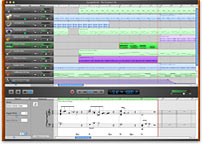
- New notation view seamlessly integrated with existing edit views
(definitely no printing, though); lots of subtle details to the way
notation's rhythm is displayed - Can enter music as notation via drop-down menu
-
New musical typing feature lets you enter music from keyboard (a la
Logic's Caps Lock keyboard — again, mapped to different keyboard
shortcuts, darnit!) - Resizable onscreen MIDI keyboard
- Adjustable keyboard sensitivity
Pitch / timing correction and effects:
- Real instruments can now match song tempo and key
- Real instruments: 'Enance tuning' / 'enhance timing'
- Vocal transformer plugin (change voice's gender or color)
- New bass and guitar amp presets
Documentation:
- Vastly expanded web resources for all of iLife
- 77-page PDF manual (Missing Manual = No Longer Missing)
I've always wanted to know how the soft synths sound in GB. any thoughts?
I think they sound pretty good. If you consider while listening that they only cost $50-80, they sound really good.
I mostly use buzzer and a couple other freeware audio units, but apples generators aren't bad for some things.
But I think if you have Reason or better, the soft synths probably won't impress you much, and thus aren't worth the price of the product.
. . . are really just presets for Logic synths. You can even edit the presets in Logic if you have both.
They're quite good, if somewhat limited. Unfortunately Apple included more loop content than instruments, but for the price it's still quite a deal.
i am currently using garageband 2.0.2 and am trying to upgrade to 3.0.2.but every time I try it sez alert an eligible garageband application was not found in /applications.what should I do?
im dealing with the same problem as Craig Griffin. does anyone have an answer?
Not to state the obvious, but GarageBand 3 is a *paid* upgrade. You need to purchase the new iLife edition to get it. Once you install that, you shouldn't have any issues getting it to install, as it will install a new copy. (Apple doesn't offer a version-to-version upgrade.)