
There are plenty of things computer drum machines / groove workstations can do to show off. There are plenty of long feature lists they might add.
But actually coming up with something you can play? That’s what can really make music better in the studio and live. And that’s why Maschine 2.2 is a welcome update.
First off, let’s admit something. Amidst all the clever functionality with grid-based controllers, there’s something that remains useful about a big, 4×4 grid of pads and MPC-style workflows for certain kinds of music. Those bigger targets don’t require a lot of accuracy, and it’s easy to keep mental track of where things are when your brain has just a 16-pad grid to track. But above and beyond that, it’s quick access to sample editing, repeated notes, mute, and other functions that make these fun to use. You can very simply improvise basic rhythmic patterns. It’s something Maschine has harnessed really well. So, whether you choose this alone or as a complement to other playing methods, it’s great when it really works. It can keep you musically productive.
And it’s no accident that you keep hearing Maschine over and over again for that reason. But while the concept was great, 1.x was a bit uneven in use. Maschine 2 brought a much-needed overhaul to the software under the hood, added lovely drum synths, cleaned up the UI, and vastly improved performance (once some drum synth issues were addressed with an update, and 2.1 added a nice shaker and a new “Grit” kick).
Maschine was a full reboot of the platform, but we haven’t yet seen NI really get to build on that foundation; the basic workflow was the same. With Maschine 2.2, Native Instruments takes the first steps that could impact how you play. It sounds like simple stuff, but having access to an enhanced arpeggiator, scales, and chords can mean much easier playability on the drum pads, without having to add a keyboard.
Okay, now, NI are keen to sell you a keyboard, as you may have heard. (See my hands-on with the much-ballyhooed keyboard.) And there’s now more integration between their Kontrol S-series keyboards and Maschine, as a selling point: not only can you use its encoders for control, but the lights above the keyboard follow along as you play. I’m a keyboardist, so of course I like the idea of playing a keyboard.
But even as a keyboardist, part of what Maschine 2.2 allows is for you to leave the keyboard at home – any keyboard, NI-manufactured or otherwise.
Adding an arpeggiator to a keyboard is nothing new, nor are chord modes. And confining a black-and-white keyboard to a scale is, frankly, a little weird – it’s not the most logical layout for a non-keyboardist, and it’s counter-intuitive for a keyboardist.
On a grid, though, it’s great, as we saw with controllers like Push. And on a 4×4 grid, it’s downright essential, because a chromatic layout just doesn’t cover it when you only have 16 pads.

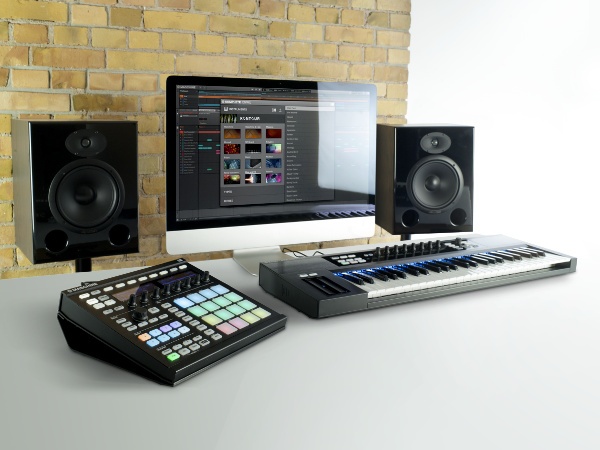
Sure, you could set up these features in software, but then you’d have to work out how to switch scales and the like. Now, you can do that directly from Maschine. (Memo to Ableton: we’d like easier switching of these on Push, too.)
The integration with hardware here makes loads of sense, including directional arpeggiator controls right on the hardware, and the ability to record everything into patterns.
I’m not advertising for NI. I can honestly tell you I went running to download this right away, because I need it for a gig I’m playing Friday. There’s a Maschine MK2 in my backpack, and … well, not much else, because I didn’t want to travel through the USA with a whole lot of luggage. So for me, and I suspect I’m not alone, this means the ability to easily add some new melodic parts to my live gig without swapping between controllers. (Yes, I could have brought Push, but for improvising drum parts I still enjoy using Maschine – either way, I would tend to want to make my life easier by choosing one or the other.)
Back at the studio, I’m definitely going to try out the keyboard integration; it might finally make me use the S-25 more heavily. Then again, buying a new keyboard really isn’t for everyone, and Maschine’s hardware already gives you great browse and parameter control functionality. But this may be the first 4×4 pad I can play melodically without wincing. And that’s a big deal.
Am I alone on this, or are some of you Maschine users feeling the same way? Let us know in comments.
By the way, the biggest news here if you’re a 1.x user and have waited to upgrade is, the upgrade is now $49.50 / 49,50 €. If you were waiting, now’s the time: the bugs are ironed out, and the added playability is huge. You’re getting a bunch of entirely new instruments in the deal, too, so I can endorse the price without hesitation.
There’s still more I want to see from NI: Audiobus support in iMaschine and easier cross-platform mobile/desktop workflows, and real-time time stretching in desktop spring to mind, among others. And please, Note Repeat is ripe for more improvements. (If it can be triggered on an offset, even better – given that even the simplest techno has beats on alternating rhythms, let alone all the rest of music, why are things like this so rare?) But I have to go play with these play modes for a while.
Addendum: Yes, hopefully some of you already figured out how to add arps to Maschine already, as below – hat tip to Moon Wheel / Olle, incidentally one of my favorite electronic musician friends. But it is awfully nice having integration on that screen.
MaxMSP MIDI arpeggiator used with Native Instruments’ Maschine from Olle Holmberg on Vimeo.

The arpeggiator (correctly) records into patterns, so you can more easily use it as a way of generating ideas.

Maschine Studio’s knobs and display now do more.
WOW! Makes me want to try Maschine again.
WOW! Makes me want to try Maschine again.
WOW! Makes me want to try Maschine again.
I wonder how well it works with the Mikro.
Works nicely with Mikro.
I wonder how well it works with the Mikro.
Works nicely with Mikro.
I wonder how well it works with the Mikro.
Works nicely with Mikro.
Great upgrade indeed, very solid and inspiring. I also appreciate hearing the swing now when using note repeat and the extended display features when touching the Maschine Studio knobs make for a great workflow improvement. As far as the scales, it would be nice to also make use of colors for notes and intervals, the way it’s implemented in the Midi control template for Live. Any reason why that could be added ?
Great upgrade indeed, very solid and inspiring. I also appreciate hearing the swing now when using note repeat and the extended display features when touching the Maschine Studio knobs make for a great workflow improvement. As far as the scales, it would be nice to also make use of colors for notes and intervals, the way it’s implemented in the Midi control template for Live. Any reason why that could be added ?
Great upgrade indeed, very solid and inspiring. I also appreciate hearing the swing now when using note repeat and the extended display features when touching the Maschine Studio knobs make for a great workflow improvement. As far as the scales, it would be nice to also make use of colors for notes and intervals, the way it’s implemented in the Midi control template for Live. Any reason why that could be added ?
I had to wait an entire year since last Black Friday, and was just about to ship off a second Maschine Studio to fix what the firmware fixed. One year. Better late than never, I suppose, but NI was more than content to throw people to the apathetic phone support that makes you wait forever just to be told you’ll receive an email with some generic steps to try because the answertron knows better, so you’re no longer in their hair, because one-way communication is the best way to resolve what now appears to have been a known issue.
I had to wait an entire year since last Black Friday, and was just about to ship off a second Maschine Studio to fix what the firmware fixed. One year. Better late than never, I suppose, but NI was more than content to throw people to the apathetic phone support that makes you wait forever just to be told you’ll receive an email with some generic steps to try because the answertron knows better, so you’re no longer in their hair, because one-way communication is the best way to resolve what now appears to have been a known issue.
I had to wait an entire year since last Black Friday, and was just about to ship off a second Maschine Studio to fix what the firmware fixed. One year. Better late than never, I suppose, but NI was more than content to throw people to the apathetic phone support that makes you wait forever just to be told you’ll receive an email with some generic steps to try because the answertron knows better, so you’re no longer in their hair, because one-way communication is the best way to resolve what now appears to have been a known issue.
i read today that maschine cannot even assign custom midi notes to the pads on the native instruments maschine forum today is that true cause akais have been able to do that for years. I was planning on getting a maschine for christmas but they cost way too much money if they are really that limited, but what other alternatives are there if i don’t want an akai?
You can assign custom MIDI notes just fine on Maschine’s pads in MIDI mode. To assign custom MIDI notes to pads in Maschine mode, you can just set different Sounds’ root notes to the notes you want and route their MIDI outputs to your instrument. There’s also the new scale feature in keyboard mode that gives you a selection of predefined scales to use.
work arounds- no mooooooooore -tired of that bs!!!!!!!!!!!!!!!
and he’s right akais have been able to do this for ages when will maschine catch up already
It’s no more of a workaround than the Akai. I have my beefs with NI, but I’m not a fanboy for anyone. What squaretooth said is that it’s a setting. How could it NOT be a setting. I’m sure it’s a setting on the MPC as well. You have 16 pads. Obviously you have to set a root note, or you’ll be limited to a range of 16 notes. “You mean I have to turn it on!? That’s a workaround! My MPC just KNOWS when I want it to do stuff.”
yes it is a setting in that you have to set it, but it’s not a setting in the way that it is on maschine. you just go to the pad setting, turn the dial, and choose the midi note on the pad…. just like any piece of hardware or software that has this feature except maschine- go figure
i read today that maschine cannot even assign custom midi notes to the pads on the native instruments maschine forum today is that true cause akais have been able to do that for years. I was planning on getting a maschine for christmas but they cost way too much money if they are really that limited, but what other alternatives are there if i don’t want an akai?
You can assign custom MIDI notes just fine on Maschine’s pads in MIDI mode. To assign custom MIDI notes to pads in Maschine mode, you can just set different Sounds’ root notes to the notes you want and route their MIDI outputs to your instrument. There’s also the new scale feature in keyboard mode that gives you a selection of predefined scales to use.
work arounds- no mooooooooore -tired of that bs!!!!!!!!!!!!!!!
and he’s right akais have been able to do this for ages when will maschine catch up already
It’s no more of a workaround than the Akai. I have my beefs with NI, but I’m not a fanboy for anyone. What squaretooth said is that it’s a setting. How could it NOT be a setting. I’m sure it’s a setting on the MPC as well. You have 16 pads. Obviously you have to set a root note, or you’ll be limited to a range of 16 notes. “You mean I have to turn it on!? That’s a workaround! My MPC just KNOWS when I want it to do stuff.”
yes it is a setting in that you have to set it, but it’s not a setting in the way that it is on maschine. you just go to the pad setting, turn the dial, and choose the midi note on the pad…. just like any piece of hardware or software that has this feature except maschine- go figure
i read today that maschine cannot even assign custom midi notes to the pads on the native instruments maschine forum today is that true cause akais have been able to do that for years. I was planning on getting a maschine for christmas but they cost way too much money if they are really that limited, but what other alternatives are there if i don’t want an akai?
You can assign custom MIDI notes just fine on Maschine’s pads in MIDI mode. To assign custom MIDI notes to pads in Maschine mode, you can just set different Sounds’ root notes to the notes you want and route their MIDI outputs to your instrument. There’s also the new scale feature in keyboard mode that gives you a selection of predefined scales to use.
work arounds- no mooooooooore -tired of that bs!!!!!!!!!!!!!!!
and he’s right akais have been able to do this for ages when will maschine catch up already
It’s no more of a workaround than the Akai. I have my beefs with NI, but I’m not a fanboy for anyone. What squaretooth said is that it’s a setting. How could it NOT be a setting. I’m sure it’s a setting on the MPC as well. You have 16 pads. Obviously you have to set a root note, or you’ll be limited to a range of 16 notes. “You mean I have to turn it on!? That’s a workaround! My MPC just KNOWS when I want it to do stuff.”
yes it is a setting in that you have to set it, but it’s not a setting in the way that it is on maschine. you just go to the pad setting, turn the dial, and choose the midi note on the pad…. just like any piece of hardware or software that has this feature except maschine- go figure
(rant) But I thought we were over rainbows bursting out of gadgets?
(rant) But I thought we were over rainbows bursting out of gadgets?
(rant) But I thought we were over rainbows bursting out of gadgets?
It’s a nice update for sure. I haven’t had much time to play with it but I like what I’m seeing.
It’d be nice if chord mode was toggled by a button, and I already want a bit of extra tweaking — for instance, a way to scale down the velocity of non-root notes, so I can add in an octave or fifth at half velocity or so — but that kind of pickiness can be dealt with in the piano roll after it’s recorded.
I’ve found with most of my gear, the more I use it, the more things like that are over-inflated metal obstacles that disappear pretty quickly with repeated use. Maschine’s hotkeys are a lot easier to remember than the ones on the Elektron stuff. I love them both, but I feel like I was able to dive in on Maschine’s sequencer the day I got it home, just from watching the pre-release videos. I still wouldn’t claim to have proportionally as much workflow proficiency on Elektron’s gear, and I’ve had it over a year.
that’s because maschines sequencer is inkomplete at best, elektrons can do much more and that is why you could not master it in one day.
I have a ton of products. No one thing does everything, or I’d have a lot less stuff laying around. Maschine benefits from having both the hardware interface AND the software, so a lot of library management and sequence editing/arranging/exporting is much easier. It’s very intuitive and there are a lot less hotkeys to get going with a basic sequencer.
I’ve had my Elektron gear for about a year now, and I feel I grok both the Elektron sequencer and the NI sequencer on about the same level. There are plenty of things I would use Maschine for, just because the workflow is quicker. My Analog 4 is now my go-to analog synth/groovebox, and I have a stable of other gear. That said, when it comes to overlapping features and sampling duties between the Octatrack and the Maschine, I would say the jury is still out on which one I prefer using. The answer right now, is Ableton+Maschine, because I don’t have to worry about where the files are saved, what they are named, or how to fix minor timing mistakes, and I like to live record a lot of finger drumming for pulling out 4+ bar loops. I feel that’s still quite a ways down the road on workflow from an MPC and a DAT, and I do a decent amount of sampling from vinyl, just like people did when the MPC became a well-known name.
It’s a nice update for sure. I haven’t had much time to play with it but I like what I’m seeing.
It’d be nice if chord mode was toggled by a button, and I already want a bit of extra tweaking — for instance, a way to scale down the velocity of non-root notes, so I can add in an octave or fifth at half velocity or so — but that kind of pickiness can be dealt with in the piano roll after it’s recorded.
I’ve found with most of my gear, the more I use it, the more things like that are over-inflated metal obstacles that disappear pretty quickly with repeated use. Maschine’s hotkeys are a lot easier to remember than the ones on the Elektron stuff. I love them both, but I feel like I was able to dive in on Maschine’s sequencer the day I got it home, just from watching the pre-release videos. I still wouldn’t claim to have proportionally as much workflow proficiency on Elektron’s gear, and I’ve had it over a year.
that’s because maschines sequencer is inkomplete at best, elektrons can do much more and that is why you could not master it in one day.
I have a ton of products. No one thing does everything, or I’d have a lot less stuff laying around. Maschine benefits from having both the hardware interface AND the software, so a lot of library management and sequence editing/arranging/exporting is much easier. It’s very intuitive and there are a lot less hotkeys to get going with a basic sequencer.
I’ve had my Elektron gear for about a year now, and I feel I grok both the Elektron sequencer and the NI sequencer on about the same level. There are plenty of things I would use Maschine for, just because the workflow is quicker. My Analog 4 is now my go-to analog synth/groovebox, and I have a stable of other gear. That said, when it comes to overlapping features and sampling duties between the Octatrack and the Maschine, I would say the jury is still out on which one I prefer using. The answer right now, is Ableton+Maschine, because I don’t have to worry about where the files are saved, what they are named, or how to fix minor timing mistakes, and I like to live record a lot of finger drumming for pulling out 4+ bar loops. I feel that’s still quite a ways down the road on workflow from an MPC and a DAT, and I do a decent amount of sampling from vinyl, just like people did when the MPC became a well-known name.
It’s a nice update for sure. I haven’t had much time to play with it but I like what I’m seeing.
It’d be nice if chord mode was toggled by a button, and I already want a bit of extra tweaking — for instance, a way to scale down the velocity of non-root notes, so I can add in an octave or fifth at half velocity or so — but that kind of pickiness can be dealt with in the piano roll after it’s recorded.
I’ve found with most of my gear, the more I use it, the more things like that are over-inflated metal obstacles that disappear pretty quickly with repeated use. Maschine’s hotkeys are a lot easier to remember than the ones on the Elektron stuff. I love them both, but I feel like I was able to dive in on Maschine’s sequencer the day I got it home, just from watching the pre-release videos. I still wouldn’t claim to have proportionally as much workflow proficiency on Elektron’s gear, and I’ve had it over a year.
that’s because maschines sequencer is inkomplete at best, elektrons can do much more and that is why you could not master it in one day.
I have a ton of products. No one thing does everything, or I’d have a lot less stuff laying around. Maschine benefits from having both the hardware interface AND the software, so a lot of library management and sequence editing/arranging/exporting is much easier. It’s very intuitive and there are a lot less hotkeys to get going with a basic sequencer.
I’ve had my Elektron gear for about a year now, and I feel I grok both the Elektron sequencer and the NI sequencer on about the same level. There are plenty of things I would use Maschine for, just because the workflow is quicker. My Analog 4 is now my go-to analog synth/groovebox, and I have a stable of other gear. That said, when it comes to overlapping features and sampling duties between the Octatrack and the Maschine, I would say the jury is still out on which one I prefer using. The answer right now, is Ableton+Maschine, because I don’t have to worry about where the files are saved, what they are named, or how to fix minor timing mistakes, and I like to live record a lot of finger drumming for pulling out 4+ bar loops. I feel that’s still quite a ways down the road on workflow from an MPC and a DAT, and I do a decent amount of sampling from vinyl, just like people did when the MPC became a well-known name.
No Ionian, Dorian, Phrygian, etc… under scale modes? Whatup with that?
No Ionian, Dorian, Phrygian, etc… under scale modes? Whatup with that?
No Ionian, Dorian, Phrygian, etc… under scale modes? Whatup with that?
Needed 10.8 🙁
My 10.7 was solid, but this made me upgrade to 10.8.
Oh the chord sets. I can hear the billion and them some tracks that will do death to those 10 minor chord sets. Few of them are based on most common chord progression ever written, but for EDM crowd those will be new. Cheesy as hell!
Oh the chords indeed. Oh the superiority. You mean like those 12 notes on the chromatic scale? Cheesy as hell, or that music theory that pretty much creates the same reused patterns to the point that almost nothing new is left under the sun as far as chord progressions go, and never mind starting in different keys. Why, you could possibly be dealing with far more than billions or even trillions of chord combinations arranged in a 4 bar progression.
I really hate it when people mistake scholarly musicianship and pretentiousness as a replacement for authentic creativity. FYI, scaled instruments have been around, and much more limited than this, going back to autoharps and harmonicas, so I’m pretty sure you don’t know what you’re talking about. Painting isn’t about knowing the arbitrary names of all the colors, it’s knowing what colors go well together. Like music, color palettes are reused again, and again, and again, because that’s what people think is aesthetically pleasing. It has nothing to do with belaboring the playing precision on one instrument at the expense of exploring other types of sound design and tonal textures, ESPECIALLY in electronic music, so if you want to jump on a soapbox with your Stradivarius and blow our collective minds with extreme overtones and crazy scales we’ve never heard before, I’m betting this is just something people say when they want to sound smart.
Daaaam!
Needed 10.8 🙁
My 10.7 was solid, but this made me upgrade to 10.8.
Oh the chord sets. I can hear the billion and them some tracks that will do death to those 10 minor chord sets. Few of them are based on most common chord progression ever written, but for EDM crowd those will be new. Cheesy as hell!
Oh the chords indeed. Oh the superiority. You mean like those 12 notes on the chromatic scale? Cheesy as hell, or that music theory that pretty much creates the same reused patterns to the point that almost nothing new is left under the sun as far as chord progressions go, and never mind starting in different keys. Why, you could possibly be dealing with far more than billions or even trillions of chord combinations arranged in a 4 bar progression.
I really hate it when people mistake scholarly musicianship and pretentiousness as a replacement for authentic creativity. FYI, scaled instruments have been around, and much more limited than this, going back to autoharps and harmonicas, so I’m pretty sure you don’t know what you’re talking about. Painting isn’t about knowing the arbitrary names of all the colors, it’s knowing what colors go well together. Like music, color palettes are reused again, and again, and again, because that’s what people think is aesthetically pleasing. It has nothing to do with belaboring the playing precision on one instrument at the expense of exploring other types of sound design and tonal textures, ESPECIALLY in electronic music, so if you want to jump on a soapbox with your Stradivarius and blow our collective minds with extreme overtones and crazy scales we’ve never heard before, I’m betting this is just something people say when they want to sound smart.
Daaaam!
Needed 10.8 🙁
My 10.7 was solid, but this made me upgrade to 10.8.
Oh the chord sets. I can hear the billion and them some tracks that will do death to those 10 minor chord sets. Few of them are based on most common chord progression ever written, but for EDM crowd those will be new. Cheesy as hell!
Oh the chords indeed. Oh the superiority. You mean like those 12 notes on the chromatic scale? Cheesy as hell, or that music theory that pretty much creates the same reused patterns to the point that almost nothing new is left under the sun as far as chord progressions go, and never mind starting in different keys. Why, you could possibly be dealing with far more than billions or even trillions of chord combinations arranged in a 4 bar progression.
I really hate it when people mistake scholarly musicianship and pretentiousness as a replacement for authentic creativity. FYI, scaled instruments have been around, and much more limited than this, going back to autoharps and harmonicas, so I’m pretty sure you don’t know what you’re talking about. Painting isn’t about knowing the arbitrary names of all the colors, it’s knowing what colors go well together. Like music, color palettes are reused again, and again, and again, because that’s what people think is aesthetically pleasing. It has nothing to do with belaboring the playing precision on one instrument at the expense of exploring other types of sound design and tonal textures, ESPECIALLY in electronic music, so if you want to jump on a soapbox with your Stradivarius and blow our collective minds with extreme overtones and crazy scales we’ve never heard before, I’m betting this is just something people say when they want to sound smart.
Daaaam!
what I miss is a stand-alone version of maschine. a works with the computer but also without tool. this whould be perfect to me.
that is never going to happen. this kind of functionality NEEDS a computer. they might be able to build one into the controller, basically – but it will still be a computer.
no discussion, it always will be a computer. but I love stand alone maschines like the old MPC.
Then get an Octatrack or an MPC. You’re not going to find the density of instruments and effects there, though. However, you can do a lot with samples on either one.
I’ve tried the octatrack twice and the feel was really good while jamming around. but the experience was too short to say “you are the missing tool in my setup”.
what I miss is a stand-alone version of maschine. a works with the computer but also without tool. this whould be perfect to me.
that is never going to happen. this kind of functionality NEEDS a computer. they might be able to build one into the controller, basically – but it will still be a computer.
no discussion, it always will be a computer. but I love stand alone maschines like the old MPC.
Then get an Octatrack or an MPC. You’re not going to find the density of instruments and effects there, though. However, you can do a lot with samples on either one.
I’ve tried the octatrack twice and the feel was really good while jamming around. but the experience was too short to say “you are the missing tool in my setup”.
what I miss is a stand-alone version of maschine. a works with the computer but also without tool. this whould be perfect to me.
that is never going to happen. this kind of functionality NEEDS a computer. they might be able to build one into the controller, basically – but it will still be a computer.
no discussion, it always will be a computer. but I love stand alone maschines like the old MPC.
Then get an Octatrack or an MPC. You’re not going to find the density of instruments and effects there, though. However, you can do a lot with samples on either one.
I’ve tried the octatrack twice and the feel was really good while jamming around. but the experience was too short to say “you are the missing tool in my setup”.
Why just the pads though?
Allow us to lock the white keyboard keys to scales too (they even have the lights to show roots etc), and let us play in-scale melodies with them too….
Please keep in mind that the chromatic scale is not the benchmark of tonal construction–there are DOZENS of countries and musical genres that do exactly that, that have built single row keyboards based on the sounds they find pleasing. Gamelan or East Asian musicians would have no problem playing on such a sarcastically suggested keyboard. Scale locking is an efficient workflow because Maschine is not setup in the fashion of a chromatic keyboard, and therefore if you want to maintain a chromatic 4×4 setup, you have to learn a new instrument setup. It makes absolutely no difference to someone who has no theory knowledge, or to a lifetime pianist and a Chicago Symphony musician, if they know the “trick” to playing a 4×4 chromatic setup. This is not preventing people from learning theory–a Maschine rig is not exactly the platform to learn your scales 😛
Actually there was nothing sarcastic in my suggestion…
Why just the pads though?
Allow us to lock the white keyboard keys to scales too (they even have the lights to show roots etc), and let us play in-scale melodies with them too….
Please keep in mind that the chromatic scale is not the benchmark of tonal construction–there are DOZENS of countries and musical genres that do exactly that, that have built single row keyboards based on the sounds they find pleasing. Gamelan or East Asian musicians would have no problem playing on such a sarcastically suggested keyboard. Scale locking is an efficient workflow because Maschine is not setup in the fashion of a chromatic keyboard, and therefore if you want to maintain a chromatic 4×4 setup, you have to learn a new instrument setup. It makes absolutely no difference to someone who has no theory knowledge, or to a lifetime pianist and a Chicago Symphony musician, if they know the “trick” to playing a 4×4 chromatic setup. This is not preventing people from learning theory–a Maschine rig is not exactly the platform to learn your scales 😛
Actually there was nothing sarcastic in my suggestion…
Why just the pads though?
Allow us to lock the white keyboard keys to scales too (they even have the lights to show roots etc), and let us play in-scale melodies with them too….
Please keep in mind that the chromatic scale is not the benchmark of tonal construction–there are DOZENS of countries and musical genres that do exactly that, that have built single row keyboards based on the sounds they find pleasing. Gamelan or East Asian musicians would have no problem playing on such a sarcastically suggested keyboard. Scale locking is an efficient workflow because Maschine is not setup in the fashion of a chromatic keyboard, and therefore if you want to maintain a chromatic 4×4 setup, you have to learn a new instrument setup. It makes absolutely no difference to someone who has no theory knowledge, or to a lifetime pianist and a Chicago Symphony musician, if they know the “trick” to playing a 4×4 chromatic setup. This is not preventing people from learning theory–a Maschine rig is not exactly the platform to learn your scales 😛
Actually there was nothing sarcastic in my suggestion…
DJs does not need to learn how to beatmatch or adjust levels, musicians does not need to learn scales and harmony.
… because aligning two phases on two imperfect motor driven platters is required. Your opinion on the subject will be *really* irrelevant in another five years.
DJs does not need to learn how to beatmatch or adjust levels, musicians does not need to learn scales and harmony.
… because aligning two phases on two imperfect motor driven platters is required. Your opinion on the subject will be *really* irrelevant in another five years.
DJs does not need to learn how to beatmatch or adjust levels, musicians does not need to learn scales and harmony.
… because aligning two phases on two imperfect motor driven platters is required. Your opinion on the subject will be *really* irrelevant in another five years.
Is it possible to edit the arp sequences?, or edit the length of each step/note?
Is it possible to edit the arp sequences?, or edit the length of each step/note?
Is it possible to edit the arp sequences?, or edit the length of each step/note?