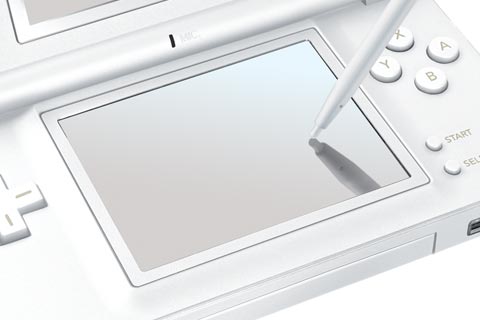
We’ve covered homebrew development and players for Nintendo DS before, but since then there have been some new developments.
Yesterday, Gizmodo noted a media dock for the Nintendo DS Lite. The device looks great, on first glance: it plays MP3s, movies, and JPEGs off CompactFlash, right on the DS. But the killer feature for many of us is the ability to play homebrew games and use emerging homebrew music-making tools like NitroTracker. With a little help from the homebrew community, your DS can be a portable music sequencer. The problem is, not all of this hardware performs equally well when supporting homebrews. NitroTracker’s creator has more.
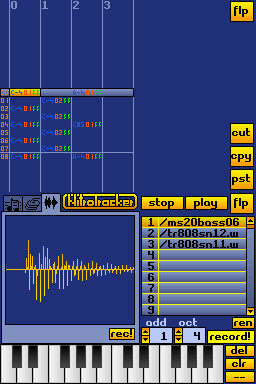
Tobias Weyand, the author of music creation homebrew app NitroTracker (pictured at the bottom of the page), has been testing various hardware products to see which allow him to run his application. Much to my surprise, the new DS Lite works, too. (Damn, my rationalization circuits are kicking in and making me want to buy that thing.) Your mileage may vary, depending on the homebrew app, but here’s what he had to say:
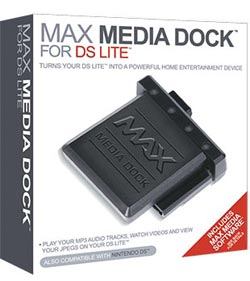
Yeah, I’m aware of this adapter, but I would be very careful about it, especially after reading the review of the related Max Media Player, which says, among other things, that homebrew support is very bad.
But, in the meantime, I fixed almost all issues with the M3 and Supercard adapters, meaning there is read and write support for all of these devices including their CF/SD/Mini SD variants. (Only Supercard SD is little slow.)
I would still recommend the GBAMP CF, as it is the cheapest and most tested adapter, and has the best support for homebrew in general. The only problem is that it sticks out pretty bad, especially on the DS Lite. If you don’t want that, you should go for an SD or Mini-SD adapter
(either M3 or Supercard). I personally have an M3 mini-SD now, which hardly sticks out of the (old) DS at all. I hoped to be able to finds some bugs that NitroTracker has on it, but it turned out that it already worked perfectly 🙂
Note that the flash module is only one component of what you need: you need a hardware device called PassMe to redirect the DS to the memory module to load the game or application. But even that could change, says Tobias:
Another currectly hot alternative to PassMe, that has recently emerged,
are so-called NoPass devices, such as the Max Media Launcher. Basically, it’s just a cartridge that goes into the DS slot (but does not
stick out like the PassMe), and starts DS code from the GBA slot. So, it does the same thing as PassMe, but has the advantage that it does not stick out, and that it works on both new and old firmware DSes (including the DS Lite). Also, it’s quite affordable (20$). I’m still waiting for mine, but some reviews say that it’s quite good.
The Max Media Launcher sounds a little scary to me; that review notes that it can take a month or more to ship and can physically damage your DS because of poor build quality. Yipes.
Incidentally, if it wasn’t clear what he was talking about, the way the PassMe works is actually to piggyback on one of your store-bought DS cartridges.
More good news for the NitroTracker software, shown below, which I’ve at least tried in emulation — a new version is forthcoming, for which Tobias plans a sample editor. (Awesome.) I’ll bring you the news here, of course.
And I’m going to try some different hardware solutions myself, in hopes of bringing you an easy solution for all of this. Tobias says he may even work up a buyer’s guide. You can help make that guide better if you have tried homebrew hardware — even if it didn’t work right. (Actually, especially if it didn’t work right.)
Hi!
I've updated some sections of the DS Wiki with the newest information on available hardware:
How to run homebrew code on the Nintendo DS
Additional hardware for the DS
My current recommendation would be a combination of the <a href="http://us.codejunkies.com/shop/product.asp?c=US&cr=USD&cs=$&r=0&l=1&ProdID=321" rel="nofollow">Max Media Launcher and the <a href="http://www.lik-sang.com/info.php?category=246&products_id=3983&" rel="nofollow">GBA Movie Player CF.
This is the cheapest possible solution (20$+25$) and is guaranteed to work on all kinds of DSes (also on the Lite).
I know of only one case where a DS was damaged by the Media Launcher, so I guess the risk is pretty low. And about the shipping times: There are other reatilers than CodeJunkies who have this device in stock, and who will probably ship quicker.
Also, I wanted to point out two other music production tools for the DS:
The <a href="http://thechuckster.homelinux.com/tr909/" rel="nofollow">Nintendo DS Drum Machine by Chuck is a basic drum machine with a nice 909-style GUI that uses the touch screen, has pattern support and several sample sets. The author is even planning a 303 softsynth!
<a href="http://www.pineight.com/ds/#axe" rel="nofollow">Axe by tepples is a nice oldschool music toy and the first homebrew program that uses the DSes programmable sound generator. The graphics are very basic, the idea is very simple, but it's totally addicting!
That, and <a href="http://www.lik-sang.com/info.php?category=275&products_id=6604&" rel="nofollow">Electroplankton, and <a href="http://www.lik-sang.com/info.php?category=275&products_id=5823&" rel="nofollow">Band brothers shoud be enough reason to get a DS for creating mobile digital music!
Bye,
Tob
[…] Homebrewed software is the key to making the Nintendo DS a platform for electronic musicians and not just mainstream gamers. The challenge, though, is getting homebrew software to work; unfortunately, piracy concerns have made the hardware somewhat less than open. We’ve covered homebrew DS development efforts, including the banner homebrew app, NitroTracker, a stylus-savvy app for oldskool tracker-style music construction, and some of the tricky bits to making this work. This week, the gang at Gizmodo gets their hands on a solution that’s very powerful and offers lots of plug-and-play features, without the usual work. Travis Hudson has a great hands-on with photos: […]